




Although looking up specific companies on social networks has been a common practice for years, many consumers have now discovered that they can use social networks to actually find a company that deals with the product or service they need.
If a consumer is in need of a law firm, all they have to do is type “law firm” into the social network’s search bar and a list of law firms will show up. If a consumer wants to find an auto repair shop—well you get the point. Social media search is slowly evolving into a search service similar to Google.
So how can your company get to the top of a social media search page? By using keywords. Smart keywords choices and placement will give you a better chance of moving up on a social media search page. In this article, we are going to show you, step by step, some of the places and different ways you can use keywords on your social media pages.
Step #1: Find the right keywords for your social media accounts.
Using keywords on social media sites is very similar to using keywords on company websites. For those who are unfamiliar, this practice is called search engine optimization (SEO), and this process involves selecting a keyword and optimizing the website for that keyword. A keyword simply means a word or short phrase that people use to search for something.
Before deciding which keywords are important for you, it’s important to realize that the keywords you decide to use will be different for different social media accounts. It is not a “one keyword fits all” operation. There are a few things you can do to find the right keywords for each of your social media sites:
- Lay Terms: Think about a common word that someone would use to describe your company. If someone couldn’t think of your company name, what would they type in the search bar of a social media site? To-do List Software? Picture app?
- Desired Association: You may want to consider choosing a keyword that you want to be associated with. If you want to show up when the words “daily deal app” are typed into the search bar, make that one of your keywords.
- Competition Check: Competition isn’t a big issue when it comes to nabbing the number one spot of a social media search query, but it’s still something to consider. Once you think you have a good keyword, type it into the search bar and see what comes up. If there are a lot of very relevant companies, you may want to try a more specific keyword.
- SEO Keyword Research: If you have already performed SEO keyword research, it would be wise to revisit your findings and use some of those same keywords.
- Prepare for Different Social Media Sites: For example, if you’re an electronics company, think of keywords related to popular product models that will be useful on your Facebook page. For your LinkedIn account you may want to consider keywords to attract talent like “engineers”, “developers”, “jobs”, and “positions”.
The screenshot below shows what I mean when I say “social media search query.” In this example, the search query is “paper company,” which is shown by the top arrow, and the top two companies who show up when typing in that keyword are shown by the bottom arrows. As you will notice, there is only one paper company that shows up when I type in this search query. Therefore, the keyword phrase “paper company” would be a great choice if you are a paper provider trying to optimize its social media accounts (Dwight Schrute would be thrilled).

Once you have found a keyword that’s right for you, it’s time to actually start optimizing.
Step #2: Use the keyword in photo captions
The goal is to use keywords on your social media site whenever possible. One of the first things you can do is use these keywords to describe your company photos.
Most companies generally have several photos on their social accounts, but few actually put thought into the captions. It may take some creativity, but the more you can incorporate your keywords the better.
Below is one example that works well if you’re hoping to pop up when the keyword “Hawaiian specialty pizza” is typed into the Facebook search bar. After all, if this is what you’re targeting this month, people are bound to type in the keyword!

Step #3: Use your keyword when linking and tagging webpages.
Social media keywords generally work best with sites such as LinkedIn and Facebook, but this ideas works just as well when it comes to Twitter. If you are ever going to update a status on your account, try and use your keywords as much as possible. Although this may be difficult when linking back to another webpage, it’s entirely possible to add it into a status description or use as a hash tag. Consider the example below:
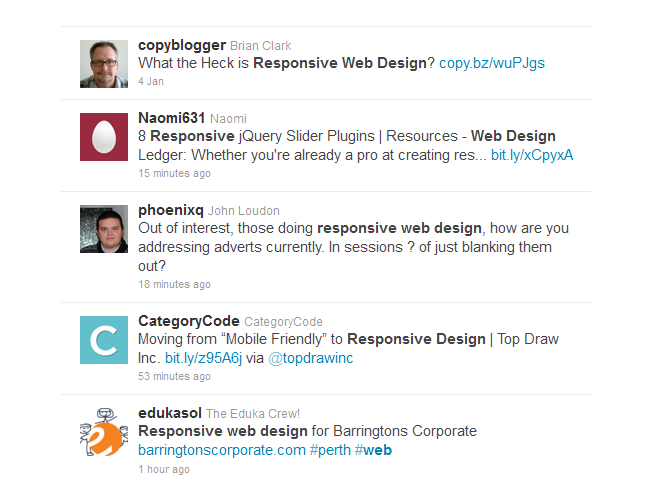
I typed in the search box the keyword phrase “responsive web design” and this is what popped up. As you will notice, the keyword phrase is bolded in all of the results, which illustrates the idea that if you used your target keyword in a status update, your company would turn up on the list of relevant pages.
Although Twitter is fast moving and it can be tough to always appear at the top of a Twitter feed, people often turn to Twitter for great articles and/or companies that can offer advice on certain topics. Therefore, it’s always something to keep in mind.
Step #4: Include the keyword in your headline
All of the major social networks have a place for a small blurb about the person or company. For example, the company Higher Visibility may want people to find their company when they type the word “internet marketing agency” into the search box. By placing it in the headline, they’re optimizing their page for that keyword.
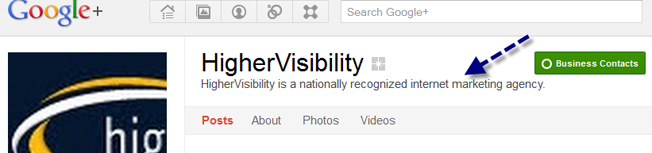
There is an additional benefit to paying extra attention to your headlines. Headlines are on-page drivers for SEO, so you can bet that search engines will be indexing important headline content often. In addition, Google+, Facebook and Twitter are all trusted domains, so they tend to rank higher in search engine results than the company website sometimes.
This is almost always true when it comes to an individual, but it’s something for companies to also consider. Ranking on major search engines like Google is important, so it’s always a good idea to give your social media accounts the extra push by using your target keywords.
Step #5: Include your keyword in your summary and “about” section
Although this doesn’t quite work with Twitter, it works well to use your keyword in the summary section of LinkedIn and the “about” section on Facebook and Google+. This is a great time to really lay on the keyword usage thick. You don’t want your summary sections to sound strange or unnatural, but if you have an opportunity to use your keyword, go for it.
The following example was found on Northern Illinois University’s LinkedIn page. You will see that they used the term “prepare college-educated teachers” once and “preparing teachers” once. If they were really going to optimize their social media account, they would probably add keywords like “teaching credential” and “master in education” (assuming those were keywords they wished to rank for).

What This Means for Your Business
Getting to the top of a search page on a social network is considerably easier than trying to get to the top of a Google search page. People search for things on social networks all the time, but the idea of optimizing an account to reach the top of the search results is relatively new. There isn’t a lot of competition, but there can be a lot of gain for companies using social media keywords. In other words:
- Transfer Your SEO Skills Into these “New” Social Media Search Boxes
- Get Ahead of the Curve Before Your Competition
- Watch Your Followers and Friends Increase
One Final Note:
As the social graph continues to opens up over time, the general consensus is that search engines will be using this social data to improve their search results. Optimizing your social media accounts now is a great way to keep ahead of the competition.
Photo Credit: mattsmarketingblog.com
About the Author: Amanda DiSilvestro is a writer on topics ranging from social media to workers compensation insurance. She writes for an online resource that gives advice on topics including background checks to small businesses and entrepreneurs for the leading business directory, Business.com.
Are You Using Google Ads? Try Our FREE Ads Grader!
Stop wasting money and unlock the hidden potential of your advertising.
- Discover the power of intentional advertising.
- Reach your ideal target audience.
- Maximize ad spend efficiency.