 Sign In


 Ubersuggest
  AnswerThePublic

Key Takeaways
- Key Takeaways
- Google AdWords, now called Google Ads, allows businesses to appear at the top of search results quickly through paid advertising.
Unlike SEO, which can take months to generate results, Google Ads can start driving traffic and conversions almost immediately. - Google Ads operates on a pay-per-click (PPC) model.
Advertisers bid on keywords and only pay when someone clicks on their ad, making it a measurable and performance-driven marketing channel. - Ad quality matters just as much as budget.
Google uses factors like click-through rate (CTR), ad relevance, and landing page experience to determine ad placement, meaning the highest bidder does not always win. - Google Ads can help businesses identify high-converting keywords.
Paid campaigns provide valuable keyword and conversion data that marketers can use to improve broader SEO and content marketing strategies. - Successful Google Ads campaigns require testing and ongoing optimization.
Advertisers need to regularly monitor metrics like impressions, clicks, conversions, and cost-per-click (CPC) while testing ad copy, keywords, and landing pages to improve performance over time. - Small businesses can compete against larger brands using Google Ads.
Even companies without strong organic rankings can gain visibility and attract customers by targeting the right keywords and building relevant ad campaigns.
I don’t get it.
I have a ton of friends who own companies. As soon as they start making some money, they start talking to me about all kinds of investments.
“Real estate’s supposed to be good.”
“I wanna be an angel investor, any tips?”
My usual response?
“Google Ads, dude!”
They run these big companies, selling great products, and what do they do?
Run off and try to put their money in anything, EXCEPT their own business.
Why not just sell more of their products?
Double down on what’s already working, instead of starting to play in a field you know nothing about.
Google Ads is usually the easiest way to do it.
If my friend wants to get ten times his investment money, say $50,000, he can
- spend 1000 hours trying to become good at angel investing, learn everything about it, and hope to land an investment in the next Facebook (which is almost impossible).
- do the same for real estate, trying to snag a cheap apartment or condo and flip it (easier, but still hard).
- spend 100 hours learning Google Ads (or just hire someone who knows it) and invest $50,000 in Google Ads campaigns to make $500,000 in sales.
Which one do you think is the most likely to pan out?
Option 3, it’s a no-brainer.
Today, I want to open the black box that Google Ads is to most people and show you what it is, how to get started, and how to reverse engineer your way to success.
If you know the costs and margins of your products, Google Ads is a really easy way to get your money’s worth, often boasting an ROI in the hundreds of percentage points.

(Image source: Optmyzr)
If you don’t know what ROI means, it stands for return on investment. In this example, not only do dynamic keyword insertions increase impressions per ad, but impressions per ad are 3.9 times higher when you give Google the flexibility with multiple texts per pinned location.
So, you could turn $100 into $430.30 and thus quadruple your money.
An ROI like this is not uncommon with Google Ads. And, if you get it right, a 900% ROI, as with my friend who wants to make ten times his money, is definitely within reach.
First, let me start at the beginning.
Google Ads Tutorial Overview
Look, my bread and butter is in SEO.
The first place I start when growing a new site is content and links. It’s the #1, go-to strategy I recommend most of the time…
Except when you need results right now.
SEO + content is powerful. Simply put: It’s the most profitable way to scale a website over the long-term. But it takes time. It requires a little patience.
Google Ads is the opposite.
You can get up-and-running in less than an hour (and you can also edit ads easily). And if you do it right (by reading the rest of this guide), you can start generating new sales at the end of the hour.
And the best part? It’s performance-based.
Here’s what I mean.
We’ve talked about pay-per-click (PPC) advertising before. It’s different from other advertising models (like banner ads with a CPM or cost per thousand impressions) because you’re not paying for eyeballs. Instead, you’re paying for results.
No results? No clicks, leads, or sales? You don’t pay. Simple as that.
But that’s not the only benefit…
When people go to Google, they’re looking for something specific. That means they have intent. What intent means, in this case, can vary. In some cases, it’s more informational, like they are researching a new topic or looking something up for clarity. Then, you have transactional, where they’re actively looking for something to buy. They’re literally telling you what they want to buy by typing out words around your products and services.
That’s why Google Ads is so powerful (and profitable). There’s no better form of SEM (search engine marketing) out there.
Out of every $3 spent on online advertising, Google gets $1. Advertising is their single greatest source of revenue.
Over 95% of their $60 billion in annual revenue comes from Google Ads. Combine that with the fact that over 80% of global businesses trust Google Ads and you know that companies are seriously spending money on this.
(Image source: YouTube)
Google Ads is a marketplace where companies pay to have their website ranked at the top of a search results page, based on keywords.
Let’s be honest with each other for a second:
Google loves big brands in their organic search rankings. So unless (or until) you’re a big brand, it’s going to be tough to outrank Papa John’s or Domino’s in the rankings — no matter how much better your pizza is (and let’s be honest again, it probably is better).
Google Ads lets you cheat.
Instead of waiting around, building up an arsenal of content and links over the course of a few months, you can jump straight to the #1 position on the page.
Check it out:
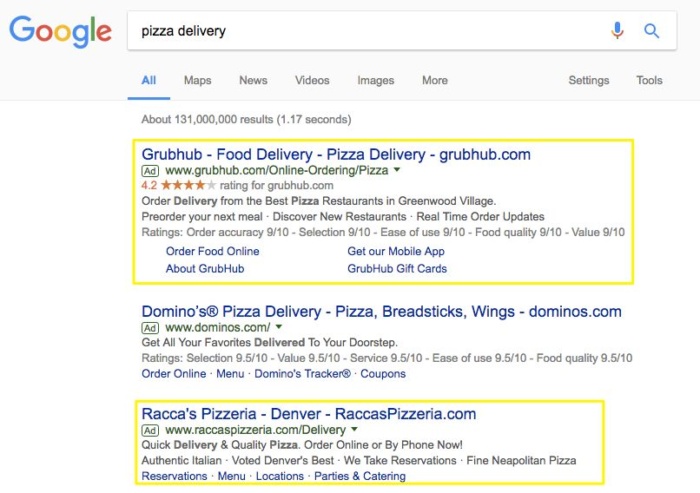
Grubhub is able to takeover #1 from Domino’s for one of the best keywords in their industry. And then Racca’s Pizzeria (some no-named place) is able to breathe down Domino’s neck, too.
So even smaller players in the industry can duke it out at the top of a SERP, and all it took was… a few minutes (as opposed to months or years with SEO).
Google Ads also gives you a little extra bonus, too. It can help you reveal the ‘money making’ keywords in your industry. So just by spending a few bucks, you will discover which keywords convert the best so you can take them back to your content and SEO strategy.
The Google Ads marketplace works as an auction. People bid money for clicks. The highest bid doesn’t always win, though. Google combines the money factor with a quality factor (which we’ll dive into shortly), in order to create the best experience for the user.
Quality ads + solid bid = win!
It is a massive industry and if you haven’t tapped into its potential, I bet you’d love to. Be warned though: Google Ads is straightforward, but not easy.
It takes time to master and most companies lose money on it, because they’re not patient enough to get results from pay-per-click advertising. In this guide, I want to help you to start simple.
Before we begin, promise me that you’ll commit to 3 things:
- Don’t spend a lot of money. Set a fixed budget. It can be as little as $50, or even $25. That’s enough to get started.
- Don’t overcomplicate things. The Google Ads interface is complex, It’s easy to get lost in it and start creating dozens of variations of ads. Don’t. Keep it simple. Do as little as the platform allows to begin.
- Be patient. This is by far the most important. 99% of the people who lose money on Google Ads simply quit too early (or spent too much, too fast). Have patience. It takes time.
Can you promise me that?
Raise your hand up high!
Okay, good.
Let’s get started with some basics.
How To Use Google Ads
First, we have to start off with some basics. That way everyone’s on the same page.
Here are some basic terms that you need to know:
A keyword is a word or phrase the user searches for and then sees your ad. Your ads will show up for the keywords that you pick.
(the dashboard is fairly complicated, but we’ll get to it)
Google counts the clicks on your ads and charges you for each click. They also count impressions, which is simply the number that tells you how often your ad has already been shown when users searched for that keyword.
If you divide clicks by impressions, you get the click-through rate, or CTR. This is just the percentage of users who land on your advertised page because they clicked on your ad. This is important, because click-through rate tells you which ads are working well and which aren’t.
Google Ads is like an auction house. You have to set a budget and a bid. The bid sets how much you are willing to pay for each click. If your maximum bid is $2, Google will only show your ad to people if others aren’t bidding more (on average).

(Auctions have changed)
Google wants to maximize its revenue, so, naturally, it’ll show the ad by the company that bids the highest amount for that keyword, assuming that all bidders have the same quality score.
However, if people are bidding less for the keyword that you want your ad to show up for, Google won’t spend your maximum bid. It optimizes impressions and bids. Therefore, you might actually end up paying less than $2 per click.
Your cost per click, or CPC, can thus be lower than your maximum bid, especially if your ads produce a good quality score. This is a metric based on the experience that the user has on your landing page, the relevancy of your website, and your actual ad.
Google doesn’t just want to show people the ads from the highest bidder – they could be horrible ads. They care about their users so much that they’d rather show them a more relevant and better ad by someone who pays less, because that keeps users coming back to Google.
None of these things matter, though, if you’re not getting conversions. A conversion is a new lead or sale, but, in general, it means the user took the action that you wanted them to take.
In some cases, that action might be something other than a purchase. Signing up for an email list or entering their personal information would be examples of other actions.
In most cases, though, it’s about the dough. And, rightfully so.
Companies often quickly burn thousands of dollars on Google Ads pay-per-click advertising, since their budget is set daily and, unless you pause the process, runs endlessly.
Imagine creating ten different campaigns for various keywords, with a $10 daily budget attached to each. If you let it run for a month, without paying attention, you’ll have paid a $3,000 bill!
That’s why you need conversions to be sales of a product, in order to quickly regain the money that you spend on ads.
In order to make money with ads, you need to sell something.
Makes sense, doesn’t it?
That’s why conversions are what we’ll start with. I’ll take you through how to set up your account, make sure you track your click-through rate and conversions and then we’ll get the ball rolling.
But first, here’s a deeper dive into how Google Ads actually works. I’m talking about the math and factors which determine the two things you should care about most:
- How much you have to pay.
- And where you’re going to rank.
Here’s how it works.
How Does Google Ads Work?
Back in the old days, you could bid on almost any keyword you wanted.
So it was a straight auction that didn’t factor in the relevance between what someone was searching for and what you were advertising.
The Quality Score changed all that, though.
This metric combines several factors in order to effectively determine how ‘good’ your offer is for someone’s search.
Buckle up, ‘cause this is about to get kinda nerdy. It’s critical to understand the basic fundamentals if you’re going to start spending into the thousands each month.
Here goes.
Each keyword in your account will get its own Quality Score. So even two keywords within the same Ad Group (we’ll get to that thing in a sec) can have different Quality Scores (that go back to how relevant it is to a search somebody is making).

So that’s the first factor they’re looking for: relevancy.
For example, let’s say someone searches for “snowboard rentals.” Which keyphrase do you think will have a higher ‘relevance’ score?
- “Snowboard rentals Tahoe”
- “Skiing rentals”
Should be simple, right? Even though they’re related, one is obviously a much better fit. This same thing happens, though, in a campaign when you’re using keyphrases like:
- “Snowboard rentals”
- “Snowboard rentals pricing”
- “Snowboard rentals in Lake Tahoe”
This time, they’re all pretty relevant. But depending on the popularity of each, you ideally want to be as specific as possible. (For example, that might mean creating individual ads or even new campaigns for each of those specific keywords.)
Because the second factor taken into account is the click-through rate (both expected and historical).

Your ads will get ‘impressions’ (views) and actual clicks. Your click-through rate (CTR) is the calculation of clicks from views. A higher CTR generally means that your ad and keyword relevancy is better than others with a lower CTR (assuming the copy is good, obviously).
So Google will look at your older CTR and also forecast future ones in order to determine how well your ad matches somebody’s search.
Next, your account history is considered. It’s a fairly minor piece of the pie (compared to the previous two metrics) but it still plays a role in helping Google determine if you’re a legitimate, credible brand with good products and services.
All of these factors so far deal with your actual Google Ads account. But the other side of the coin is your landing page — or the place people will go once they click on your ad.
It needs to be relevant to what someone just searched. So a “snowboard rentals” search should bring up “snowboard rental” ads that bring you to a page which talks about “snowboard rentals.”
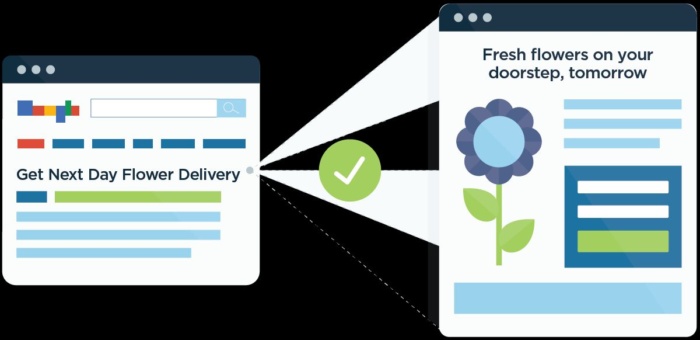
The landing page itself also needs to be user friendly. For example, if it’s tough to navigate or seems sketchy in anyway, people will bounce (or leave your site immediately).
That’s a negative sign for Google. It means your page, for whatever reason, isn’t responsive. And therefore, your ‘score’ will take a hit and you’ll either drop below those who have better landing pages (or you have to pay more to make up ground).
Because that’s the one thing that’s funny about Google Ads…
It’s an auction, true. But sometimes, if you do it right, you can actually rank at the top while also paying the least (out of the other advertisers).
It often comes back to your Quality Score and your Ad Rank.
Ad Rank is your Quality Score times the maximum bid you’ve selected. Simple math, really. And that (in theory) is what dictates which position you’re going to appear. (In reality, it’s not always that simple, because Google Ads is such a massive landscape.)
Then, the effective Cost Per Click you’re going to pay is often determined by these scores vs. your competitors.
So Google Ads will assess your max bid + Quality Scores + ad rank and compare those against your competitors — all in fractions of a second — in order to determine what you’re going to pay.
Here’s a brilliant visual from WordStream that illustrates how this works:

The cost per clicks in your own industry might vary wildly based on the (1) demand of people searching and (2) how much the competition is spending.
For example, the automotive industry might only set you back a few bucks per click. But in competitive industries like insurance and law, I’ve personally seen cost per clicks that range from $50-100 a piece!
You might be asking yourself: How in the world can you afford to pay $50 bucks a click?
That seems so expensive!
Guess what, though. With Google Ads, it’s actually pretty cheap. If you know what you’re doing, you can still make back 10x on your money.
How?
First, you keep reading this guide.
Because I’m about to show you after we first talk about getting an Google Ads account setup for the first time.
Step 0. Google Ads 101: Getting set up with your first campaign
This is pretty straightforward.
Go to Google Ads and hit ‘Start now.’
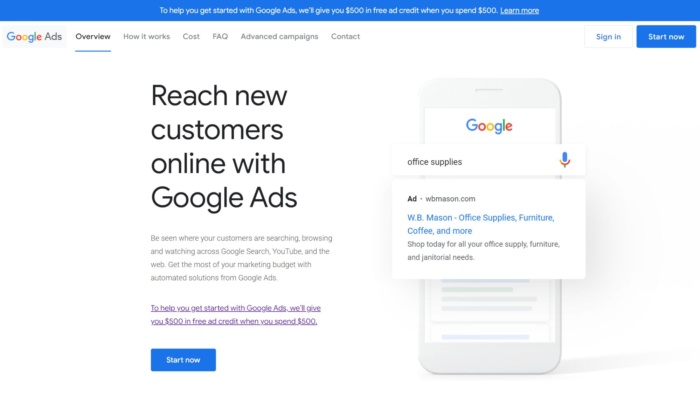
Enter your email (best to use a Gmail account) and homepage URL to open your Google Ads account. Then, Google wants you to set up your first campaign.

What the heck, Google?
How am I supposed to know any of these things, if I’m just starting out?
That’s what this guide is for. You can leave the browser tab open in the background. First let’s talk about all the different types of campaigns you can run on Google Ads.
Typically, when I say “PPC advertising” I’m technically referring to the Search Network. This is what we’ve been talking about so far, with the text-based results that show up directly on Google.com after you perform a search.

There’s also a ‘Network’ selection that will extend where your ads show up. For example, if you do a search on one of Google’s partners, then your ads can show up on their site, too.
We’ll spend most of this guide focusing on the search network because of the benefits we’ve already discussed (like searcher intent and pay-for-performance). That means you can expect better results than on the Display Network. (Which is why I recommend starting here, first.)
Google Display Network typically shows up on other websites. These are banner ads that get sent out across their AdSense network on blogs of literally all sizes. Google themselves claim that the two million websites on their Display Network can help you reach about 90% of the internet’s visitors!

You can target blogs and websites within specific categories (like ‘home improvement’ for example). Otherwise, you lack that killer search intent to drive conversions.
Instead, you want to use the Display Network to get your name out there. Reaching that many people can help you improve branding and visibility within an industry.
That way, when people do start searching and looking for a product to buy, they already recognize your name. A perfect example includes high-priced services. People might not feel comfortable spending $10k+ on their very first visit to your site.
But after seeing your name around the Display Network and after visiting your site a few times, they’ll finally do a search when ready to buy.
So let’s start there.
First, we’ll cover how to calculate a Google Ads budget that will profitably bring in more than you spend. And then, we can dive into advanced bidding strategies.
Let’s do it.
Step 1: Calculate A Google Ads Budget
You can do this with fourth-grade math, really.
In order to know how much you can comfortably spend, you just have to work backward.
Let’s say you’re selling bricks. You need two components to work this out: your profit per sale and your conversion rate.
If a package of 500 bricks costs $200, and, out of that $200, you make a $100 profit on each package, the $100 will be your profit per sale.
Your conversion rate is the percentage of people who actually order when they arrive on your bricks sales page.
If for every 1,000 views of the page, ten people buy, that’s a 1% conversion rate.
Since advertising on Google costs money, they get a cut as well.
Out of each sale, how much would you be willing to give to them?
If you think making $70 per sale is still okay, then it’s okay if you pay Google a 30% commission for each successful conversion through Google Ads.
Putting all of it together will give you your maximum CPC.
Max. CPC = your profit x commission for Google x your conversion rate
In this case, that would be $100 x 0.3 x 1% = $0.30
That means you can spend $0.30 per click on Google Ads and still make $70 per sale (given your conversion rate stays the same).
That wasn’t so hard, was it?
Now, we can just scale our maximum CPC up, to determine our daily budget. One common misconception is that you need lots of clicks to be able to evaluate anything.
This is not true.
You just need a few clicks to get started.
Of course, the more data that you have, the more statistically significant it will be. With this said, this volume of data is something you will get over time.
If you just get 20 clicks per day, in the beginning, that’s okay.
At our maximum CPC, that would cost us $6 per day, tops. You can run a campaign for ten days and just spend $60.
Perfect!
Easy right?!
Now you can improve this performance with bidding strategies.
Google Ads provides people with a few different ways to manage these bids to help you keep track of multiple campaigns at one time as they fluctuate.
For example, you can keep it on Manual CPC to keep the most control over your campaigns. Essentially, each keyword or Ad Group would have the same bid (unless you go in manually, of course, to change it).
First time doing this? On a shoestring budget? Keep your bids set at Manual CPC to make sure they don’t automatically raise or lower without you realizing it.
Automatic CPC is an advanced bidding strategy to decrease the amount of time it takes for you to manage each campaign. For example, bids can raise or lower on their own depending on different factors.
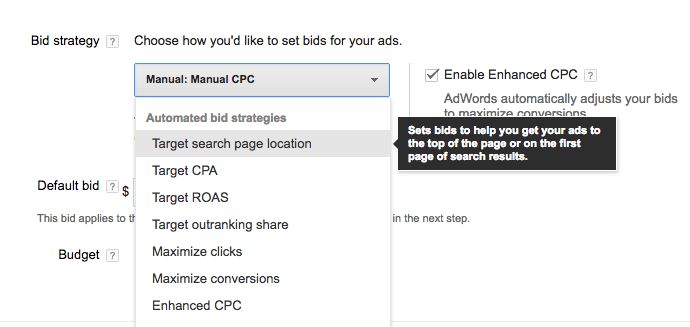
Let’s say you want to reach the most amount of people possible. If your impressions start dropping like a rock, bids can raise a little bit to make sure your ads will continue to show up and be seen.
So what’s the downside?
Unlike manual CPC bidding, you can’t set a max CPC bid on different keywords. You end up trading off some of your budget control.
Enhanced CPC relies on Google’s own historical data to help you predict where and when to adjust bids in order to drive the best results.
For example, if a campaign’s performance looks promising, it will automatically raise bids to ‘capture’ more results (for less money). Similarly, it will also drop bids if necessary to help you save on wasted ad spend if performance starts to slide.
You now know that CPC refers to Cost Per Click. CPA Bidding is another variation on that, so you pay a Cost Per Action (or conversion) instead.
In other words, Google will adjust bids in order to get you the best Cost Per Conversion possible on a campaign (even if that means raising them in some cases).
CPM bidding applies only to the Display Network (along with remarketing campaigns, too). Here you pay a cost (like a few cents or dollars) per one thousand impressions.
In this case, you’re paying for eyeballs instead of clicks or conversions. So your goals should be a little different, too.
You wouldn’t use CPM bidding to maximize on driving more qualified leads or conversions. But to increase brand awareness, first — in a separate campaign — before following up with CPC and CPA bidding on different campaigns to ‘capture’ or convert that new attention.
Those are the most popular bidding strategies. Each one can be further optimized based on bid modifiers.
Three common modifiers include geographic locations, device, and dayparting.
Geographic locations is exactly what it sounds like. You’re able to create ‘rules’ that raise or lower bids based on where somebody is searching from.
For example, maybe people from California will spend more money. Or maybe conversions in Ohio tend to be more expensive (on a Cost Per Lead basis).
This modifier will help you ‘handicap’ those differences so you’re not overpaying in one area (like Ohio). But you’re also not leaving easy money on the table in another (like California).

The same idea applies to the device someone is using.
More people are accessing the internet on their mobile devices than on Desktop. That means more people are searching on their mobile, too.
BUT… that doesn’t mean conversions also follow that trend.
Historically, conversion rates on desktop still tend to be higher than mobile.
What does this data tell us?
You might want to optimize mobile campaigns for driving new awareness or visibility. But focus conversion-driven ones for when people are back at the office.
So your bid modifiers on devices will help you control how much of that spend is getting allocated (and when to pull back).

One of the final most popular techniques is called dayparting. This simply refers to controlling days and times of the week when your ads show up.
For example, if you want leads to call your office, you might use a bid modifier so that your campaigns are most aggressive during normal business hours. This is the precise time you want the phone ringing.
But when it’s 11pm at night and nobody’s manning the phones, you can back those bids off a bit and let your competition overspend in the meantime.
These are all advanced techniques you can use to refine things once you’ve got a little experience under your belt. But let’s leave it there for now in order to start setting up your account.
Got your budget in order? Have at least a rough idea of what you can spend? Good. Here’s how to find profitable keywords for that price.
Step 2: Pick a keyword
Now that you know that you want your maximum keyword price to be in the $3 range, it’s time to determine some keywords.
Head over to the Google keyword planner and start searching.

Put yourself in your customer’s shoes.
If you were looking to buy bricks online, what would you enter into the Google search bar?
Type in exactly that.
You can even set your product category, if you can find it. Also, set the right country and language, under ‘Targeting.’

For Google, only choose Google and exclude the network (these are sites that show banners etc.). Hit ‘Get ideas.’
Once you go to the keyword ideas tab, you’ll see the monthly search volume for your keywords in that region, plus the average CPC for each one.

From this, you can see that only ten people per month in the US search for “buy bricks cheap”, but it costs almost $3.00 per click to advertise for that keyword.
Not such a great deal.
“Cheap bricks,” on the other hand, has 260 searches per month, but only costs $0.78, on average.
That’s a solid start!
How can you keep these coming?
Always start with branded searches.
These are the easy, ‘low hanging fruit’ terms that are already associated with your company. That could mean the name of your product or service. OR it could mean a term you’ve come up with to describe what you do (think: HubSpot’s coining of ‘Inbound Marketing’).

These terms will help you net easy conversions from people who’re already looking for you by name.
The downside of that, though, is that we’re talking about a pretty small market in the scheme of things. Instead, you need to go after bigger terms from people who haven’t heard of you yet.
These ‘lower’ or bottom-of-the-funnel keywords convert at a higher rate. But there’s less of them. So you’re going to need to add keywords from both the middle and top of the funnel, too.
These should be the same topics that you’ve already identified in your content strategy.

For example, “marketing automation consultants” might be too small of a market. So you can go upstream a little bit by discovering relevant terms that already have huge search demand.
Moz’s Keyword Explorer (technically, a paid tool for SEO) helps make this discovery process a little easier. For example, start with one search term and it’ll provide a list of recommended suggestions that you can sort by both relevancy and search volume.

Semrush is another great tool for keyword research. But with an added bonus.
You can use a tool like Semrush to literally spy on the competition. You can see who else is bidding on these same terms you’re researching, and even what ad copy they’re using to target this phrase.
So if you type in “buy car insurance online” for example, you can also export their ad copy to think ahead about what other relevant terms might be appropriate.

We’re just barely scratching the surface on keyword research.
For example, you can also look at key phrase based on:
- What’s trending – Hop over to Google Trends to see if specific people, places, or locations are gaining steam in the mainstream media.
- Seasonality – Around big events that are taking place in the next few weeks (like The Super Bowl or similar)
- Site search – Google Analytics will tell you what people are searching for already on your site. So you just need to find it and give it to them.
The keywords you pick are important. But you also need to consider their match types, too.
Here’s why.
Say you’re looking to hire “engineers.” So you put up a new landing page and create a new Google Ads campaign to start driving new engineering applicants into your system.
Only one problem…
When you start sifting through your early results, you notice that many of these engineers aren’t the right kind.
You wanted “software engineers.” But instead, you’re getting “electrical engineers”, “civil engineers”, and more.
Your problem wasn’t just the keyword you choose. But more specifically, the match type you were using.
Google Ads has three primary match types:
- Broad: Picks up any word related to the one you chose.
- Phrase: Picks up the word when used as part of a phrase.
- Exact: Picks up only when that exact word choice is used.

So broad match will pull in the widest amount of people possible. While exact will pull in the smallest.
You typically need a balance of all three in order to get the best bang for your buck. Too few, and you’ll never scale your business. Too many, and you’re overpaying for junk clicks.
So here’s how you would write each instead (pay attention to the punctuation used):
- Broad: +software +engineer
- Phrase: “software engineer”
- Exact: [software engineer]
Using a blend of the three match types will make sure that you get a good cross-section of search terms.
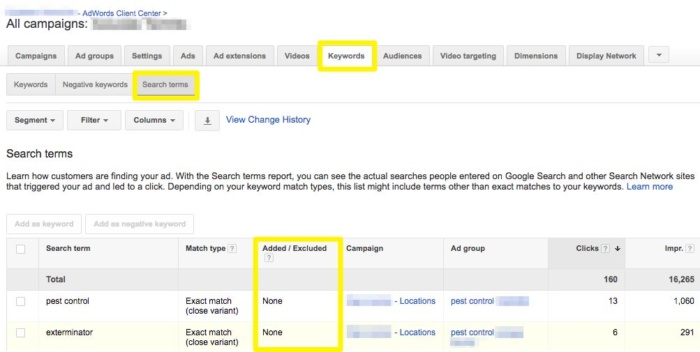
That’s critical, because while you’re bidding on keywords, what you’re actually paying for is search terms.
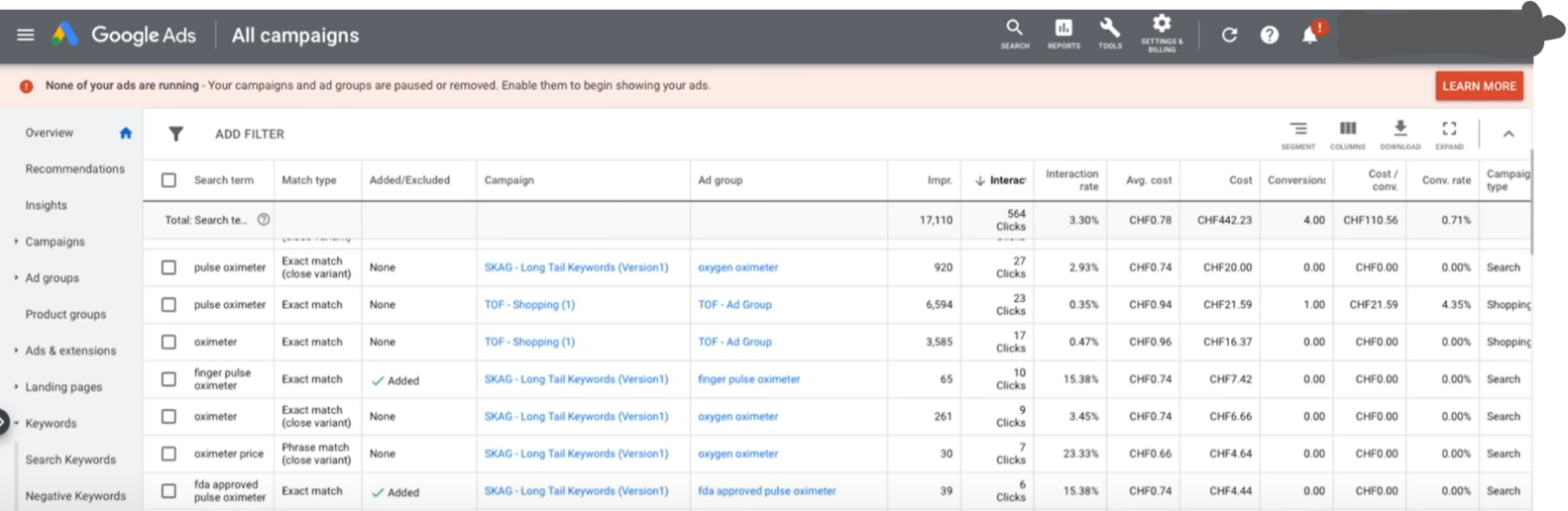
These are the words people are using when they type into Google and your ad gets displayed.
And that’s why, if you weren’t using the proper match types earlier, you started getting a bunch of random — but kinda related — results for “civil” and “electrical” engineers.
So under the Keywords tab, you can look for the Search Terms report and see all of the terms you’re currently paying for (even though you haven’t added those to any campaigns necessarily).
Now… what if you don’t like these search terms showing up?
What if they’re completely irrelevant and you’re just wasting a ton of money paying for these bad clicks (like the “civil” or “electrical” ones earlier)?
You’ll want to exclude them by adding them as negative keywords.
Later in this guide we’ll discuss a ‘maintenance’ routine to run through on a regular basis so that you catch all of these bad keywords before they ruin your budget.
But for now, just realize that you can ‘flag’ certain keywords inside your campaigns that basically tell Google never to show your ads for those again.
All of these negative keywords get put on a list that builds up over time. So in a few weeks, you’ll start filtering out all of the junk and catching it before it wreaks havoc.
That means your ads should only show up for the good stuff. And your campaign ROI should actually increase over time.
Selecting your own budget and key phrases is half the battle. The other half that determines what you’re going to pay, is the competition you’re going up against.
Here’s how to dominate them.
Step 3: Check out the competition
Peeking into your competitor’s business will help you to determine if it’s easy or not to outrank them.
Remember how Google Ads also considers quality? You want to know how good your ads have to be to win.
This is also known as competitor intelligence.
Here’s how to get started.
Go to Spyfu.com and enter your keyword. In this case, it’s “cheap bricks.”
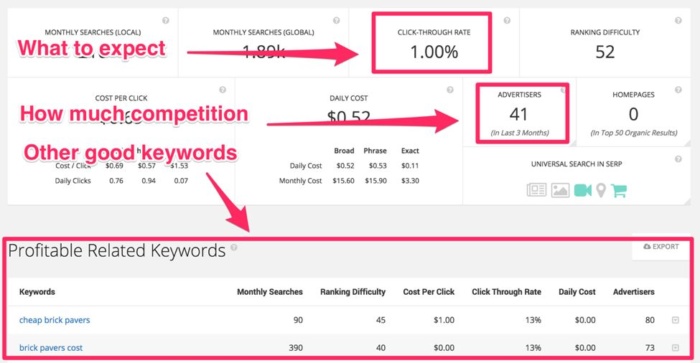
It’ll show you the average CTR (so you know what to expect) and the number of companies who have advertised for this keyword in the past 3 months.
In this case, there’s just 41, which is nothing, considering there are over 1 million companies advertising on Google Ads.
It’ll also show you other keywords that have done well on Google Ads, in this niche.
If you click on “Advertiser history”, you’ll even see the actual ads that your competitors use.
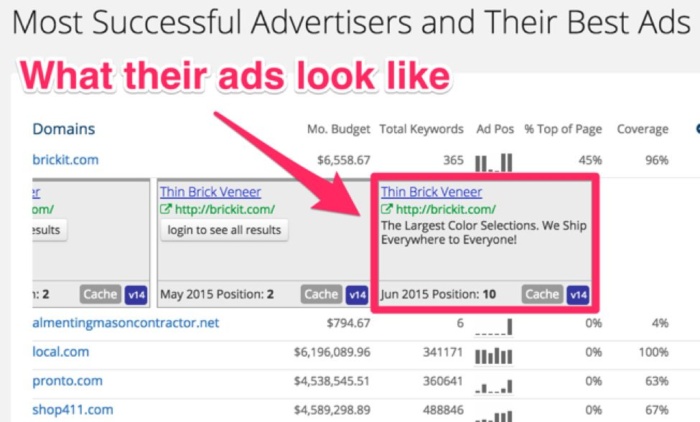
Pro tip: One determinant of relevancy, for Google’s quality score, is whether the keyword shows up in your actual ad.
In this case, Brickit doesn’t even mention bricks in their ad. So, that means that they shouldn’t be too hard to beat.
Remember Semrush? Let’s pull that up again to do a similar competitive analysis. You can use it to find what the average, estimated costs are for specific keywords.

But here’s an even better tip.
You can look up an individual competitor. So start with the 800-lb-gorilla who’s dominating the SERPs.
Then you can go in and look up all the keywords they’re currently bidding on (along with their estimate volume and costs of course).
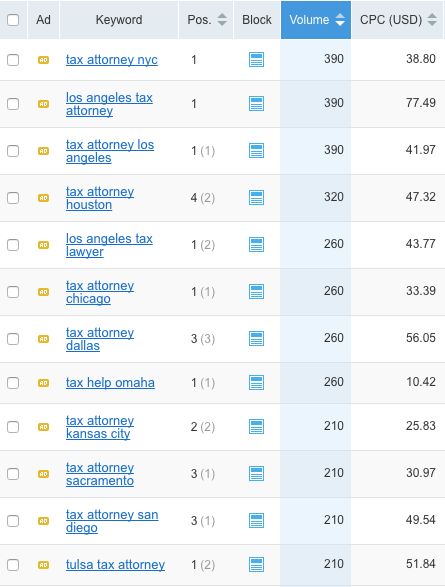
So combining these approaches can help you uncover your competition’s entire PPC playbook.
And then you can reverse engineer it to outperform them.
Sneaky, right?!
Don’t compete. Dominate.
Now you know how Google Ads works. You understand the fundamentals of how the ad-based auction determines your pricing.
We’ve covered nerdy stuff like bidding strategies. Selecting keywords (and their match types). Refining those based on the search terms you get and excluding bad stuff with negative keyphrases.
Then you just saw how to spy on the competition and use their own strategy against them.
We’ve covered a ton of ground. So it’s time to turn those campaigns live now, right?
Not yet. Here’s why.
Step 4: Make sure your landing page rocks
You’re about to spend money to get traffic.
I need to make sure you understand that.
You will pay people money to go to your website, in essence.
It’s still your job to convert them and encourage them to pay you money.
Which means, if your landing page sucks, you’ll lose all of that money. I was shocked to find out that businesses will only spend $1 converting their traffic for every $92 they spend acquiring it.
After people have come to your landing page, would you spend another $92 on them, if that meant they’d end up buying your $300 product? Of course you would!
Make sure that you’ve done everything possible to convert visitors, before starting to advertise. If you send 1000 people to your landing page through Google Ads and convert at 1%, you’ll make $1000 with a $100 product. Imagine increasing that to 2%.
You’d instantly double your money and be able to spend more on ads.
If done right, Google Ads has a positive reinforcement effect, but your landing page needs to convert.
After spending a quarter of a million dollars on conversion rate optimization (CRO), it breaks my heart to see generic, boring offers, like this one from Citibank:
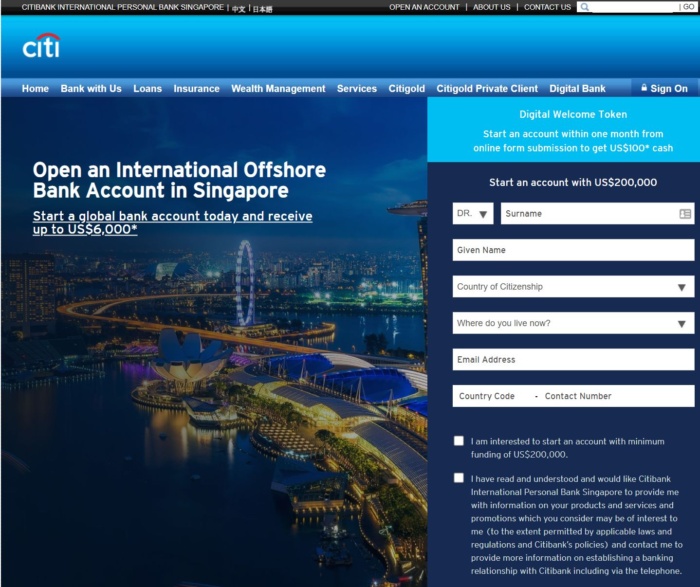
They offer some kind of bank account. But, it has no obvious benefits over, well, any other bank account.
Even worse, they also want me to enter a ton of information.

WordStream has come up with a good article on improving your landing page.
Here are 4 main points to consider:
- Keep the design simple. Don’t cram your page with tons of videos, animations, and fancy design that take forever to load.
- Make the headline powerful and make it stand out. It’s the first thing that people read. It better be good.
- Write clear copy. Don’t try to sound smart by using complex terms that no one understands. Write as you speak. Be as clear as possible about what you have to offer.
- Use bullet points, pictures, and other visual elements. Again, don’t overdo it. These things are supposed to help the reader get a better grasp of your message, not become the sole reason for catching their eye.
Want an example of a job well done? Check out Lyft.
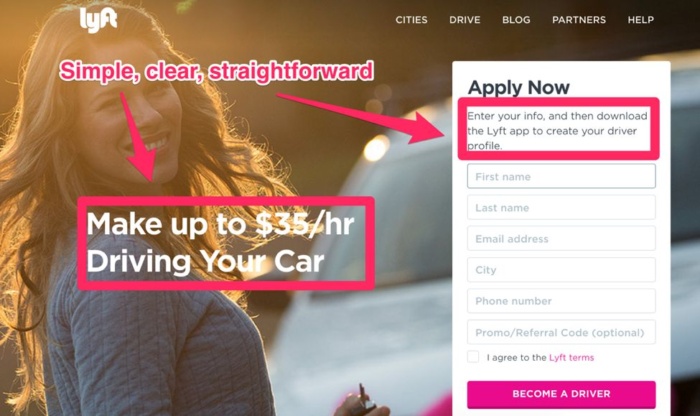

Simple design, clear headline, straightforward instructions.
Another good example is Codecademy. Their homepage immediately tells you what you’ll get and that you’ll get it fast.
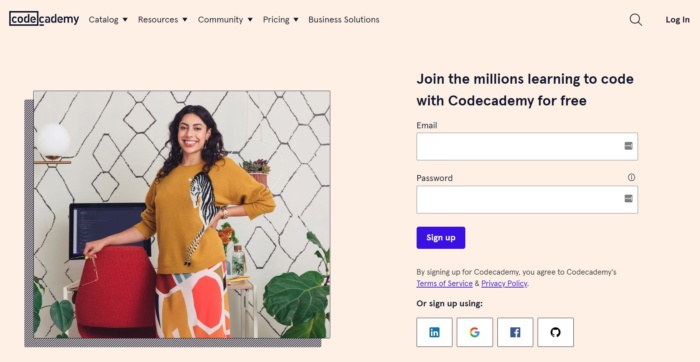
Both Lyft and Codecademy are perfect examples of conversion-centered design. It makes readers stick to your page like glue. And entices them so they have to click to find out more.
For example, Hiten teamed up with ProfitWell to analyze the difference between a ‘good’ and ‘bad’ pricing page.
Specifically, pages that combined “more information” and “more action” result in the most confident users. (Meaning they feel the most comfortable moving forward with you.)
Otherwise, get that mix wrong and the result is often intimidated, discouraged, or distracted visitors. None of which will buy.

Their study pointed to Zendesk as one of the bad examples. Check out how cluttered and confusing the information on this page is:

Now compare that with this simplified one from Campaign Monitor:
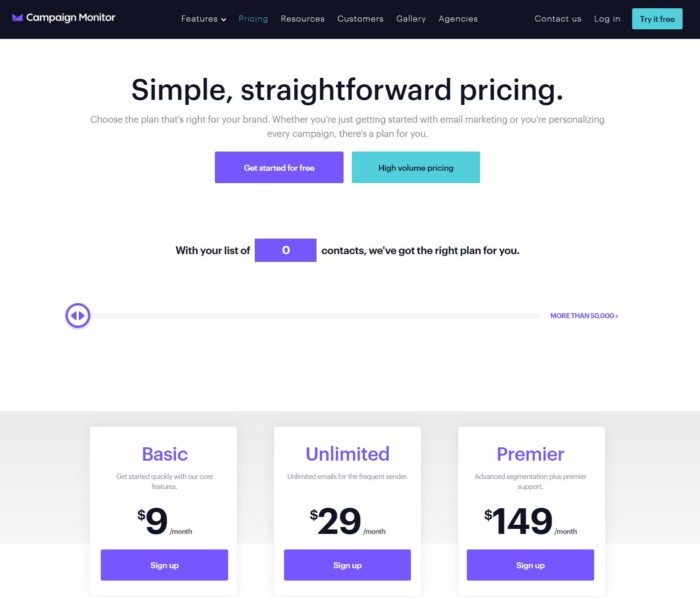
On the surface, the pricing page layout is relatively similar.
The big difference, though, is in how they showcase the information. Which all comes back to page design.
The next key difference is the copy.
Copywriting is another complex, challenging topic on its own. It would require way too much information to cover here (in a post about Google Ads).
So instead, keep this simple framework in mind: PAS.
Here’s how it works.
- Problem: Google Ads can make you a ton of money. But it’s difficult and complex to get started.
- Agitate: Get it wrong, and you’ll not only waste tons of time, but tons of money, too.
- Solution: Fortunately, you can read this in-depth guide to avoid making those mistakes made on Google Ads.

This formula helps you focus on keeping someone’s pain points front-and-center. And it also helps you better match the landing page ‘relevance’ + the keyword you’re targeting + the search term someone used. (Which, as we’ve covered, gives you the best ROI.)
Sounds great, right? Easy enough.
Only one problem…
How are you supposed to get these pages up?
The Quality Score is going to grade your landing page relevance. That means it needs to match the keyphrase you’re going after.
Multiple keyphrases mean multiple landing pages.
If you’re already working with designers and developers, problem solved. But if not, you’re going to need a few extra tricks or tools.
Unbounce solves a lot of these problem areas, like creating, hosting, and testing new pages. They have a template library with designs you can simply pull off the shelf.
Then their website builder is a simple drag-and-drop customizer so you can edit or change almost anything about the page (without touching a line of code).

They also have an advanced feature called Dynamic Keyword Replacement. Using this, you can create just a single landing page and it will automatically pull in the keyphrase someone searched for.
In the old days, you’d have to create dedicated landing pages for each major Google Ads campaign. That was incredibly time-consuming.
But not anymore with that tool.
Instapage and LeadPages are two other options. Both offer beautiful templates that you can select with a click. And both provide limited customizations, so you can get a new landing page up within minutes.

Unfortunately, getting your landing page live is only half the battle. For example, here’s what commonly plays out.
You pick a beautiful template. Push it live. Flip the switch on your ad campaigns, and then… nothing.
Visits are coming in, but leads and sales aren’t happening.
What’s going on?
One way to find out is to use CrazyEgg. This tool will help you uncover user behavior — like what people are actually doing on the page.
So you can see what people are clicking on, how much they’re scrolling, how visitors from Facebook look for different things on your page than from Google Ads visits.

Basically, it’ll help you get one step closer to figuring out what’s working well, and what needs to improve.
(Which is usually just a simple drag-and-drop fix with one of those earlier landing page tools.)
Now you’ve fixed the page. Leads have started rolling in. You need one final thing until your Google Ads strategy is complete.
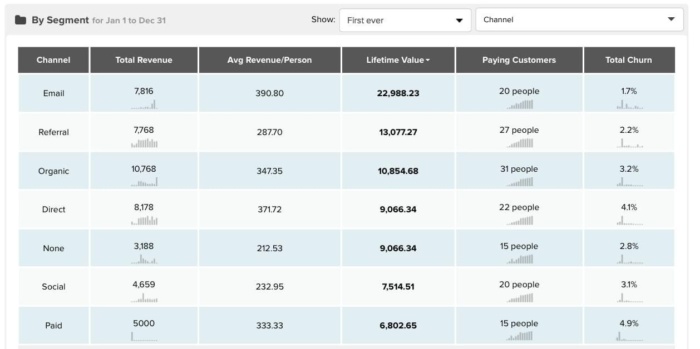
Google Analytics is great. But it only will show you a raw number of conversions. That’s why you need something extra like Ubersuggest .
If you’re already spending thousands each month on Google Ads, you need to know which of those campaigns are driving the most buyers (not just opt-ins).
Campaign A delivers ten leads. Campaign B, only five. But those numbers don’t matter.
What matters is how many of those people are eventually paying you.
That might only be two for Campaign A and three for Campaign B.
Or Campaign B’s average order value might be higher. So you have to go all the way to the finish line in order to see which campaigns are actually driving revenue (from those that look good on the surface, but aren’t delivering the goods).
Your landing page is designed to convert. It gives people all the information they need, but presents it simply so it’s easy to understand.
Your page’s copywriting follows the simple PAS formula. And you’re able to edit landing pages on the fly once you start seeing how user behavior looks and how many real customers you’re getting.
Now it’s time to go back to the ad setup process.
Step 5: Setting up Your First Google Ads Campaign
Earlier we set up a daily budget. Let’s go with $6.00 just to give you an idea of how it works.
The next step is to consider where are customers are. Physically.
If your business is operating only in the US, but US-wide, enter United States.

Under networks, uncheck the display network. You only want your ad to show up in the Google desktop search results, not on other websites in your industry.
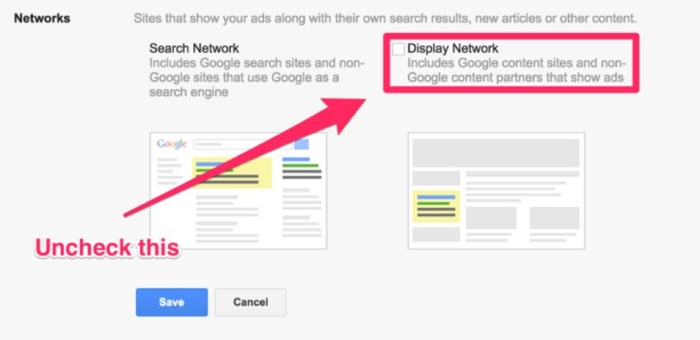
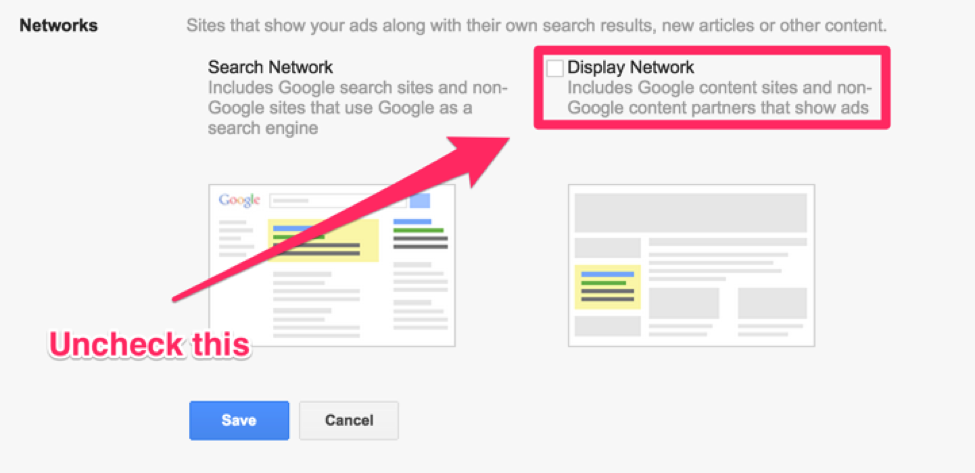
Then, enter your keyword (don’t worry about Google’s recommendations, you can add more later) and set your bid to $3.00.

It’s important you understand what’s happening here.
We’re creating a Campaign that will ‘house’ everything. Underneath that, there’s Ad Groups. Then under that, Keywords and Ads. Here’s how it looks:

You might just want to start off with a single campaign for now. But once you get good at this, you’ll have multiple campaigns. Under each campaign, there might be a ton of Ad Groups. And then even more keywords and ads.
Now there’s a few ways to structure your account.
Most professional PPC experts have their own ‘favorite’ one. But there’s no consensus. There’s no perfect setup. So we’ll cover a few of the most popular fast, along with their Pros and Cons, so you can make your own decision.
The first setup is by match type. (Remember those?)
You’re basically creating one campaign for Broad match. Then another for Phrase match. And finally another for Exact match.
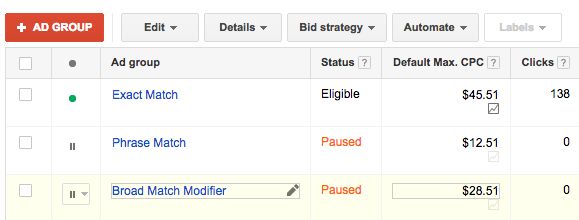
This setup’s good because it helps you quickly highlight performance from those exact terms. So you can adjust a smaller budget quickly based on results.
The downside is that it often becomes big and complex over time. So if you’re a bigger advertiser with a huge product catalog and are about to drop some coin, you might want to avoid this one.
Instead, you might want to setup campaigns around your own product, brands, etc.
On the plus side, it makes organization easy and you can quickly devote time and money to whatever you’re trying to push into the market.
While it makes product organization and objectives easier though, it can be tough to improve what’s happening on a keyword level with individual performance.
Last but not least, are single keyword ad groups (SKAG). These are a little unique, because you’re literally creating independent ad groups for each keyword.

If you’re going to have a ton of keywords… that means a ton of work to organize and manage. But that also provides a few benefits down the line.
KlientBoost founder Johnathan Dane (self proclaimed SKAG lover) highlights a few of those benefits:
- It automatically solves for Quality Score and message match on its own.
- Ads become laser targeted for a single keyword.
- And you’re able to have greater ‘control’ over what gets through (like the search terms you’re paying for).
The big downside (beside how time-consuming it gets) is that you need to already know which keywords you’re targeting while or before setting these campaigns up. So there’s not a lot of room for experimentation.
Each of these methods will work. It just depends on what fits you best.
No matter which one you choose, though, it’s important to understand how it’s going to fit into your customer’s journey.
Check out these three search queries:
- Las Vegas
- Las Vegas Restaurants
- Las Vegas Hotel
They’re all related. But each person is looking for something different. The intent changes.
For example, someone looking for the first phrase might just be generally interested in the city. They’re maybe comparing it to other places, like New Orleans, for an upcoming vacation.
But that doesn’t mean they’re ready to buy or put down a credit card on a hotel.
The second phrase means that person is traveling, but still evaluating their options. It looks like they might be going to Las Vegas for sure, but that doesn’t mean they have a hotel picked out. They’re still looking around.
The third and final one is somebody who’s ready to buy. They’re now comparing travel dates and seeing what hotel pricing looks like.
Each of these three is important. But the keywords you pick to attract each will be different. Same goes for the ads you’re going to eventually show them.
Once again, it all goes back to your own business. You might have a limited budget and want to aggressively go after paying customers.
Or maybe you want to reach people earlier in their decision-making process to lower the Cost Per Lead you’ll eventually get.
The point is, you have to think through how these Google Ads campaigns are going to be set up, and which part of the funnel they’re going to target, before you can dive into the details of creating an ad.
Which brings us to our next step.
All that’s missing now is the ad.
Step 6: Write your first ad
So, what does it take to write a great Google ad? A few things.
Be precise. You don’t have a lot of room to express yourself. So, be short and sweet.
Having a unique value proposition (UVP) helps. It’s a one-sentence description of the benefits for your customers.
Remember the old Domino’s slogan?
“You get fresh, hot pizza, delivered to you in under 30 minutes – or it’s free!”

(Image source: ConversionXL)
What more could you want when ordering pizza? Fast delivery and it’s still hot when you get it.
Spend some time thinking about how you’re different from anyone else. What can you bring to the table that your competitors don’t?
Capitalize on that.
There’s good news, too.
You don’t have to be original or clever. You just need to mimic what already works.
For example, MarketingExperiments.com ran a study in the past that showed using the same headline copy (more or less) on both your ad and landing page generated 2.5X more leads.

Another test showed that incorporating a number into the headline resulted in a 217% increase in CTR and 23% improvement for increasing your Google Ads conversion rate.

In other words, there are patterns to follow. Formulas to emulate. When someone types in, “Los Angeles Tax Attorney,” it means they actually want to find a tax attorney in Los Angeles.
So create a compelling ‘hook’ in your ad copy that grabs their attention. Make sure there’s a compelling value proposition.
But otherwise, don’t reinvent the wheel. Don’t be overly complex or clever at the expense of conversions.
Including a call-to-action is also tremendously important, too. The easiest way to get people to click your ad is to ask them to do so. Without a clear call-to-action, your click-through rate will suffer.
One technique to give your CTA an extra boost is by using power words. These trigger words almost force prospects to click. They play on our psychology (whether we like it or not).
For example, sometimes it’s better to use fear. And sometimes it backfires. The trick is knowing when to use it correctly.
Outbrain found that negative-based headlines (ones that focus on threats and mistakes) got 69% higher click-through rates than positive ones (while also outperforming them 50%, too).
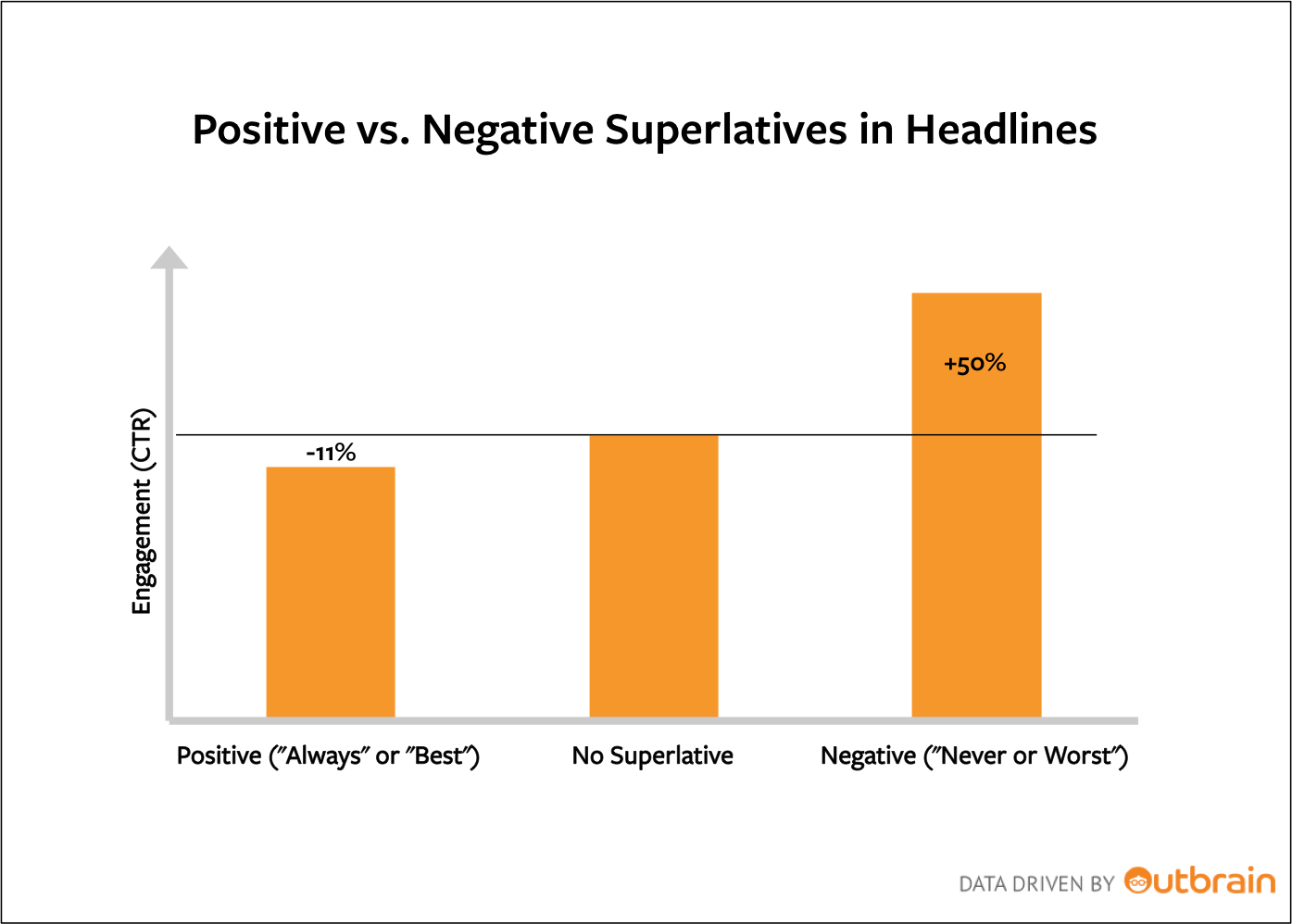
So when you’re writing ad text, switching the CTA from talking about saving money to wasting money might make all the difference. Instead of, “Get these money-saving tips now,” it would be, “Stop these 5 brain-dead money-making mistakes now.”
Sometimes, the less said the better.
Curiosity is one of the most powerful levers of motivation we have. By piquing people’s interest, by teasing them or asking a question without immediately giving away the answer, it creates a little ‘gap’ inside someone’s mind.
One they absolutely have to fill.
Curiosity is even a go-to technique from Copyhackers, who once used it to increase clicks by 927%.
Here’s a bad example to learn from.
Look at this ad that comes up for our keyword “cheap bricks”.

Not only do they not include the keyword properly (having it in its true form is very helpful), but there’s also no action that they prompt me to take.
Different types of stones, 12 years of experience.
And?
What does that mean for me? Nothing.
They’re not telling me to do anything, so I don’t.
Another key factor is your display URL. This is the green link displayed beneath the title. It can be anything you want it to be, but the domain has to match the domain of your landing page.
You should always include the keyword here, for additional highlighting.
Keeping those factors in mind, create your ad.
How about this:
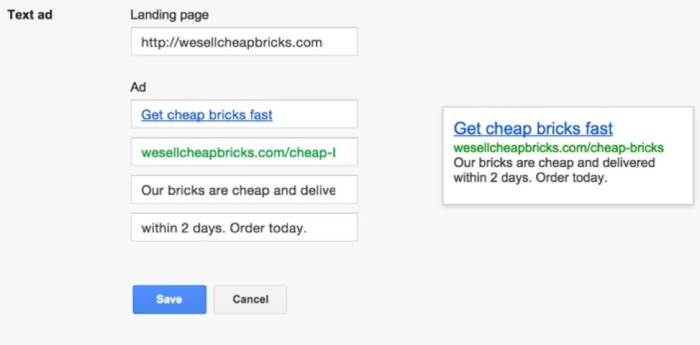
If our page is wesellcheapbricks.com, we need to make that the display URL as well.
Pro tip: Remove the “https://” in your display URL to get more space for your keyword.
Let’s dissect the ad real quick:
Headline:
“Get cheap bricks fast” is a headline that doesn’t solely rely on the keyword and thus stands out, but it is also an action people can take, which makes it clickable.
Display URL:
Again, we remove the http and added “cheap-bricks” at the end, so it’ll be highlighted in the search results and make our ad more relevant to searchers of the keyword.
Ad copy:
You only have two lines, which isn’t much to get the message across. “Our bricks are cheap and delivered within 2 days.” That’s as clear as it gets. Of course, cheap is always relative, but it sounds good enough to the searcher.
Delivering within two days is definitely a bonus that most other brick stores might not offer (let alone mention in their ads).
Call-to-action (CTA):
“Order today.” What more needs to be said? There is no exclamation mark, because Google isn’t big on those, but it’s definitely a good prompt to take action.
Have everything? Hit save and continue.
Step 7: Fix the Details
You’ll then land on your dashboard for the first time. First of all, pause the Google Ads campaign, so it doesn’t start running just yet.

If you click on the campaign, you’ll see that inside of the campaign, Google automatically created an ad group. With our single ad example, the ad group doesn’t matter. But, when you start running a larger Google Ads campaign with multiple keywords, dividing them into ad groups makes your ads management much simpler.

If you click on that, you’ll land on the ad level, where you can see your keyword.

Click on your keyword and set it to phrase match.

Initially, Google sets this to broad match. Unfortunately, that’s not very targeted. It means that users can type in your keywords anywhere in the query.
But, if someone searches for “how can i make bricks at home cheap”, they’re not looking to buy cheap bricks, so that’s not what you want.
Exact match might be too targeted, though, since it only allows the exact phrase, “cheap bricks.”
Usually, phrase match is a good option, since it must contain your keyword as a fixed phrase, but can have other terms around it.
If users search “where to buy cheap bricks” your ad will still show up.
Now, all that you need to do is one last thing…
Step 8: Setup conversion tracking
Remember how I said that all of this is useless without conversions?
That’s why you need to track each and every single one of them.
How does Google do this?
With a snippet of code.
You put a bit of code on the page users reach, after successfully buying from you, which will let
Google Ads know that there was a purchase every time that a user reaches the page after clicking on an ad.
To set it up, go to “Tools” and then “Conversions.”
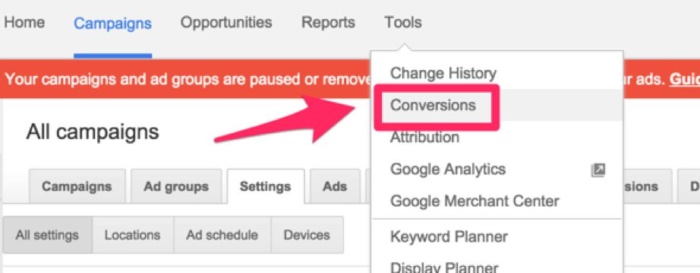
Click “+ Conversion.”

Now, choose “Website.”

Add the info, basically just a name and the value of the conversion.
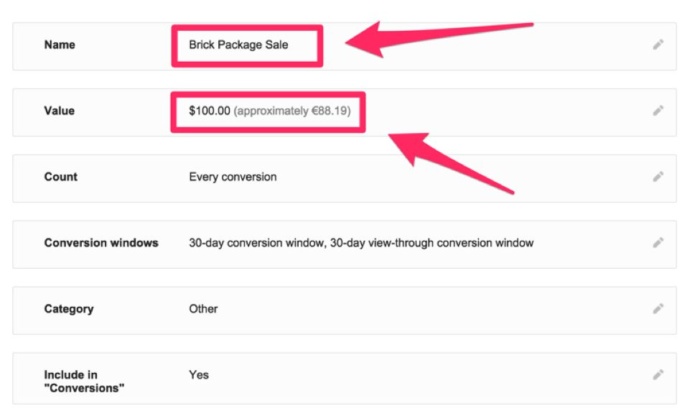
Hit “save and continue.” Then. you’ll reach the page with the code snippet.

Just copy the code snippet and add it to the HTML code of your thank you page (the one people see right after making a purchase).
That’s it!
It’ll say unverified in your dashboard, at first, but that will change after a few hours or a day.

Once you’ve set this up, go to the Campaigns tab and let the campaign run.
But… what if you’re a lead-based company?
According to an OuterBox study, 79% of smartphone users have made a purchase online using their mobile device.
Average conversion rates might hover around 1-2% online. But e-commerce dollars make up 10% of ALL retail revenue. So two things to try.
The first is setting up the Google Ads call extension. This will add a phone number or call button to the ad itself.

So when someone calls, it will record new rings as conversions inside Google Ads (so you can see what campaign or even ad delivered each phone call).
But not everyone will call the number on that ad. They might click through to the website and browse around a bit before calling.
Unfortunately, you’re going to lose the digital trail from what ad delivered that call. Unless you use a tool like CallRail to help you keep track.
All you have to do is copy and paste a script on your website (similar to the Google Ads one above).
Then you can set the phone number on your site as the ‘swap target.’

Now, a brand new phone number will be assigned to each visitor, following them from page to page.
That way when someone does call, you instantly know what ad campaign sent them to you in the first place.
Congrats, you just set up your first Google Ads campaign!
Now it’s time to maintain it.
What happens now?
Not much.
Google will first review your ad, before it starts showing it to people. That’s why it doesn’t make a lot of sense to create lots of ads right away.
Once you go into your account the next day and see that your ad has been approved (you’ll also receive an email from Google), you can start creating more ads by copying your original ad.
That way, you can avoid going through the approval process all over again. Go to the Ads tab.

Select your ad, in the checkbox and click “Edit,” then “Copy.”

Then, do the same and click “Paste” (or just press Cmd/Ctrl+V).
Paste your ad and check both boxes.

Then, you can click on your copied ad and modify it. Change the headline and/or copy.

In order to get results on Google Ads, you always need to test different ads against each other.
If you only run one ad and you get crappy results, you can’t possibly know what would have been better, because you can’t compare it to anything.
That’s why you should create at least a second ad on your second day, once the first has been approved.
Extra credit: Regular account maintenance
Your account is up-and-running. (Finally!)
Over the next few days and weeks, results will begin pouring in.
There’s not a whole lot to do until then.
There is one last thing to put on your radar before you get too comfortable counting all those new sales, though,
Over time, you’ll want to continuously maintain, prune, and improve your account. Smaller accounts can wait every month or so. While other big ones I’ve worked on run through something like this every week.
The goal is to check the health of your campaigns. And quickly fix what’s not working in order to minimize the amount of wasted ad spend.
So first and foremost, pull up that Search Term report.
You’ll want to run through this report regularly and do one of two things:
- Identify new potential keyphrases to add to your existing campaigns, or
- Identify off-topic keywords that you’ll want to add to your negative keyword list so that it doesn’t show up again.
The goal here is to move bad spend to good. Restricting any wasted piece of your budget and instead putting it behind the stuff you can already see is performing well.
That will give eventually give you a way to compare profitability per keyword.

The next step is to check ad positions.
For example, if you’re consistently showing up in the first position, you might actually get away with decreasing your budget a little bit at a time in order to bring down your Cost Per Lead (while still showing up at the top).
Whereas if you’re showing up in positions 3-4, you’re probably not getting very many clicks. So this time, raise your keyword bids bit by bit in order to slowly creep up into positions 1-2 (again, without overspending).
Next step is to create more ads. Ideally speaking, you’d like to see ads performing with a click-through rate (CTR) of at least ~8%.

That means you’ll probably have to test at least a few variations per keyword or ad group (depending on how yours is set up) in order to find the one high-performing ad.
In the meantime, feel free to drop or pause the underperformers. Typically you’ll have ads rotating indefinitely to test multiple versions. So be quick to pause the losing ones so it won’t continue to pull budget away from your winners.
You can also experiment with new ad extensions during this time, too. For example, sometimes adding a few extensions (whether that’s a phone number or those little yellow stars from product ratings) can improve an existing ad’s performance.
After improving ads, head over to your locations and time of day (both under dimensions).
This part is simple.
What locations are under-performing? Pull budget away and put it behind those that are producing.

Same goes for days and times.
What days of the week or times of day are under-performing?

No fancy graphs or stats required. Just common sense once you know where to look.
FAQs
What is Google Ads?
Google Ads is a product that can help you promote your business, sell items or services, raise awareness, and drive visitors to your site. Set your budget and start measuring the impact of your ad.
Is Google AdWords now Google Ads?
Yes. Google made this change in 2018 to include a wider range of campaign types including Search, Display, and Video. This was simply an update to the interface for the brand.
When should I start using Google Ads as part of my marketing campaign?
Once you have the budget set for your paid marketing strategy and familiarized yourself with the platform, you can be strategic and refine your Google Ads campaign. Make sure you have the customer demand with a unique selling proposition and know how your competition is performing. Once you measure your metrics from ad campaigns, you can make adjustments to hit your KPI targets.
How can Google Ads help you advance your business goals?
Google Ads can help your drive sales, build brand awareness, and aid with shoppers’ purchasing decisions. You can follow reports and insights putting important data into action by making adjustments to your ad better suited for your audience.
What is the cheapest Google Ad setup?
You will need to research your niche and see what the average rate per click is currently. However, on average, across most industries Google Ads fall just under $3 per click (Display) and just under $1 per click (Search).
Conclusion
Sit back and wait. I’m serious.
Turn on your second ad and, once everything is running, do something else.
Don’t sit at the computer, waiting for things to happen.
Remember the third promise that you made before we began? Google Ads takes patience.
Check back in a day. Then, create more ads and start building your first ad groups. Start tweaking. Read the data.
And, remember: Nothing matters without conversions.
It’s great if you can tell which ads get a better CTR, but, if they don’t get conversions, that also doesn’t help you make money.
It might take you a month to get results (here’s a good infographic on what to do during that month).
Just follow your ads and analyze the data, as it comes in over the next ten days.
Then, review, turn off ads that don’t work, add more keywords, and double down on what’s performing well.
Once you start going deeper, be sure to check out Skillshop to get Google Ads certified to grow your skills and advertise your business online. You can also try to join the Google Partner program.
What do you want to use Google Ads for? Let me know the headline of your first ad in the comments.