




Keywords play an integral role in search engine optimization.
That’s why, if you want your SEO strategy, particularly keyword research, to be successful, you must know where to find relevant keywords.
You must know how to find keywords everywhere—and not just any keywords, but high-intent, low competition keywords you can rank for.
Why It’s Important to Find Keywords Everywhere
Whenever keyword research is mentioned, the conversation is usually centered around finding the best keyword research tool.
However, to have a set of winning keywords for your SEO strategy, you need to look beyond the standard keyword research tools everyone else is using.
You can’t rely on one single SEO tool or strategy. That’s because no single SEO tool can provide you with all the information you need to create a robust SEO strategy. Besides, take a look at the results you get from different tools, and you’ll find that every SEO tool provides slightly different results for the same query.
That incomplete data puts you at a great disadvantage. That’s why, if you want to outperform your competition, you must put in the effort and look for keywords everywhere—not just using a single tool or platform.
So how do you find keywords everywhere?
That’s what I’ll share in this post.
4 Tools and Strategies for Finding SEO Keywords Everywhere
When done right, SEO keywords can help you rank content, sell more products, and build your brand. That’s why investing the time and resources to find the right ones is so critical to business growth. Here are some tools and strategies to help you do just that.
1. Do a Manual Google Search
What better place to look for relevant keywords than on the biggest search engines of our time? Yes, I’m talking about Google.
On your quest to find keywords everywhere, one of your first steps must be a manual Google search. Here are a few ways you can find relevant SEO keywords using this method:
Google’s Autocomplete
Google’s Autocomplete function is the suggestions Google offers when a user is typing in a search query. While it was originally meant to help users reduce typing time, it has become a wealth of data for SEOs. That’s because the autocomplete suggestions are pulled from real-time, trending searches.
To find keywords using Google’s autocomplete, type in a keyword and note the suggestions Google offers. You’ll notice most of the suggestions are long-tail keywords. This makes this strategy excellent for finding long-tail keywords.
Featured Snippets
Another way to manually find keywords on Google is by searching for niche-related keywords and focus on the featured snippets.
Also known as “position zero,” a featured snippet is the first listing on the search engine results pages (SERPs). It’s different from other results in that it contains more information. Both factors make it more appealing to users than the other results on the page.

Featured snippets can also help you find keywords to use in your content—and the best featured snippets to use for your keyword research are your competitors’ featured snippets.
Of course, manually searching for these is laborious and time-consuming. To make it easier, use an SEO tool like SEMrush’s Featured Snippet Report to track your competitors’ featured snippets.
Once you’ve compiled your competitors’ featured snippets, find the keywords they are ranking for and add those to your keyword list.
People Also Ask
The “people also ask” box is another great place to find SEO keywords. For some searches, Google will display related questions people ask in drop-down boxes like this:

Just like Google’s autocomplete feature, the “people also ask” box is a goldmine of long-tail keywords.
Related Searches
The related searches section at the bottom of the SERPs features related keywords users input into the search bar.
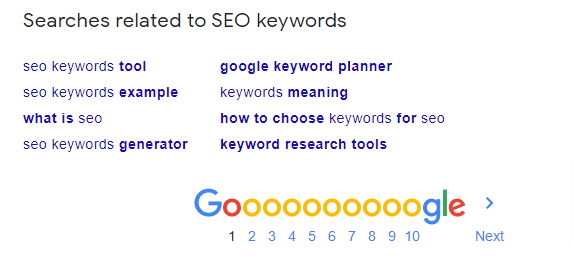
Sift through the related searches on as many pages as you can and look for relevant SEO keywords to add to your content strategy.
2. Use Keyword Research Tools like Ubersuggest
Want to find keywords everywhere?
Then you’ll want to use SEO tools like Ubersuggest.
Ubersuggest is a free tool specializing in generating keywords and serving up critical data on those keywords. The main features of the tool include:
Domain Overview
The Domain Overview feature gives you insight into your competitors’ SEO, content marketing, and social media strategies. This allows you to see what’s working in your niche so you can adapt those strategies for your campaigns.
Top SEO Pages
This feature helps you discover which competitors’ pages rank for particular organic keywords. It also shows which content performs well on social media.
Keyword Ideas
This is one of my favorite features—and the most useful. All you have to do is type in a seed keyword, and the tool provides a list of head and long-tail keyword suggestions.
Ubersuggest will not only give you keyword suggestions, but will also give you important metrics about the keyword.
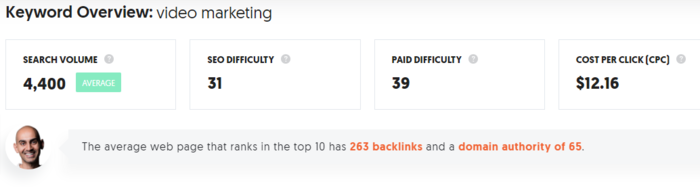
- Search Volume: The number of monthly searches on Google for the keyword
- Cost Per Click (CPC): The average cost per click if you want to pay for Google Ads
- Paid Difficulty (PD): The estimated competition in paid search
- Seo Difficulty (SD): The estimated competition in organic search
Of course, Ubersuggest isn’t the only keyword research tool on the market (but it is one of the best as far as free features go).
If you’ve got a bit of money to splurge and need to dive a bit deeper into data, you can also try tools like Moz, Semrush, and Mangool’s Keyword Finder.
3. Use Chrome Extensions Like Ubersuggest
If you want to find keywords on the fly, use Chrome extensions like Ubersuggest.
The Ubersuggest Chrome extension gives you the most actionable SEO metrics directly in, among others:
- Google search results
- YouTube search results
- Amazon search suggested terms
Every time you perform a search in Google, the extension gives you SEO data on your search query.
4. Complete Competitor Research With Tools
If you want to find keywords everywhere, one of the best sources for winning keywords is your competitors.
No, they won’t deliver those keywords to you on a silver platter. However, you can discover the keywords they are using by leveraging tools like TagCrowd.
All you have to do is input your competitor’s URL, and it will show you the keywords they’re using.
Other competitor research tools you can use to find the keywords your competitors are using include:
- SpyFu
- BuzzSumo
- SEMrush
- Ahrefs
- Ubersuggest
You can then use those keywords to create better content that outranks your competitors.
4 Tools and Strategies for Finding Amazon Keywords Everywhere
Need to outrank your competitors on Amazon? It’s a tall order, as there are over 1 million of them in America alone.
Then you must know how to find Amazon keywords everywhere. Like Google, Amazon is a search engine that uses its own algorithm to rank content. And because searchers on Amazon are usually looking for something specific (products), your keyword research must align with their search intent.
A few tools and strategies to help you do that include:
1. Complete a Manual Search
Using Amazon to conduct keyword research manually is one of the best ways to find keywords on Amazon. To do this, type in your product name in the search bar and note the autocomplete suggestions that come up.

The suggestions are aggregated from the most popular searches users make. You can find some amazing keywords here you won’t find using regular keyword research tools.
2. Do Manual Competitor Research
One way to stand apart on Amazon is to be very specific in your product descriptions.
To figure out what keywords to use:
- Look at what comes up when you search for products that are similar to the ones you offer.
- Check the product descriptions and look at the keywords they’re using.
- Consider using the ones that apply in your own copy.
However, don’t just blindly apply your competitor’s keywords. Consider similar variations and think about what features are likely to be important to searchers.
3. Use Amazon-Specific Keyword Tools
Amazon is a search engine that uses its own algorithm to rank content. That’s why when looking for keywords to help you rank on Amazon, you must use Amazon-specific keyword research tools. Tools like Sonar and KeywordTool.io use complex algorithms to collect data about the keywords Amazon shoppers use when looking for products.
These tools will help you find keywords that are more relevant to your Amazon SEO strategy.
4. Use Analytics From Your Website
Your website is also another great to check out as you look for Amazon keywords everywhere. Use a tool like SEMrush to analyze your product pages and see which keywords are ranking high.
If they are specific and can be targeted towards Amazon shoppers, you can use them in your Amazon SEO strategy.
Remember, the competition on Amazon gets hotter every day as more people join the e-commerce bandwagon. To stay ahead of competitors, you’ll need to pull all the stops when doing your keyword research.
4 Tools and Strategies for Finding YouTube Keywords Everywhere
What started as a site to share video content has become one of the most popular search engines.
Yes, I’m talking about YouTube.
With over 2 billion users globally, you can’t afford to ignore this platform.
YouTube SEO is slightly different from other search engines because it’s a search engine for video content. Videos must follow YouTube SEO best practices to rank well there—and that includes using different keyword research strategies.
You must know how to find YouTube keywords everywhere possible to outrank your competition.
Here’s how to perform keyword research for YouTube.
1. Do a Manual YouTube Search
As with other search engines, your first port of call is to do a manual YouTube keyword search. To do this, you can:
Use the Suggested Keywords
Input your keyword idea into YouTube’s search bar, and it will suggest similar or related keywords.

A major advantage of this strategy is the suggestions are collected from real YouTube. As a result, they are more likely to be relevant.
Check Top-performing Video’s Metadata
Another YouTube keyword strategy is to look for popular videos in your niche and check the video’s metadata. This includes title, description, and video tags. You’ll find top keywords you can use for your own videos.
2. Use YouTube Keyword Tools
Because YouTube SEO is unique to the platform, it’s essential to use YouTube-specific keyword tools to help you uncover unique keywords.
Tools like Kparser and VidIQ specifically generate keywords for YouTube. They are also designed to generate keywords for video titles, descriptions, and tags.
3. Use Discussion Forums like Quora
An important aspect of keyword research is to find the keywords people actually use in search queries.
And what better place to find those keywords than on platforms where people discuss topics related to your niche or industry. One such platform is Quora.
Search Quora for hot topics in your industry and think about relevant keywords and content you can create on YouTube along those same lines.
4. Review Your Blog
When doing keyword research for YouTube, think about the keywords you use to rank blog content. Use an SEO tool to analyze which keywords you’re ranking for, and then use these same keywords to develop content ideas for your YouTube channel.
When you create your YouTube content, embed those videos into the related blog posts—which is a great way to boost SEO on both Google and YouTube.
Conclusion
Keyword research is not just confined to keyword research tools. You can find keywords everywhere—if you know where to look.
Hopefully, this blog post has provided you with several fresh strategies to find keywords.
While looking for keywords everywhere can be time-consuming, it’s one of the first steps to gaining a competitive edge.
Which keyword research tool or strategy is the most effective for you?

Unlock Thousands of Keywords with Ubersuggest
Ready to Outrank Your Competitors?
- Find long-tail keywords with High ROI
- Find 1000s of keywords instantly
- Turn searches into visits and conversions
Free keyword research tool