




Everyone wants to log in to Google Search Console to find their website is error-free and running perfectly. This is rarely the case, unfortunately.
The good news is schema validation error notifications offer important information you can use to fix your site.
Good SEO is about consistently taking care of the small details, and that’s exactly what Google Search Console errors allow you to do. What exactly are schema validation errors though, and how do you fix them?
In this guide we will go over schema validation errors in more detail; specifically, the most common one, called “either “offers”, “review”, or “aggregate rating” should be specified.”
What Are Schema Validation Errors?
Schema validation errors are mistakes in the formatting of your Schema data, making it difficult for Google to understand that data.
Schema is the structured data that helps the search engines understand what your page is about. By interpreting the schema of your page, the search engines can show rich results, like the ones below.

While the traditional search engine listing might just be a link and meta description, rich results show a wide variety of information designed to improve the user experience.
The right schema markup can result in an increased CTR, but your rich results might not show up correctly if you have schema validation errors.
Many website builders or plugins such as Yoast SEO help take care of schema for you, but sometimes, you might still see schema validation errors in your Google Search Console (GSC).
Here’s a little more information on adding structured data to your website before we start to look at specific errors.
What Does a Schema Validation Error Mean?
If you’re not using Google Search Console to keep track of your progress with your website, then you’re missing out. It’s full of so many important insights into how your site acquires traffic and the errors that are holding back your SEO, so it’s something you should be checking in with regularly.
When you log in to GSC, a common error you might see is a schema validation error. These errors simply refer to issues with the way you have structured your data, causing Google to have problems interpreting it.
This isn’t likely to directly affect your rankings too much, but as we know, rich results help click-through rates, and this is a big part of SEO. Schema.org allows for a huge amount of information about your product to be included in your code, and all of this helps search engines better understand what you’re offering.
A search engine results page (SERP) is a competitive place, and it’s important to use all of its features to stand out from the crowd. You don’t have many opportunities to earn someone’s click, so you want your schema to be in order so you can use the extra features to grab people’s attention.
Here are some of the most common schema markups you might use:
- organization: provides important details about the organization
- person: provides important details about a person
- local business: information about a local business such as an address, contact details, opening times
- product and offer: specifications of a product and offers
- articles: for blog posts and news
- video: helps Google to index the video content on your site
- event: gives people information about upcoming events
- review: shows reviews about a product or business
- rating: shows an aggregated rating for a product or business
If this information isn’t formatted correctly, or Google doesn’t see the information it thinks it should be seeing, it will show a schema validation error.
Three Schemas You Need to Avoid the “Either “Offers”, “Review”, or “aggregateRating” Should be Specified” Error
This is one of the most common schema markup errors and it can be a little complex to fix (you’ll actually need three schemas). Don’t stress, though, I am going to walk you through it.
Google encourages product pages to make use of all product markups because it increases CTR and results in more sales.
As consumers, we’re attracted to offers and social proof plays a huge part in the buying decision. With rich results, you can use these tools right from the get-go, attracting people to click on your pages, and giving yourself a shot at the sale.
However, some pages don’t contain the right schema markup, leading to schema validation errors in your GSC.
Three errors you will commonly see are for “offers,” “review,” and “aggregate rating,” which show up in a “either”offers “,”review “, or “aggregateRating” should be specified” warning.
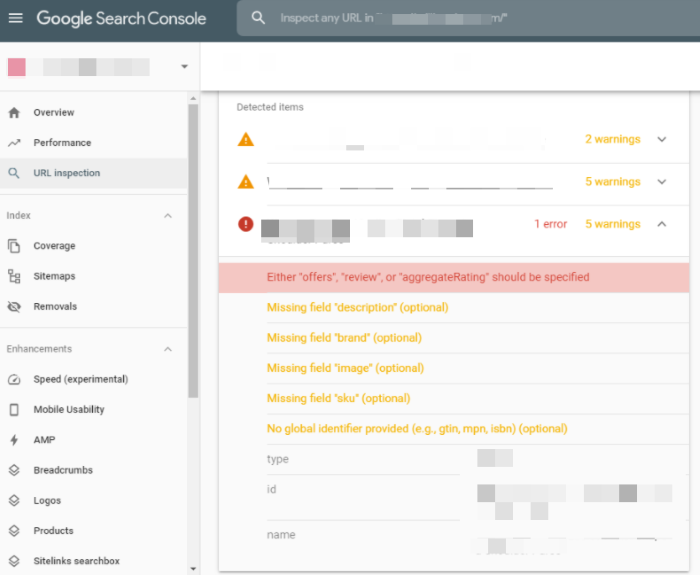
To fix this error, you’ll need to use these three schemas.
Offers
If you’ve got some great offers on your products, then you want to tell everyone. When you run ads, your offers are often one of the most prominent aspects, so it makes sense to aim for the same thing with your organic listings.
Sales promotions work, so be creative with your offers and make sure people are aware of them. Cost might not be everything, but it’s certainly important when it comes to selling your products, and this is an area where schema can be incredibly helpful.
That’s where the offer Schema comes in.
Review
Social proof has always been important in marketing. As long as people have been selling things, there have always been people recommending them to their family and friends, and this has a huge effect.
Today, the internet has supercharged the idea of social proof.
We have immediate access to the thoughts and experiences of people all over the world who have bought the product we’re looking at. Modern consumers want to see this, and it has a big impact on their purchasing decisions.
If reviews are a big part of the buying decision, then they’re also going to help earn you clicks, but they can only do this if you’ve got the correct schema.
Rating
We’re all accustomed to seeing star ratings for all the products we buy. It’s so ubiquitous that we’d think something was up if a product didn’t show a rating.
Ratings are like reviews, just even more convenient. They give you an immediate snapshot of people’s experiences with a certain product. This is highly beneficial for businesses that can display a good level of social proof, and naturally, they want to make the most of it wherever they can.
If you’ve got a great rating score for your product, then you want to showcase it, and where better than on Google using the rating schema?
How to Fix the Schema Validation Error “Either “Offers”, “Review”, or “aggregateRating” Should be Specified”
If you click on your “Either “Offers”, “Review”, or “aggregateRating” Should be Specified” warnings in Google Search Console, it will show you the pages they’re affecting.
For most people using WooCommerce (who seem to be the main people affected by this), you’ll find the warning isn’t actually for product pages, it’s for category pages.
This is because WooCommerce automatically sets your product pages up with the following schema: Name, Description, URL, SKU, Availability, Image, Offers, AggregateRating, Price, Review, and more.
Thus, the problem isn’t with product pages. Instead, they’re normally on archived products and category pages. This is because WooCommerce has included some of the product schema on these pages, but Google says archive and categories pages shouldn’t have this markup.
Again, this isn’t something to be unduly worried about and it’s not going to destroy your rankings.
It is worth fixing, though. Since the error is caused by WooCommerce adding schema to a page that isn’t a dedicated product page, the answer is to remove the product schema markup for those pages.
The way to do it is by adding a snippet of code to your theme’s function.php file.
When you mention code, things start to sound very technical, but it’s not too complicated. Of course, if you’re not comfortable making changes on your site’s back-end, then you can always get a developer to do this for you:
- head to your dashboard in WordPress
- hover over “appearance” in the left sidebar and select “theme editor”
- select “functions.php” from the “theme files box on the right
- scroll to the bottom of the text box
- insert the following code:
/**
* Remove the generated product schema markup from Product Category and Shop pages.
*/
function wc_remove_product_schema_product_archive() {
remove_action( ‘woocommerce_shop_loop’, array( WC()->structured_data, ‘generate_product_data’ ), 10, 0 );
}
add_action( ‘woocommerce_init’, ‘wc_remove_product_schema_product_archive’ );


This piece of code should fix the schema errors on your category and archive pages and remove the warning from your GSC. It might take a little bit of time for the Search Console to recognize the changes, so don’t worry if the warnings don’t disappear immediately.
Other Schema Validation Errors
Schema is like a language that allows you to speak with search engines. Sometimes, there are errors in our communication and the message doesn’t get passed on.
There are lots of different things you can communicate through your schema, so occasionally, there may be slight errors.
Google Search Console helps give you a good picture of how your website is performing on schema, but it also offers other tools to help you spot issues. The rich results test gives you a good visual breakdown of how your page looks in Google’s eyes, and when used in conjunction with GSC can give you a much clearer picture.
Here are some of the errors you are likely to see, what they mean, and how to fix them.
Missing Field Price
If you see a missing field price error in your GSC, you may have entered the price in the wrong format. It needs to be entered as xx.xx without the dollar sign. For example, if your product is $42.99, then it needs to be entered as 42.99.
Rating Is Missing Best and/or Worst Values
If you include an aggregate rating in your schema, then you need to enter the highest rating and lowest rating possible. Most of the time, this means one star is the lowest possible value and five stars is the highest value.
Value in Property “ratingCount” Must Be Positive
This number represents the number of ratings a product has so it cannot be negative. Your product page might not have any ratings, and in this case, the value will be zero, but it can never be negative.
Conclusion
Schema is an important part of how your website communicates with the search engines, so it needs to be correct—otherwise you’re wasting time. If your Google Search Console is showing schema validation errors, it doesn’t mean your website is about to tank in the rankings, but it is important to fix.
A common error many people see is the “Either “Offers”, “Review”, or “aggregateRating” Should be Specified” error, and this can be an easy fix.
When you successfully use schema, it can boost your site, improve your CTR, and ultimately bring more traffic to your site. It might only take a few small tweaks to fix your schema validation errors, so it’s well worth the effort.
Several elements come together for an SEO strategy, and making sure your schema markup is correct is one of them.
If this all sounds too overwhelming and you need help with your SEO strategy, let our team know. We can help!
Have you been getting lots of schema validation errors lately?
Unlock Thousands of Keywords with Ubersuggest
Ready to Outrank Your Competitors?
- Find long-tail keywords with High ROI
- Find 1000s of keywords instantly
- Turn searches into visits and conversions
Free keyword research tool