




Universal Analytics (UA) was the much-loved third iteration of Google Analytics.
Google Analytics 4 (GA4) has now replaced it completely, but many people still have questions.
Why was UA retired?
Is it possible to access old UA data?
Is it too late to switch to GA4?
How does UA compare to GA4?
If you’re struggling to navigate the retirement of UA, don’t worry. I’ve got plenty of answers.
Key Takeaways
- UA was the third major version of Google Analytics, and GA4 has now completely replaced it.
- UA was retired primarily because its tracking and cross-platform functionality was becoming outdated.
- As of July 2024, users cannot access UA properties, nor is it possible to access or migrate data from old UA properties to GA4.
- Despite reports to the contrary, nearly all major features of UA (along with many new ones) are available in GA4.
What Is Universal Analytics?
Universal Analytics, often abbreviated to UA or GA3, was the third version of Google Analytics. The paid counterpart was called Universal Analytics 360.
Google fully retired UA in July 2024, and all properties (including their data) were deleted. Google Analytics 4 and Google Analytics 360 (part of Google Marketing Platform) are the current free and paid versions of Google Analytics.
Universal Analytics in Context: A Quick Timeline
Google Analytics is the web’s most used analytics platform. It began life as Urchin, which has gone through three major platform upgrades since then, of which UA was the second.
Google Analytics is currently used on 28 million websites. The release and promotion of UA was a seminal moment, marking a notable uptick in usage and cementing Google Analytics as the preeminent web tracking solution.
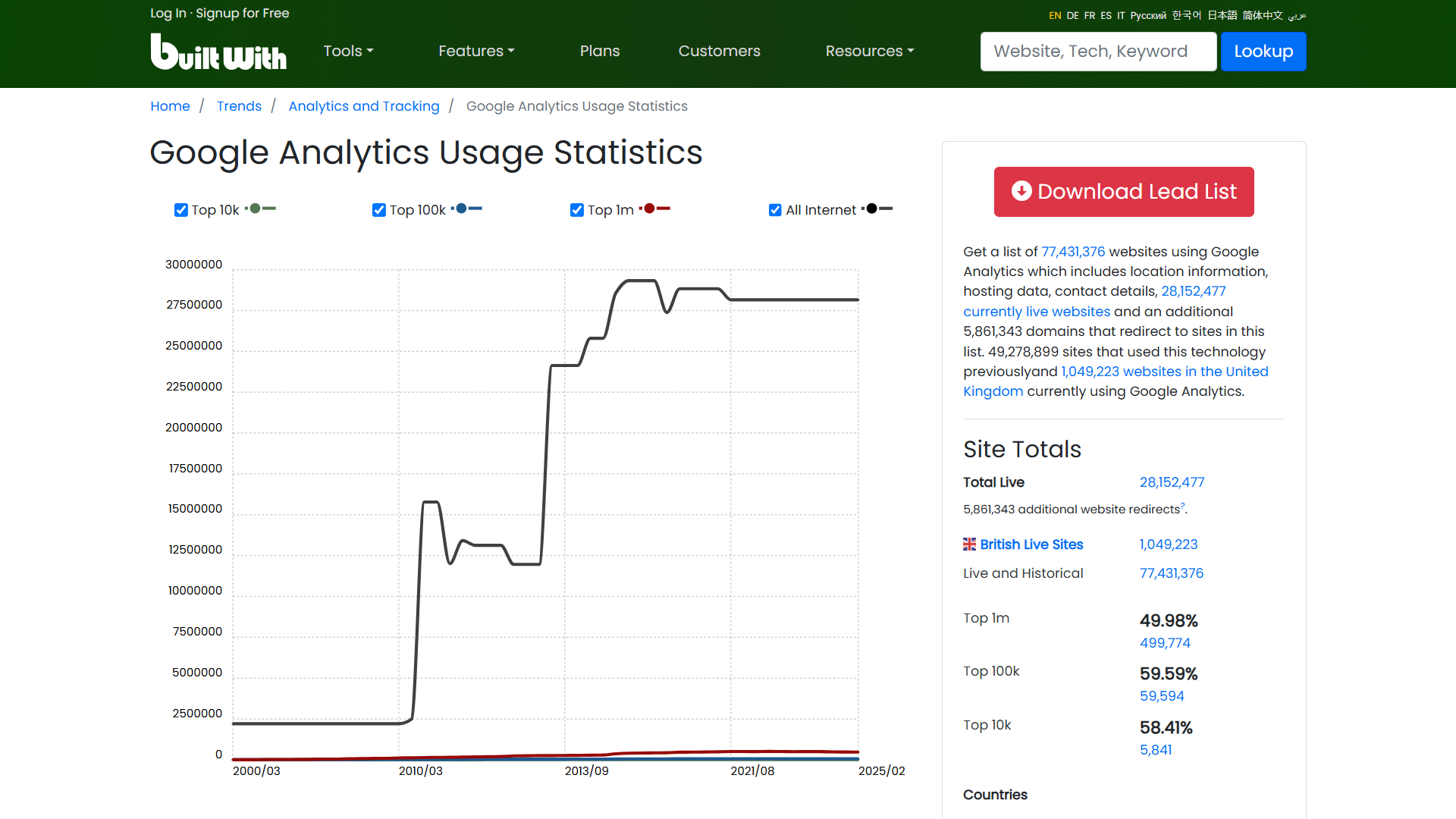
Here’s a quick timeline of Google Analytics iterations:
- Urchin: Google acquires Urchin for around $30 million, according to second-hand reports. It will go on to form the basis of the first version of Google Analytics, although Google will continue to sell Urchin products until March 2012.

- Classic Google Analytics: Google launches the first ever version of Google Analytics in November 2005, essentially a rebranded and modified version of Urchin. It proves very popular, and Google is forced to switch from an open to an invitation-only model soon after release.

- Universal Analytics: In the second major upgrade to the classic platform, Google launches Universal Analytics. Like its predecessor, it’s a success and user numbers skyrocket in the years immediately after its release.

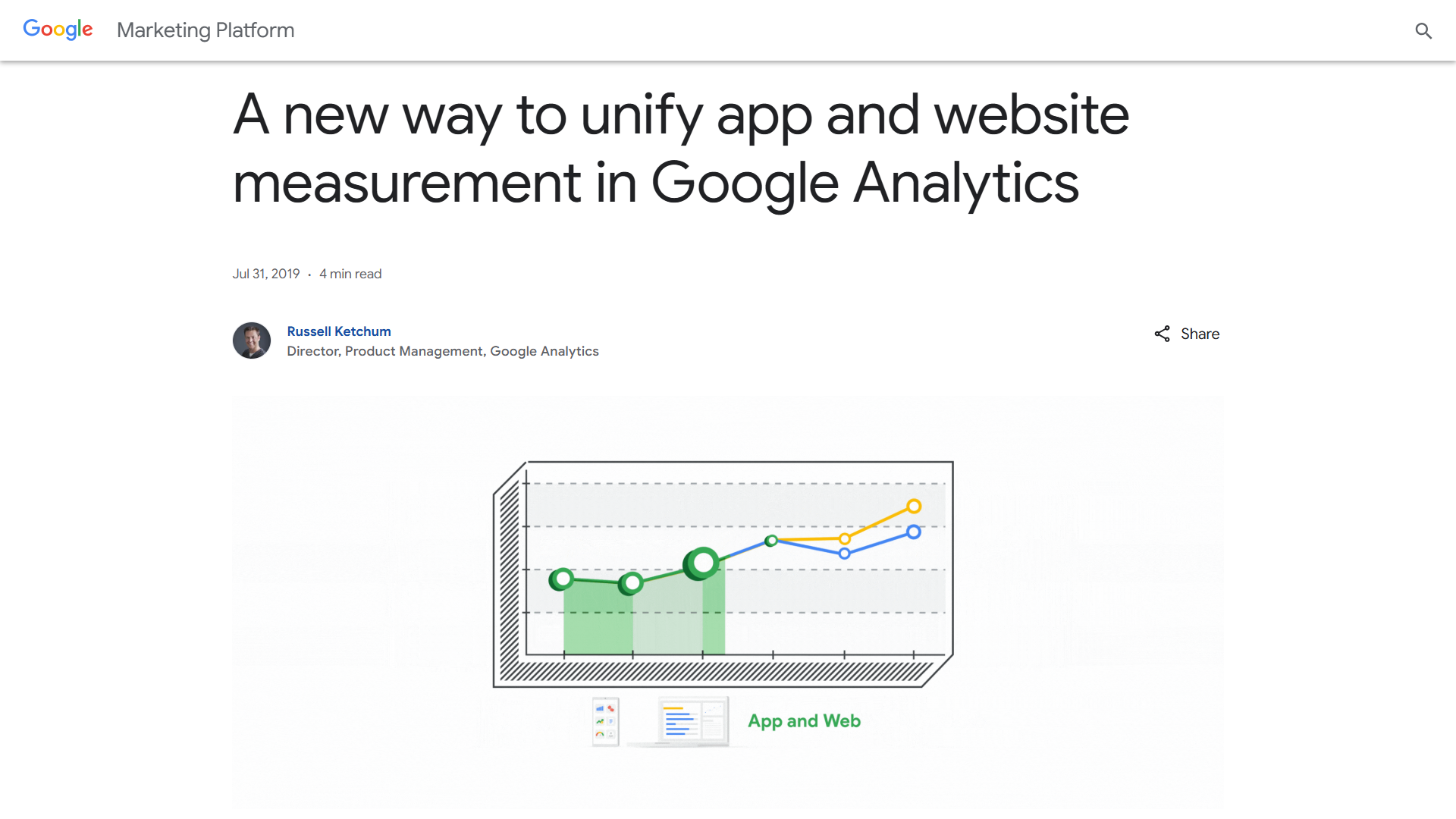
- Google Analytics 4: Google announces a new “App + Web” property in Google Analytics in July 2019. The new property functionality forms the basis of Google Analytics 4, which is fully released in October 2020.
- Universal Analytics retirement: Google announces the retirement of Universal Analytics in 2022, citing outdated cross-platform and privacy functionality. Google deletes all UA properties in July 2024.

Universal Analytics: Retirement Timeline
Google announced the retirement of Universal Analytics in March 2022. It cited outdated privacy practices, the growing ineffectiveness of session-based tracking, and a lack of granular controls, among other issues.

Here’s a timeline of key events from the announcement of the retirement of UA to its full discontinuation:
- October 2020: After the success of a beta version called “App + Web,” GA4 is officially released.
- March 2022: Google announces the retirement of UA along with a sunsetting schedule.
- March 2023: Google creates a new GA4 property for users that haven’t manually migrated or opted out of automatic property creation.
- July 2023: Standard UA properties stop collecting and processing data. This doesn’t apply to the premium Google 360 version, which receives a one-year processing extension.
- January 2024: Google begins to deprecate features prior to full closure of properties.
- July 2024: Google begins removing access to all UA properties and the API. Upon property deletion, all data is deleted.
Why Was Universal Analytics Retired?
Many users were upset about the retirement of UA. In particular, they valued its simplicity and out-of-the-box functionality.
Despite this, it was fast becoming redundant. A new platform was needed, both to adhere to updated privacy standards and to provide access to new technologies.
Here are the main reasons why UA was retired:
- Focus on desktop web: UA was good at tracking session-based desktop behavior. However, it struggled with fragmented browsing and non-pageview events that are common on mobile. Similarly, UA lacked integrated cross-platform app and browser tracking.
- Session tracking: UA used a session-based analytics model (compared to an event-based model in GA4). This means that it tracked behavior within a specific window of time, not across the whole journey of a visitor if that journey didn’t fit neatly within a set period.
- Reliance on data from cookies: UA relied heavily on client-side (third-party) cookies. With tightening browser restrictions and the phasing out of third-party cookies, accurate data collection would have become increasingly limited.
- Obsolete privacy standards: In addition to cookie limitations, new regulations like GDPR meant that Google needed to introduce privacy features such as the option to delete data.
- Limited advanced functionality: UA lacked certain advanced functionality, especially AI-powered behavioral modeling, that allows for a more complete, nuanced view of user behavior.
How Does Universal Analytics Compare to GA4?
GA4 is a more complex and advanced platform compared to UA, with several differences. And while the feature set of GA4 is much broader, not all functionality from UA was included (but there are usually fairly straightforward workarounds).
Here are the main features that GA4 provides that weren’t available in UA:
- Detailed event tracking: Tracking specific events, like button clicks and form completions, is much easier than in UA, which required users to set up tags.
- Free BigQuery integration: GA4’s BigQuery integration lets users export large datasets to a data repository where it’s possible to run custom queries. In UA, this was only available on the paid plan. In GA4, it’s free.
- AI-powered forecasting: GA4 uses AI modeling to fill in data gaps and improve the quality of tracking.
- Mobile app tracking: GA4 combines data across browsers (on mobile and desktop) and mobile apps, presenting a unified user journey. It was possible to track app data in UA with SDKs but it wasn’t unified.
- “Cookie-less” tracking: GA4 combines data from first-party cookies, device signals, signed-in user behavior, and AI modeling.
- Customizable reports: While reports are generally more complex than in UA, GA4 allows for more nuanced, deeper insights through features like the Explorations tool and custom events.
While nearly all UA functionality has been replicated in GA4, not everything was carried over.
Here’s a rundown of “lost” features:
- Views: This UA feature allowed users to apply different filters to the same property (such as excluding traffic from certain countries). In GA4, it has been replaced with “data filters.”
- Unique Pageviews: GA4 doesn’t show “”Unique Pageviews,” although the “Users” column provides close to the equivalent of this data.
- Content drilldown: Content drilldown showed metrics by directory (such as /blog). This automated feature is no longer available in GA4, and reports that track page groups must be created manually.
- Some attribution models: UA offered five attribution models, whereas GA4 only offers three. However, GA4 models are more holistic and rely less on last-click data.
- Bounce rate: In UA, bounces were single-page sessions, whereas in GA4, they are sessions that last less than 10 seconds and have no conversion or second pageview.
- Page paths: UA showed the sequences of pages that users visited (previous and next page). This can be somewhat replicated with the “Path exploration” feature.
It’s also worth mentioning that annotations, with which users could add comments to reports, were available in UA but not initially in GA4. It was one of the most requested additions and has since been added.
Is It Too Late to Switch to GA4 From Universal Analytics?
The short answer is yes. Old UA properties stopped working in July 2024. However, unless you opted out of automatic property creation, Google created a new property for you.
While data was not automatically carried across, you should have access to all traffic data from the date of creation of the new property, potentially dating back to early 2023, if you installed the new tracking code on your website. If you didn’t, there’s unfortunately nothing you can do to access historical data.
What Should You Do If You’ve Not Migrated From Universal Analytics?
If you’ve not yet migrated, it is now too late to do so. You should set up a new property in GA4 and go from there. You’ll find extensive documentation about how to do this from Google. I’ve also written a straightforward guide on the topic that walks you through the whole process.
Remove any lingering UA code from your website—the gtag.js or analytics.js snippet from the <head> section of your webpages. Then set up and configure a Google Analytics account or GA4 property in your existing account and follow the instructions for setting up tracking on your site.
FAQs
What is Universal Analytics?
Universal Analytics (UA) was the third major version of Google Analytics. It tracked user behavior using sessions and pageviews, making it the go-to analytics platform for over a decade.
Google officially shut down UA in July 2024 and replaced it with Google Analytics 4 (GA4), which uses a more modern, event-based tracking system.
Does Universal Analytics still work?
No, Universal Analytics no longer works. As of July 2024, all UA properties have been deleted, including access to reports and the API. You can no longer retrieve historical data or migrate anything to GA4.
If you haven’t set up GA4 yet, you’ll need to start fresh with a new property and tracking code.
What is the major difference between UA and GA4?
The biggest difference is how data is tracked.
- UA used a session-based model focused on web activity
- GA4 uses an event-based model that captures all user interactions across web and app platforms
GA4 also supports cross-platform tracking, offers AI-powered insights, and provides more flexible reporting through tools like Explorations. While the setup is more complex, GA4 delivers a much more complete picture of user behavior.
What’s the Verdict on Universal Analytics?
Many users were upset about the sunsetting of UA. Its replacement, Google Analytics 4, was seen as unnecessarily complex and lacking in popular features.
However, the reality is that the change needed to happen. UA’s underlying session-based tracking engine was fast becoming outdated, in part due to new privacy standards. It was also overly focused on desktop web browsing.
GA4 offers nearly all of the same features, sometimes in slightly different ways, along with a host of new ones. It also includes comprehensive cross-platform support.
Once you learn how to use it, you’ll also find that you have much more freedom when it comes to custom reports, advanced tracking, audience research, and more.
Are You Using Google Ads? Try Our FREE Ads Grader!
Stop wasting money and unlock the hidden potential of your advertising.
- Discover the power of intentional advertising.
- Reach your ideal target audience.
- Maximize ad spend efficiency.