




When it comes to pay-per-click (PPC) and paid ads, a lot goes into these campaigns.
You have to create the landing page, design the ad, and set up a framework for the campaign. Not to mention A/B testing various aspects of the ad and landing page.
If there’s one step that can’t be overlooked when setting up your campaign, it’s selecting keywords to bid on. Keywords make or break a PPC campaign because they determine who sees your ad and who doesn’t. Even the most clever paid ads will fail if they don’t get in front of the right people.
Choosing keywords wisely ensures your audience is well-targeted, relevant, and that your budget is put to good use. These 4 steps are all you need to determine the best keywords for your next paid campaign.
Step 1: Brainstorm
The first step in choosing keywords for any campaign is to brainstorm a big, long list of potential terms. Your list should be based on the landing pages the ads will link to.
The key is to get inside your customer’s mind.
What are they searching for? How do they phrase search queries? What are they typing into that magic Google box when they’re looking for your product? Don’t forget to include synonyms that customers might use instead of another word and alternate spellings.
Another thing to consider: Your list should include both head terms and long-tail keyword phrases. Head terms are broader and likely bring in a lot of search volume while long-tail phrases get your ads in front of a highly targeted audience — so it’s good to include both in your campaigns.
To ensure you have a comprehensive list, consider all 4 types of keyword terms:
- Generic terms — Keywords that describe your product or service (i.e. running shoes)
- Related terms — Terms that don’t directly apply to your business that your audience may be searching for (i.e. jogging)
- Brand terms — Keywords containing your brand or business name (i.e. Nike.com)
- Competitor terms — Terms including brands and names of your competitors (i.e. New Balance shoes)
The sky’s the limit, so find a whiteboard and list every keyword you can muster to consider bidding on.
You’ll whittle this down later, so it’s impossible to have too many keywords at this stage. Once you’ve completely racked your brain, we can move on to Step 2.
Step 2: Choose Local Search Keywords
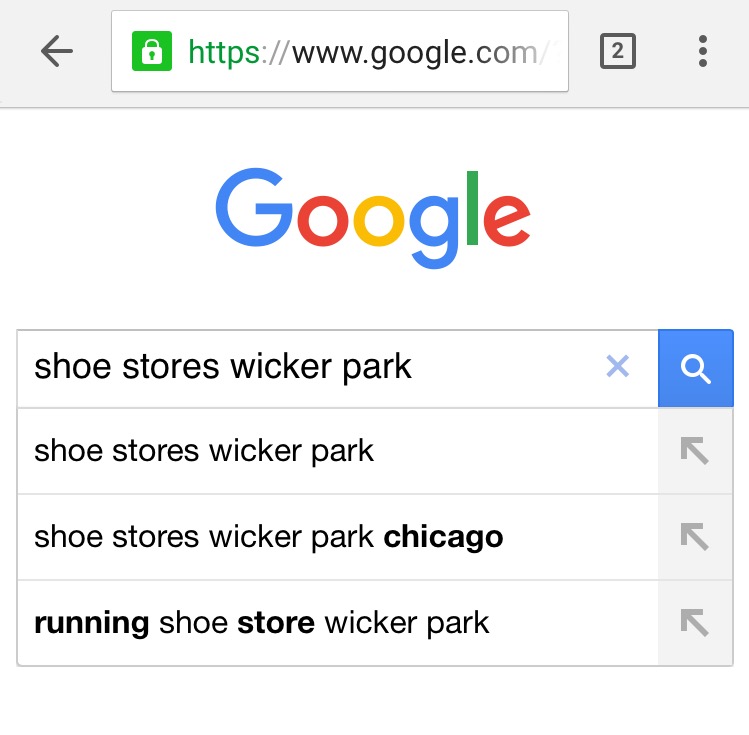
Local search keywords are exactly what they sound like — search terms that involve a particular location.
The query “shoe stores in wicker park, Chicago” is a good example. For businesses that are more than e-commerce, these are a big deal.
With so many searches happening on mobile devices, these queries bring you even closer to an actual sale. If you have a brick & mortar location, local search keywords will draw the most engaged and relevant audience to your site and your store, because searchers are literally right down the road from you.
Keep local search in mind when creating and refining your list of keywords. Be sure to include terms that relate to your street address, neighborhood, and town.
There’s nothing more valuable than getting your ads in front of potential customers who are looking for exactly what you offer, right where you are.
Step 3: Think About Relevance
Now that you have a huge list of more keywords than you can possibly bid on, it’s time to start narrowing it down. The most effective way to choose which terms to eliminate and which to keep is to weigh relevance.
The key to determining how relevant a search term is to consider the searcher’s intent.
Are people who search this term actually looking for what you offer? And how likely are they to buy from you?
For example, if your industry has strong brands, then search traffic around competitor terms may not be relevant enough to include. Users who search explicitly for a particular brand — i.e. “Nike shoes” — are probably not interested in buying from Puma.
Another important factor to consider is where in the buying cycle users are. Someone who searches “Nike Women’s Free 4.0 Flyknit” is probably a lot closer to making a purchase than someone searching “good running shoes.”
Depending on the type of content your ads link to, you’ll want to target terms that indicate a particular time in the buyer’s journey. If your ad is for a blog post called “What Characteristics Make a Great Running Shoe,” then target users early in the cycle. For product-specific landing pages, you want to get in front of people who are ready to make a purchase.
Don’t Forget Negative Keywords
Negative keywords are terms and phrases that you explicitly don’t want your ads to show for. By including them in your campaign, you’re essentially telling Google, Don’t waste my budget on these terms.
As your campaign runs, you can find negative keywords in your search query reports. If you see any terms that aren’t a good fit for your campaign (they’re irrelevant or offensive, or user intent doesn’t fit), you can add them to your negative keywords at any time.

However, you should be able to identify some negative terms right off the bat. For example, if you’re located in Tulsa, you can eliminate queries like “shoe stores in Atlanta.”
If you’re selling software that doesn’t include a freemium option, omit terms like those pictured above. Including these from the get-go will help you spend your budget on terms that actually drive revenue.
Step 4: Consider Competition and Cost
By now, you should have a decent-sized list of keywords that have been refined to reflect what your business really does and what your customers really search for.
This list is your ideal campaign. However, now you need to consider the competition for these keywords and how much you’ll have to spend to actually show up for them.

It’s important to do your research to determine who else is bidding on the keywords you want, how much they’re spending, and the average cost per click.
This info will help you determine which terms are worth spending your budget on and which ones are just a pipe dream that will chew through the budget with little return. Once you have cost and competitive data, you can eliminate overly competitive and high-cost keywords from your list.
Step 5: Get Some Tools
Great news: You don’t have to do all of the above by yourself. There are plenty of tools available to help you determine user intent, competition, and the overall value of bidding on specific keywords.
- With Ubersuggest, you can see historical stats on any keyword. You can get information on how keywords might perform, what competitive bids look like, and recommended budgets.
- Think With Google gives you access to a wide range of data to help you predict future trends and turn information into actionable, well, insights.
- HubSpot’s Keyword Grader condenses all of the data into one, easy to interpret number. The “difficulty score” is based on a number of metrics and scored 0-100.
There are tons of other options for keyword research, too. All you have to do is find the one that works for you.
Get Started
Now it’s time to get moving. To get started with your initial list, keep these brainstorming rules in mind:
- No criticism
- Encourage wild ideas
- Emphasize quantity
At first glance, it might seem obvious which keywords make sense for your business and your campaign. However, taking the time to complete the steps above will ensure your campaign is well-informed and highly effective.
Choosing the most targeted keywords through adequate research and data analysis can be the difference between success and failure.
About the Author: Kiera Abbamonte is the Content Marketing Specialist and copywriter. Catch up with her on Twitter @kieraabbamonte.
Are You Using Google Ads? Try Our FREE Ads Grader!
Stop wasting money and unlock the hidden potential of your advertising.
- Discover the power of intentional advertising.
- Reach your ideal target audience.
- Maximize ad spend efficiency.