Facebook organic reach is down. Way down.
In the past, posting a link on your Facebook or Instagram page could drive hundreds of clicks. Not anymore.
Social media referrals have stagnated at around 5 percent of all traffic for years.
The average Facebook post will reach just over 5 percent of your followers.
The encouraging news is social media reach is still massive. There are more than 3.96 billion active social media users.

But reaching that massive audience is harder than ever before.
What’s the answer on how to grow a Facebook page? That’s exactly what we’ll cover in this article.
What Exactly Is Organic Reach On Facebook?
Organic reach is the number of people who see your content without paid distribution. It includes people who are shown your posts in their own feed or because their friends have interacted with you.
Paid reach is the people who see your content as a result of paid promotions. It is influenced by your ad targeting options and can also impact how to increase organic reach on Facebook.
But it’s not so simple.
Your content’s reach has a lot to do with engagement — that is how many people like, react, comment, or share your post.
Engagement rates are way up — but organic reach is way down.
And it is still on a rapid decline. So why aren’t our posts being surfaced more often?
Let me explain.
Why Facebook Organic Reach Is Declining
There are two major reasons Facebook organic reach continues to drop:
- More content: More content is being published than there is news feed space for it to be shown. Every minute, more than 510,000 comments and 293,000 statuses are posted on Facebook.
- Personalized news feeds: Facebook provides the most relevant content to each user. To increase engagement and optimize user experience, content is tailored to each user’s individual interests.
Can businesses keep succeeding with this decline in organic reach? Absolutely.
You can still get tons of traffic from Facebook.
The network’s ad platform has cushioned the damage for those who’ve made the most of it. The advertiser count to date has surpassed 10 million.
Knowing this, should marketers really worry about how to increase organic reach on Facebook?
Wouldn’t we be better off focusing on Facebook ads?
Yes and yes.
Here’s why.
Why You Need To Think About Declining Facebook Organic Reach
Organic reach is important for several reasons. Mainly so you don’t have to pay to play. So, don’t underestimate the importance of how to increase organic reach on Facebook:
Reason 1: Nurture More Leads and Organic Conversions
Many people use social media solely for brand awareness.
That’s fine – but it leaves so much opportunity on the table to drive real results for your business.
Lead generation is one of the missed opportunities. It also happens to be the linchpin of any successful marketing campaign.
You need to attract potential buyers and lead them into your sales funnel. When you do this organically, it won’t cost you anything besides time and effort.
In turn, the price of converting these potential buyers into actual buyers will be less.
That’s because the results of an organic campaign tend to snowball. This means that when more people engage with your content, it adds context to your campaigns.
The more organic reach that you have, the better your lead generation and conversion funnels will work.
Reason 2: Reduce the Cost Per Click of Paid Campaigns
Yes, Facebook’s ad product is one of the most intuitive and impressive that we’ve ever seen.
And yes, the sophistication of the audience targeting options is every marketer’s dream.
AdExpresso analyzed over 636 million dollars of ad spend and determined the average ad cost for the whole of 2021.
Here’s what they found:
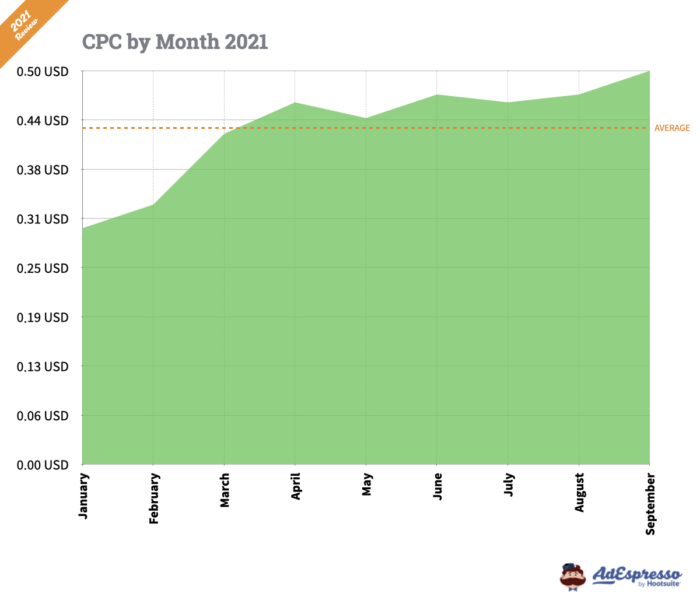
As you can see, the average CPC for ads can be very low if you master the other variables.
But here’s the deal:
You can just as easily spend a fortune on Facebook ads and see no return. This means that to increase the effectiveness of your ads and stretch your advertising dollars, learning how to increase organic reach on Facebook is critical.
Reason 3: There Are Tons of New (Under-Utilized) Facebook Features
In the past, your options on Facebook were pretty much posts, videos, and ads. Now there are tons of new features like Facebook Stories, Facebook Watch, Facebook Groups, and Facebook Live.
Many companies aren’t making the most of these features — which creates an opportunity to drive organic traffic by filling the gap.
With that said, let’s look at how Facebook’s news feed algorithm works to surface content.
Then, we’ll dive into some strategies on how to increase organic reach on Facebook.
Understanding Facebook’s News Feed Algorithm
Facebook’s algorithm has changed drastically in recent years. The introduction of reactions and the “Why am I seeing this post” feature has changed how Facebook decides what posts to show users.

Facebook uses hundreds of thousands of factors to decide which posts show in a user’s News Feed.
Who you interact with, the type of media, and the popularity of the post are all used as ranking signals.
According to Mark Zuckerberg, Facebook now prioritizes posts that spark “meaningful interactions” and posts from friends and family.
There are other detailed data points that come into play:
- how recently the post was published
- how frequently the publisher posts content
- the number of likes, comments, and shares on the post
- how often the user has interacted with the page posting the update
- past user interaction with the same post type
- negative feedback on the post
- how useful the post is
The list goes on, but these factors give us enough food for thought.
So, with this in mind, what’s Facebook’s ultimate goal for News Feeds?
Like other platforms, Facebook cares the most about its users. It wants to continuously improve their experience with high-quality, relevant content.
Overly promotional content doesn’t fare well with users, so Facebook cracked down on that type of content. In the past, they also cut traffic from publishers in favor of user-generated content.
So, how can you drive traffic from Facebook when these algorithmic changes are decreasing your reach?
Let’s take lessons from BuzzFeed.
What is BuzzFeed doing right? Besides posting engaging content on Facebook, they’re spending millions of dollars on Facebook Ads.
Now, most people don’t have a ton of cash to spend like BuzzFeed.
So, we’ll take the smarter route that doesn’t require a heavy investment for a small business owner.
Before we look at the secrets on how to increase organic reach on Facebook, here are five things you must avoid doing at all costs on your Facebook page.
1. Don’t Automate Everything
Facebook is a social platform and your brand needs to have a human touch. Don’t just schedule your latest blog links and product updates. Post your team photos like Zappos.

Social media marketing should show your funny or creative side, like Nutella.

Or, share inspirational graphics like me.

2. Don’t Just Promote Products and Services
Facebook is based on interest, not intent. Not every update you send out on your Facebook page should be promotional. Rather, 80% of your updates should be social. Otherwise, users won’t hesitate to click the unlike button on your page (it’s just a click away).
Instead, use Facebook to build a community. Add value and start conversations with your audience.
It’s best to vary your posts to include different types of content:
- Brand story posts
- Authority building posts
- Lead nurture posts
- Personal posts
3. Don’t Try to Cheat the Facebook Ecosystem
Buying 5,000 likes for $5. Using clickbait headlines. Bombarding your fans with 10 poor-quality updates in an hour.

It’s a sheer waste of time and money.
Facebook seriously cracks down on spammers. Stick with the Facebook code and stay in their good graces.
Not only that, these manipulative tactics add no real value to your business. In fact, they’re likely to hurt you.
AdExpresso conducted a paid like experiment where they posted an identical video on three of their fan pages. They then paid to boost each post.
The result?
The two pages where they bought likes saw zero engagement, even after Facebook had automatically deleted the likes that were paid for.

4. Don’t Build a Fanbase You Can’t Sustain
The brutal truth about a large fanbase – no matter how targeted – is that your reach will automatically be lower.

This means that you have to put in extra work to create content that is relevant and useful to several different segments of your audience.
Would you rather have a small but hyper-engaged audience or a large and unresponsive one?
How To Track and Analyze Your Current Facebook Organic Reach
Now that you know what you shouldn’t do, it’s time to work on how to increase organic reach on Facebook.
The first step is to pinpoint where your shortcomings are. We’ll be gathering some key metrics to measure your performance.
Without this diagnosis, you won’t know where to focus your efforts.
Let’s jump in.
Step 1: Export Insights Data from Facebook
First, click on the “Insights” tab on the left sidebar of your Facebook business page.
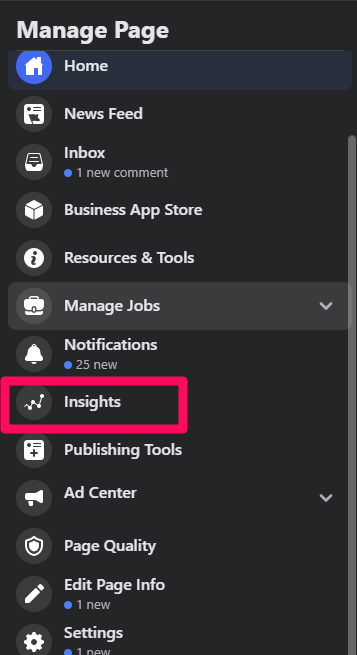
At the top of the insights page, there’s a button that will allow you to export your data both on a page and post level.

A window will pop up with three different options for your insights:

Select your option and click “Export Data.” Your data will be saved onto an excel file.
Step 2: Delve in Deeper to Post Metrics
In my experience, post level metrics are more insightful than page metrics.
Page metrics give a great panoramic view of your performance. Post metrics provide a more detailed look at how users interact with your content.
And that’s what really makes the difference.
To get a deeper view, go to “Posts” and then “Post Types.”

With the data you collect, you can tell:
- Which posts have the highest organic reach
- What types of posts that your audience prefer
- Number of likes on each post
These will give you a good guideline for launching an effective content strategy.
Step 3: Fine Tune Your Data and Select Only The Metrics You Need
Not all of the data points will be useful.
Sift through them and choose the ones that make sense for you — and that might vary based on your industry and social media goals.
Here’s the data that will tell you the most:
- Organic reach
- Engagement
- Link clicks
- Number of people who gave negative feedback
Now that you’ve analyzed your organic reach, it’s time to make some improvements.
20 Strategies to Boost Facebook Organic Reach
Remember that every industry and audience is different. I don’t recommend implementing all of these strategies right now. Instead, look at your data and see where you can make the most improvements, then pick a handful of strategies to try.
Keep what works, ditch what doesn’t, then try another strategy. Rinse and repeat.
1. Build Your Presence and Authority
I know what you’re thinking.
If organic reach decreases as the size of your audience increases, where is the value in growing your presence?
Well, there are still several benefits of having a large presence.
- You get to add social context to your ads, which makes them cheaper and more effective.
- You’ll have better posts and page insights to tailor your marketing efforts. This includes both demographic and psychographic data.
- Your perceived influence will increase, which amps up your credibility factor.
Growing your presence is not about increasing your page likes. The number of likes your page has gives no indication of how your content will perform.
What matters is that you build enough authority to command your audience to action. This means that they will engage with your content more favorably.
Here’s what you can do to increase engagement:
Attract the Right Kind of People to Your Facebook Page
Random fans are useless.
They don’t engage and they don’t have a positive influence on your marketing campaigns.
This is why I don’t recommend trying to grow your Facebook page at the expense of building a targeted audience.
You want people who are finely tuned to your business interests.
This way, the content you publish will be more relevant to them. In turn, it will have a greater chance of showing up in their newsfeeds.
What can you do to build a targeted audience?
Have a Strong Brand Presence
If your brand is watered down, chances are your audience will be too.
What you want is a brand image that sticks in the minds and hearts of your audience.
Constantly reinforce your message, post content that is relevant to your business, and always be consistent.
Use Audience Insights to Build a Target Persona Specifically for Facebook
Earlier, we walked through the tracking of your page and post insights. This same information can be used to construct your persona.
Gender, age, background, location, and occupation are all black and white data points that you can collect.
You can then flesh it out with more substantive information like:
- What are their pain points?
- What are their interests?
- What are their attitudes and beliefs towards your business or industry?
- What are their objections and how will you address them?
Target That Demographic When you Boost or Promote Your Posts
You can create a custom audience modeled after your ideal persona. This way, when you boost or promote a post, you’re more likely to reach those people.
Later, I’ll walk you through the best practices for paid campaigns.
Make Sure Your Like Campaigns are Very Targeted
I’m all for more likes – but not if it’s only a vanity metric.
You want quality over quantity.
There are a few ways you can attract the kind of people who care about your brand:
Apart from running like campaigns on your target audience, you can invite people who have liked your individual posts to like your page.
First, plug in your page in the search bar.

Select one of your posts and click on the group of people who’ve liked it.
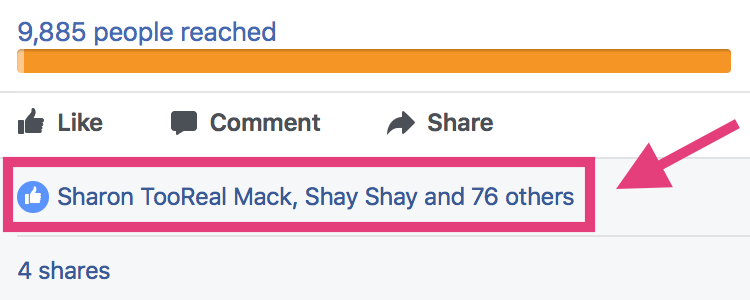
This is a goldmine for finding people who already have an affinity for your content.
Browse through to see how many people who’ve liked your posts but have not liked your page.

Invite them to do so.
9 out of 10 times, they will.
Add Integrations and Customizations to Your Page
You can integrate your Facebook page with other apps, tools, and platforms. These can increase the usability of your page as well as amplify your marketing efforts.
Here are some of the customizations that you can include:
- Custom tabs
- Email capture forms
- Podcasts
- Video players
- Quizzes
- Polls
- Landing pages
- Apps to run contests
- Appointment schedule apps
- Blog and RSS feeds
- E-commerce tabs
Cross-Promote Other Social Media Platforms with Facebook
If you’ve built a sizable following elsewhere, you can use these platforms to grow your Facebook page.
Here’s what you can do:
- Leave a link to your Facebook page in the bio of your other social accounts
- Place clickable social icons on your cover photos
- Broadcast to your other networks about your Facebook page and ask them to engage
2. Drive Facebook Organic Reach By Publishing Evergreen Content
Too many people aren’t strategic with their social media content.
Whatever your goals are for your Facebook page — be it to generate revenue or drive traffic — evergreen content is the most powerful tool at your disposal.
Freshness isn’t just Google’s ranking factor.
The life of a post in Facebook News Feed is also dependent on recency. If you publish timeless content, then it will be useful for your audience for longer periods. They’ll keep engaging with your post.
Be sure to let users know that they can revisit evergreen posts that they’ve liked and engaged with in the past.
This will lead to an increase in engagement and Facebook will ensure that your post gets distributed further and that it appears in feeds for longer periods.
I challenge you to boost post durability with evergreen content.

The above evergreen post appeared 18 hours after being posted.
That’s an extremely long lifespan!
For posts that perform this well, you can repurpose them to ensure that you maximize their reach.
Here’s a simple process for repurposing evergreen content:
- Select posts that have done exceedingly well and continued to provide value to your audience long after it was published. Take a note of them in a spreadsheet.
- Approach that piece of content from a different angle. Put a new spin on it or change the context. Keep in mind that video content can outperform the same content in text form and vice versa. The key is to test what resonates best with your audience.
- Publish your repurposed content at different times. This ensures that some fresh eyes get to see and engage with your newly revamped content.
But what if you don’t want to do the legwork of creating and repurposing your own posts?
Curate Other People’s Evergreen Content
Content curation is not about taking someone else’s work as your own.
It’s about collecting posts from across the internet and sharing them with your network.
But it’s a little more than just stumbling across a post, liking it, and pressing the share button.
Instead, you should treat the curation process just like you would if you were publishing your own content. Spend some time reviewing and analyzing several posts on the same topic and share them with your audience on a consistent publishing schedule.
Prime example: Later tells the stories of brands they’ve impacted successfully through their resource offerings.

While they do this on their blog, you can adopt the same concept for your Facebook page.
Here are some examples of evergreen content using curation-type posts:
- Video tutorials
- Recipe posts
- Testimonials
- Interviews
- “How To” posts
- Q & A’s
- Thought pieces
- Lists
- Checklists
- Industry-specific stats
- Weekly roundups
- Company mentions
- Industry news
How can you ensure that your audience engages with this content?
Ensure your posts have all the persuasive checks and balances.
Coming up with a content strategy is half the battle.
You still have to ensure that you create the types of posts that make your audience want to share and engage.
Some tips for creating posts that captivate and inspire action:
- Use solid visuals
- Don’t be too formal
- Keep it short and snappy
- Ask a pertinent question
- Be human
- Have a clear call to action (I would be careful with simply asking people to like or comment)
3. Create a Facebook Group for Your Most Engaged Audience Members
Facebook is about building communities. A tightly-knit group is the closest you can get to it on social media.
A whopping 400 billion people use Facebook groups.
You’ve got two community options:
- Start your own group.
- Join a highly engaged and relevant group that serves your business goals.
We’ll focus on number 1, as it is the best addition to your Facebook marketing arsenal.
You can use it to listen and engage with your brand advocates.
Before we get into the steps for building your group, let’s talk about the reasons you may want to start your own group.
Most people form groups around:
- Their brand/business
- Their products/services
- A specific lifestyle, e.g., a book club or a journaling club
- Specific topics, e.g., a content marketing group
Of course, these aren’t your only options. As long as you can rally a group of people for a common goal, you’re good to go.
I’ve found that the most valuable groups for business are those that are either brand-specific or product-specific.
Here’s why.
You can use a branded group to build and nurture a community around your business. It also makes for a powerful tool to market your products/services.
Similarly, a product-specific group is geared towards helping customers get the most out of a product or service that you offer.
It’s all about customer success, retention, and loyalty.
You can do live coaching sessions, live Q&As, personal implementation feedback sessions, and accountability systems in your groups, to ensure that customers receive the transformation that they paid for.
Let’s get into the steps for creating a group.
Step 1. Create and Name Your Group
Find the option that says “Create Group” to begin the process.
It’s easy to find from your homepage.
After you click on this tab, you’ll be prompted to name your group.

Step 2. Create a Description
Write down your value proposition in your group description and lay down clear rules for posting in the group.
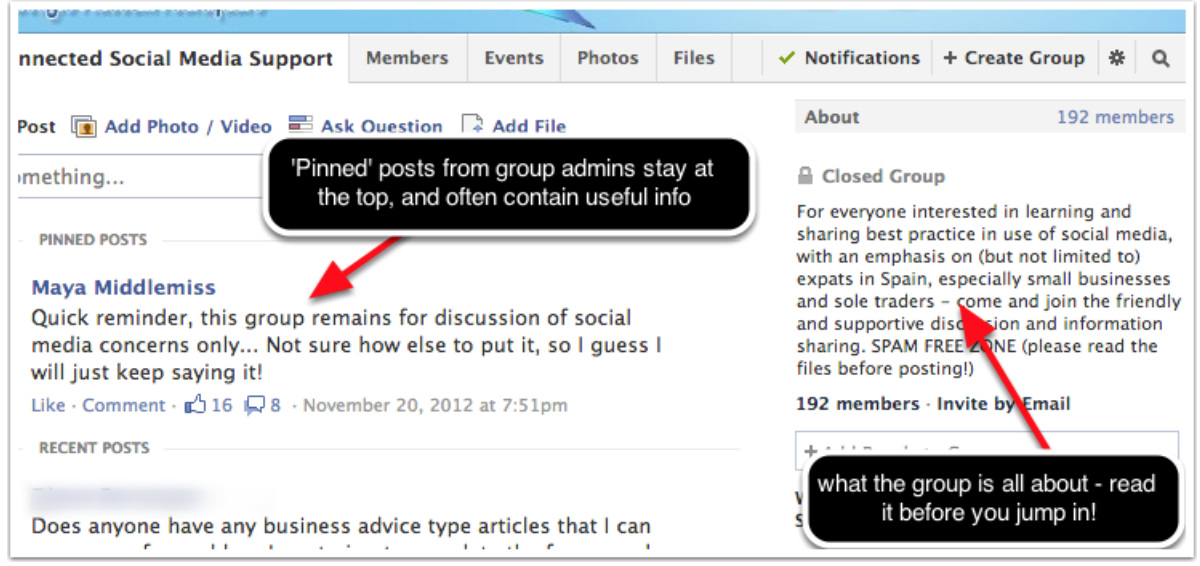
Pro Tip: Pin your rules post at the top of the group feed. It will guide new members to act appropriately.
Also, set up your group’s privacy settings properly.

Step 3. Invite Engaged Audience Members to Join
Depending on the type of group, you may have to incentivize people to join.
However, with most groups, the promise of community and support is enough to get them on board.
But in case you need some incentives, you can:
- Have an actual launch for your group. Why not turn it into an event? You can set up an email capture form to get people on a notification list.
- Offer a welcome gift to new members. It could be a coupon code, an ebook, or anything related to your business.
- Offer a bonus referral gift to anyone who recruits other members.
Step 4. Ignite Conversations Relevant to Your Industry
Great conversations help boost post engagement. Don’t solely promote or sell your content and products.
Other ways to increase engagement in Facebook groups:
- Consider giving active members of your groups admin/publisher status so they can help nurture the group.
- Do live Q&As
- Create challenges for group members
Step 5. Create a Content Strategy for Your Group
This can include creating content themes and inciting user-generated content campaigns. User-generated content actually drives 6.9x higher engagement than brand-generated content.
For example, you can set a designated topic or engagement theme for each day.
Melyssa Griffin’s group does this very well:


Step 6. Moderate Your Posts
Moderate all of the posts in the group and have a zero-tolerance policy when it comes to spam.
You want your group members to have the best possible experience, so weed out the spammers quickly.

This is a lot easier when you establish in your group rules what qualifies as spam.
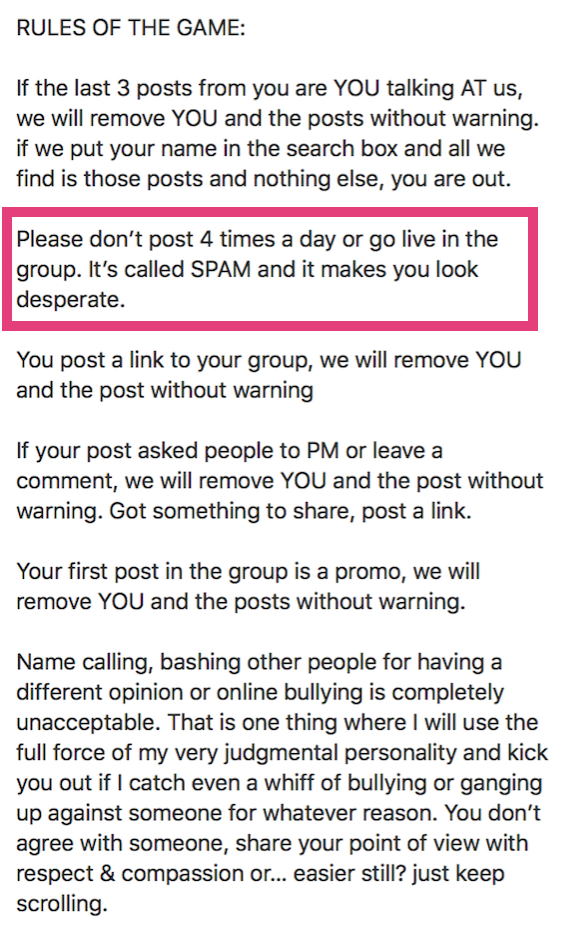
So, that’s it for setting up a group.
I want to warn you, though: Groups require a time commitment. You’ve got to show up to welcome new members and encourage discussions.
Also, as groups grow, engagement decreases. At this point, you may want to consider segmenting larger groups into smaller, more focused ones.
Some people completely dismantle groups with tens of thousands of members because of poor engagement.
You don’t want that.
4. Use Organic Post Targeting
Targeting isn’t limited to Facebook Ads.
You can target your organic posts to make sure that they reach the right people.
While it’s been around for a while, the feature has gotten more useful with the decrease in organic reach of quality content. You can serve your post to relevant customers based on their age and location.
Your post has to at least target 20 people. You might get below this threshold if your page only has a few thousand fans.
Here are the steps to get started with targeting.
Step 1: Enable the Targeting Feature on your Page
Head to General settings to enable targeting from your page settings.

Step 2: Create Your Post and Customize Targeting Options
Dig into your Facebook Insights for data about your audience and choose targeting parameters based on your goals.
When you create your post, click the “Public” setting under your page name, and you’ll see the option to set a “restricted audience.”

Select “Restricted Audience,” then set the age and location you want to reach. This is especially useful for local businesses or those with multiple target audiences.
Step 3: Run Several Targeted Posts Using Different Parameters
This is so you can test how your content performs for different audiences.
Step 4: Check the Results
Hop on Facebook Insights and check your results. Did the organically targeted post perform better?

Compare these social media marketing results with your average engagment rate. Also, figure out the targeting parameter that’s performing better.
In Social Media Examiner’s Experiment with Organic Targeting, a smaller page performed better than a larger page.
But, results will vary based on your audience.
5. Post When Your Competitors Are Asleep
When is the best time to post on Facebook? There’s no easy answer.
You need to consider:
- your location and that of your audience
- your audience profile (age, interests, occupation, etc.)
- the type of content that you create
- the scheduling tools that you have at your disposal
CoSchedule reports that the optimal times are 7:00 AM, 3:15 PM or 7:00 PM.
They even broke it down according to each day of the week:
- Friday at 7:00 AM, 3:15 PM or 7:00 PM Wednesday at 7:00 AM, 3:15 PM or 7:00 PM Monday at 7:00 AM, 3:15 PM or 7:00 PM
For the most shares and clickthroughs, they’ve cited 12:00 PM, 6:00 PM, or 9:00 AM as the optimal times.
Here are a few more studies and optimal times for any media marketer or business owner to best time good content.
Scratching your head already, aren’t you? Don’t blindly post at any of these optimal times.
Dig into your Facebook Insights. Find out when your fans are online.

Then, conduct your own test.
Post in the off-peak hours (6 PM – 8 AM) with the maximum possible fans online. Your chances of appearing in the feed increase since other Facebook pages aren’t posting during this period.
Here are the results when Track Maven tested with this social media marketing strategy.

Jon Loomer also tried posting links at off-peak hours and had positive results with his organic reach.

The reasons why this strategy is effective (besides less competition) are:
- If you have an international audience, you’ll reach out to fans in a different time zone.
- As your post receives higher engagement, Facebook will distribute the post to more of your fans.
It might even boost post views over the newer content published during peak hours.
Note: You can monitor the social media marketing posting strategies of your industry competitors using Fan Page Karma.

6. Post the Content Your Users Like
Links have worked better for driving traffic. Sometimes.
Fred Alberti found that pure links generated 82% more page views than posts with photos and links in the caption.
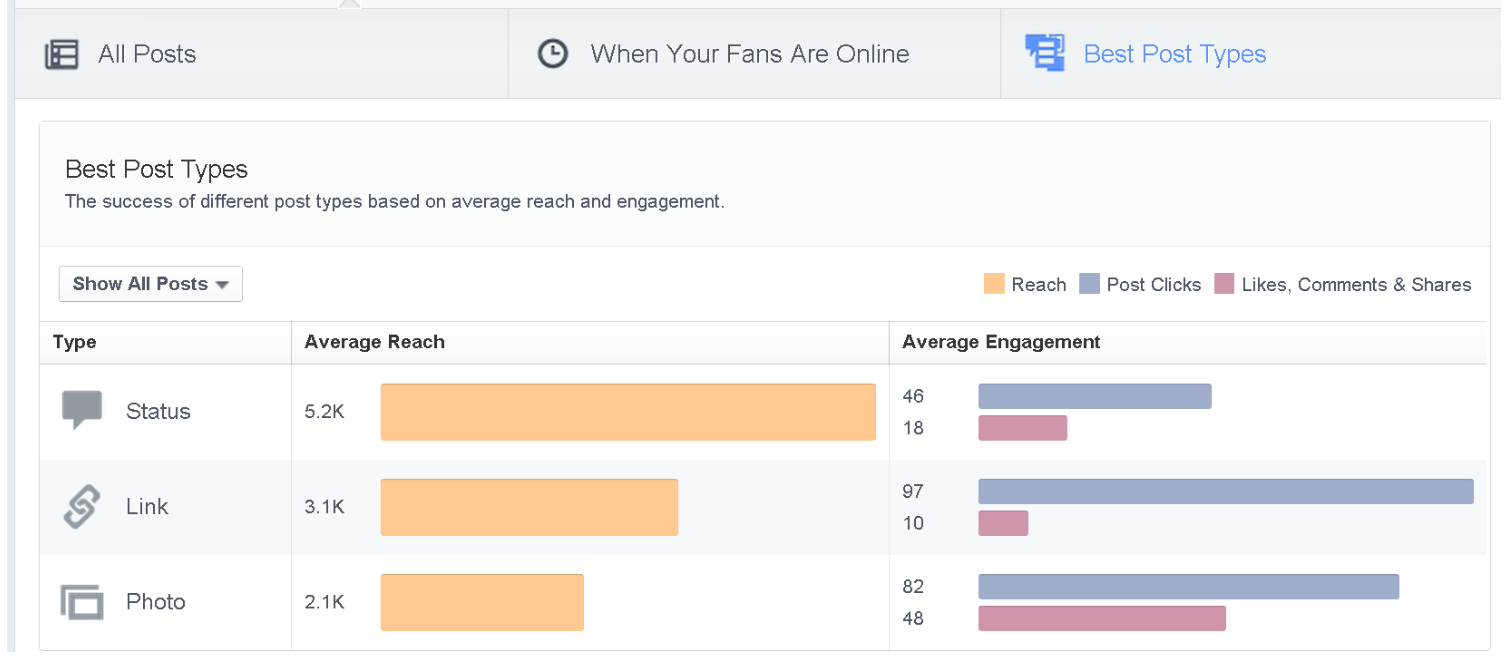
Photos have become an unpopular post type with users, and hence, with marketers.
My recommendation is to post all types of updates that add value for your fans, be it links, images, polls, Facebook Lives, Facebook Stories, or even Facebook Watch videos.
Don’t stick with one content form into another just because a certain type of post is (currently) performing better on Facebook. Just like Google Facebook updates its algorithm regularly.
Instead, analyze your data from Facebook Insights to find the type of posts that resonate with your audience.
If you can, try serving value in the types of content that your audience likes.
You can also ask your audience what they prefer and respect their choice.
Simply create a poll on your Facebook page:

Post your question.

You might be surprised by the results! Don’t forget to test new features when they come out.
Facebook Watch, for example, drove tons of traffic when it was first released, and a lot of marketers are still not using it!
7. Publish Videos Natively on Facebook
In recent years, there has been a shift to video content.
Facebook Watch views top 1.25 billion monthly users.
Facebook tends to favor video updates, causing media marketers to use more video blog post content.
Native videos are one of the strongest performers in the news feed.
The video plays silently until a user clicks on it. It’s important that your video is high quality from the first frame. It also needs to capture attention, even without sound.
Here are some tips on getting started with Facebook Videos.
To further engage the video viewers, you can add a call-to-action (CTA) to visit your website or a destination of your choice. This can be included in the final frame, or you can boost the video and use Facebook’s Ad CTA buttons.
AdExpresso found that “Learn More,” “Shop Now,” and “Sign Up” are more popular.

You also get rich video insights, so you can find out what is working with your audience.

If you want, you can pin a video to the top of your videos tab on your Facebook page. Just click on “Feature this Video.”
BuzzFeed got 1.7 million views for a featured video.

The featured video also appears prominently below your About section. Social Media Examiner used it to promote their upcoming event.
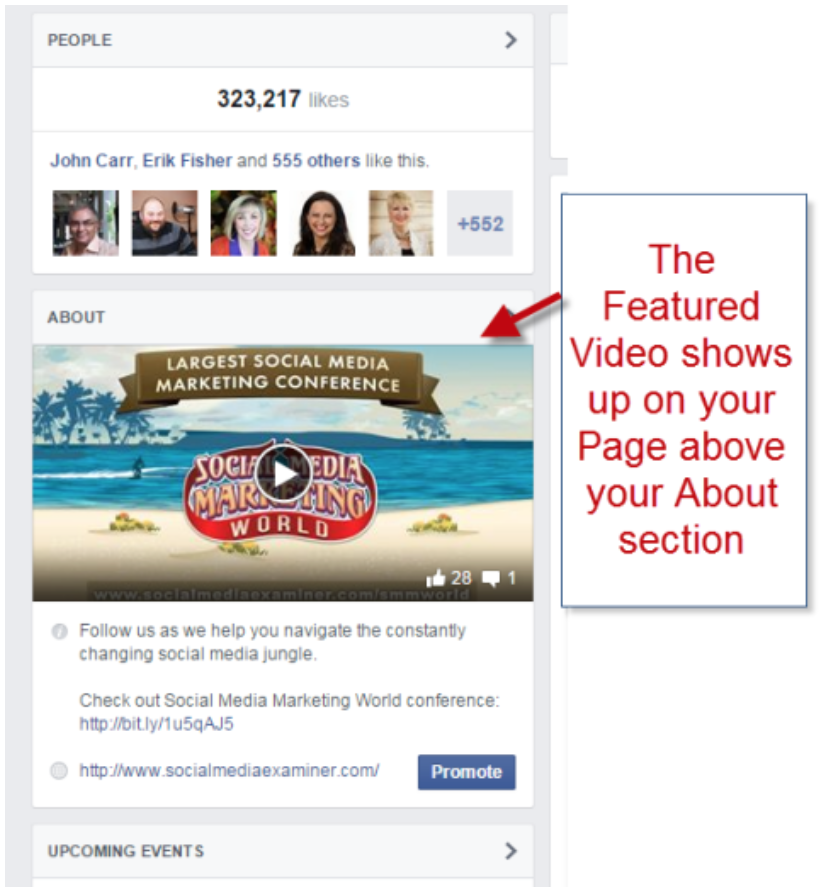
You can also embed the video in a blog post. It’ll make for a good multimedia experience for your blog audience and it can also increase the engagement on the Facebook post.
But, can you embed videos from YouTube or should you upload them directly on Facebook?
Naturally, Facebook favors native uploads over embedded videos from YouTube or any other third party. A business owner should not be intimidated by this media marketing strategy.

This SEJ study was performed for two weeks on three Facebook pages – Search Engine Journal, Stunning and Interesting Facts, and Did You Know.
Here is a detailed breakdown of the numbers.

Native videos also offer a better user experience and are usually cheaper to promote.
You can use native videos for Q&As, product launches, and co-creating with other targeted users.
8. Test Your Posting Frequency
How often should you post on Facebook? Well, it depends.
Massive websites like Huffington Post, Telegraph, and The New York Times publish a huge amount of content every day. They also push their content aggressively on Facebook.
For the average brand, this isn’t realistic.
Don’t be tempted to post 20 times a day.
Engagement actually decreases when you post too often.
The rule of thumb is to keep it between 1-3 posts/day, depending on your following.
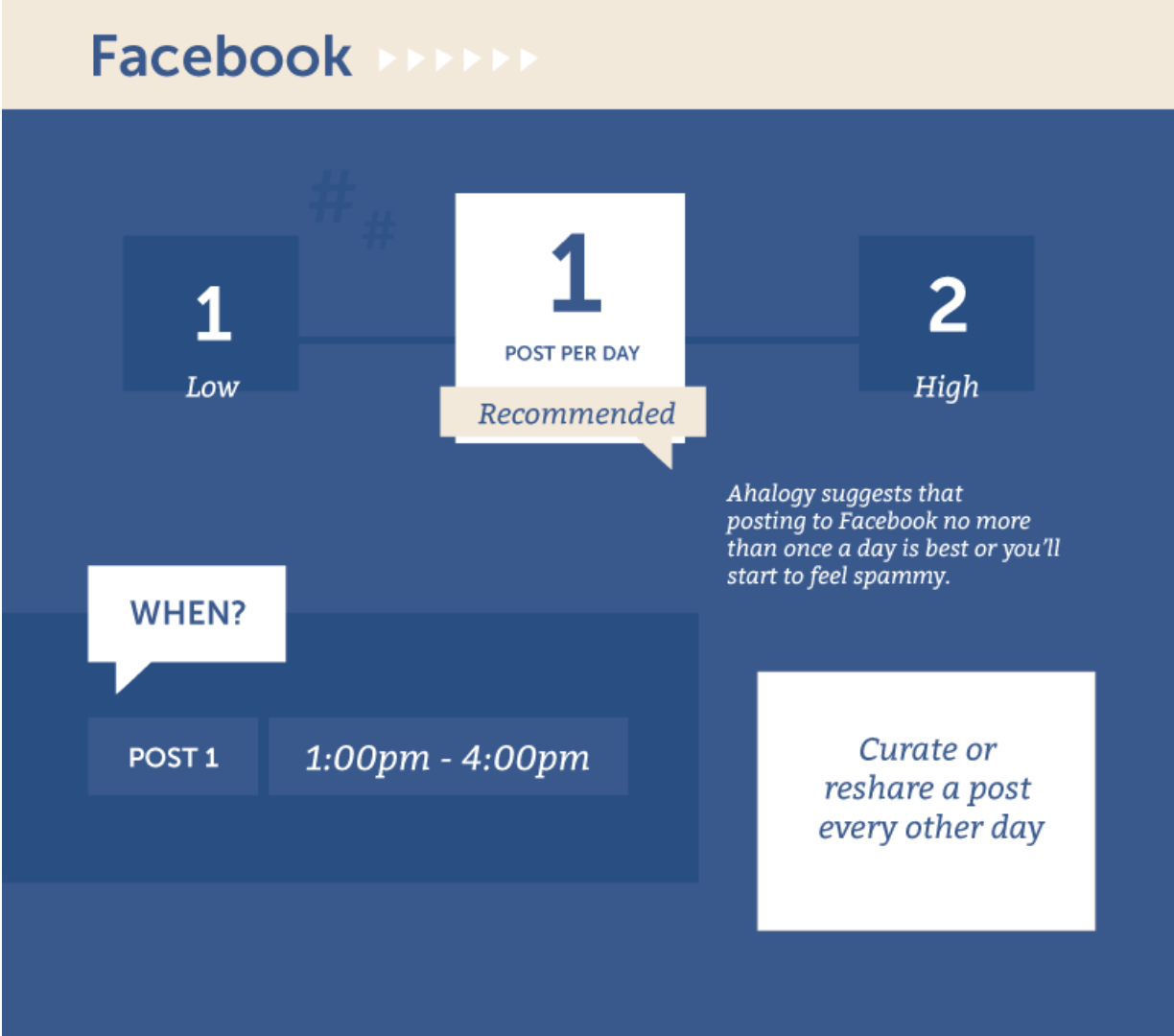
Here are a few takeaways on the frequency of posting for social media marketing on Facebook:
- Avoid posting more than the recommended one to three times a day. It can overwhelm your audience.
- You can post more often at widely different times if you’ve got an international audience. That’ll help you reach out to different segments of your audience (who live in a different time zone or log in to Facebook occasionally).
- Always post high-quality content. Engage your audience with humor, inspirational, and educational content.
- You can be successful, even with a higher posting frequency, by providing great content variety. Mix your posting schedule and post types.
- Test your page frequency. Only your data can reveal your audience’s exact response.
9. Partner with Other Facebook Pages in Your Niche
A while ago, I shared a case study on how I used Instagram to earn $332,640 in 3 months. I struck deals with Instagram influencers (having a huge following) to post links to my landing pages.
You can use a similar strategy on Facebook.
I reached out to Facebook Pages having less than 30,000 likes for my Nutrition Secrets project. I offered a shoutout for shoutout deal to Facebook pages in my niche (about 1 in 10 pages accept such requests).
This helped me to increase the number of likes on the Nutrition Secrets Facebook Page. Any business owner will appreciate the simplicity of this media marketing strategy.
Similarly, have a look at the Facebook pages of media websites like Huffington Post and Elite Daily. They both have millions of Facebook fans and a similar audience (for certain types of content that they publish).
They share each other’s blog posts on Facebook regularly. This boosts post views for both parties while providing good content they didn’t need to create. This is simply smart media marketing.
Here is an example of a Huffington Post blog post shared by Elite Daily’s Facebook page.

And, here’s an Elite Daily blog post shared by Huffington Post.

Wired and Refinery29 also seem to have a similar partnership.

To achieve good results from this strategy, you’ll need to strike deals with pages that have tens of thousands of likes.
This means you need to have a solid influencer outreach strategy.
Here’s what you need to consider:
- Is your target influencer the right fit, contextually? Your brand needs to resonate with its audience. Promoting your brand to a misaligned audience won’t have an impact.
- How much reach do they have? Your influencer doesn’t need millions of followers. They just need a solid enough reach to make a difference.
- How much authority do they have? It’s critical that your influencer has enough influence to inspire action among their audience.
- What’s your leverage? If you’re targeting someone with a massive following and authority, you need to have something just as valuable to offer.
10. Use Word-of-Mouth Marketing to Grow Your Brand
There’s no better way to generate buzz for your brand than to turn your customers, employees, and fans into advocates.
Word-of-mouth marketing is the practice of leveraging devout fans to spread the word about your business.
Think about brands like Apple, Microsoft, and Nike.
They are known for their die-hard fans who constantly promote their products and content.
The best part?
Most do it without any paid incentive.
You, too, can leverage word-of-mouth marketing.
Here are some ideas:
- Reach out to the right people. Engaging your employees is one of the most effective ways of cultivating a culture of advocacy. Give them a reason to rave about your business!
- Offer rewards and loyalty points to customers.
- Give referral bonuses for recruiting more people into the network.
- Have top-notch customer service. You can use Facebook Messenger bots to communicate and provide value to customers.
- Create special brand content that your advocates can share with their networks in real-time.
- Always measure the effectiveness of your advocacy program. You can track sales from referral links, engagement on branded content, and the overall performance of your advocates.
11. Put Your Email List to Work
Do you ever wonder how I receive hundreds of shares and comments on every blog post I write?
It’s triggered by my email subscribers.
I simply email them, informing them about my new post. They kick off the interaction and sharing on every post.
Jay Baer shows us the similarities between an email list and Facebook fans.

So, how can you inspire social actions from email?
Simple social media marketing suggests starting by adding Facebook share buttons to your email newsletters. Some email platforms, like Mailchimp, make this easy.
Otherwise, you will need to create an HTML version of your email and create custom code for the share buttons.
Here’s how:

Convince and Convert further recommends sending out your popular and interesting status updates to your email list on the same day.
This increases reactions and comments on the post and drives engagement on your Facebook page.
You can also combine this email list with the Facebook group strategy.
Ask your subscribers to join exciting conversations on your exclusive Facebook group.
Killer Strategy to Increase Facebook Shares
Say you already have a few hundred social media shares on your post. How would you like to increase the number of shares to a thousand?
You need to plan a strategic email outreach campaign to influencers, transitioning from just a good content strategy to boosting post views.
Identify the overlap in social media trends to your email campaigns for opportunities.
Combining the content messaging just makes sense.
The relationship between the two builds your brand engagement showing they can successfully go hand-in-hand.
12. Run Contests to Drive Facebook Organic Reach
Facebook contests are a simple way to increase your presence quickly.
But it’s a little more than just luring fans with a free gift.
Here’s what it entails:
Step #1: Set a Goal For Your Contest
Do you want to increase engagement? Grow your fan base? Generate more leads?
Whatever you decide, ensure that it is specific and measurable.
Step #2: Select What Type of Contest You’ll Run
If your goal is to generate leads, then your entry method should include a mechanism to capture those leads, for example, an email grab.
If your goal is to grow your Facebook fan base, you can require participants to follow and like your page to enter the contest.
Do you see how your method of entry should be tailored to your goal?
Step #3: Determine the Rules of Entry
Before you do so, be sure to check out Facebook’s guidelines for running contests and challenges.

You’ll still be required to set your own rules for the contest.
Simply write up a brief letting participants know how the winner will be chosen, who’s eligible to enter, and the details of the prize.
Step #4: Decide How to Select Winners
With most contests, the winner is usually chosen randomly.
If your promotion is a challenge, then you will need someone or a group of people to judge the entries. Alternatively, you can have a voting system to pick a winner.
Step #5: Choose a Prize and Develop a Promotion Strategy
This is where most brands fail miserably.
If you don’t pick your prize carefully and promote your contest, there’s a good chance it will flop.
Always pick a prize that is relevant to your business so you avoid attracting people who are in it just for the freebie.
Here are some ideas for promoting your contest:

13. Share Posts From Your Facebook Page on Your Facebook Profile
This strategy is for avid Facebook users. You should have at least 1,000+ friends on your personal Facebook profile to drive significant results.
You have the content. Now, let’s boost post views.
You first share a post on your Facebook page. Then, you share it from the page on your personal Facebook profile.

WPChronicles increased its reach from 5 people to 134, by using this strategy.
Keep in mind, this strategy isn’t scalable and you might annoy your friends if you do it to much.
However, you can use it occasionally for posts that add value to your Facebook friends.
Pro Tip: If you just started your Facebook page, you can quickly build your first 100 fans and get social proof. Just use the “Invite Friends” feature.

This feature can also be used to grow your Facebook page from your email list. It isn’t available to all Facebook pages, though.
Using it is simple. Upload your contacts from MailChimp, Constant Contact, or any other email services. Facebook will find them and ‘suggest’ that they like your page.
14. Drive Organic Facebook Traffic With Hashtags (Used Carefully)
We’re all familiar with hashtags and how they work.
But what’s the deal with them on Facebook?
Do they have impact on a post’s reach?
Let’s see.
BuzzSumo analyzed more than 1 billion Facebook posts from over 30 million pages.
Their study seems to agree with the general consensus that Facebook users are prone to hashtag fatigue.
Posts with hashtags performed worse than those without.

Does that mean that marketers shouldn’t use hashtags on Facebook at all? Not exactly.
There’s a lot of utility in Facebook hashtags.
It’s a matter of experimenting with relevant ones to see what works in your industry and for your audience.
They should also be used in moderation — one to two hashtags maximum.
Why so little?
Post Planner reported interactions are highest when one to two hashtags are used.

While the consensus is that you shouldn’t hashtag everything, Facebook is still built to accommodate their use.
This means that you can get quite a bit of functionality out of them without adding hashtags to all your posts.
Here’s how.
Create Your Own Hashtags
There’s no special protocol for creating hashtags.
Anyone can do it.
I recommend making your hashtags unique to your brand, so it doesn’t get confused with anyone else’s. It’s also smart to use the same branding style hashtags on all social media platforms, so there’s familiarity across channels.
Pro tip: Use your branded hashtags as a metric to track your brand equity on Facebook. Their popularity will give you a good indication of how many people are buzzing about your business at a given time.
You can also point your audience to the URLs of specific hashtags so they can participate in the relevant conversations.
Use Hashtags to Make Your Facebook Group Easier to Navigate
Facebook creates a unique URL for each hashtag used. This means that you can use them to search for content.
This is particularly useful in groups when you don’t want evergreen content to be buried. Simply hashtag them so users can continue to refer to these content pieces by conducting a quick hashtag search.
For example: If you create content themes like I’ve recommended, your users can find all published content for each theme by searching for the unique URL.
Take Advantage of Facebook Trending Topics
Ever heard of newsjacking?
It’s when someone piggybacks on a trend to gain exposure for their brand.
We’ve seen it is best to use hashtags sparingly.
But if there’s ever a prime time to use them, it’s when they link to a trending topic. This way, you tap into the traffic and increase your exposure.
I must warn you: This strategy requires caution. You don’t want to be hopping on a trend that may do you more harm than good.
15. Go Against the Grain to Stand Out
Listen:
A big piece of the organic reach puzzle is competition.
You have to fight for the attention of your audience.
Want to know the best way to always be ahead of your competitors?
Find your differentiating factor and flaunt it.
Both your visual and written content should stand out.
Some pro tips for your visual content:
- Avoid blues and grays at all costs. These colors are dominant in Facebook’s theme which means you’ll morph into a user’s news feed. You want to use colors that will stop someone in their tracks. Red, yellow, and orange are great options.
- Create multiple visuals per post and A/B test to see which one performs better. After you’ve conducted several tests for your posts, you’ll begin to see a pattern emerge. Your audience likely responds to a few designs better than the rest.
- Add call-to-action buttons on the actual image. This is because you want as many visual cues as possible to let users know that they should “Click Here.”
- Don’t use stock photos. Transparency and authenticity matter on Facebook. Create your own images to humanize your brand and share visuals your audience can connect with.
- Capture and keep attention with short captions on your visuals. Posts with 80 characters or less receive 66% higher engagement.

- Ask questions. Posts with a question have higher engagement than those without.

16. Take Advantage of New Facebook Features
Facebook’s constant app updates are no secret.
The changes come fast and frequently.
But here’s the thing:
They may fly under your radar if you don’t make it a priority to stay informed. That’s because new features are almost always released in different segments of the platform at different times.
You can take advantage of these updates.
When you get in on them early, you get the early mover’s advantage. This means that you can master it faster than anyone else and tap into the new capabilities for the benefit of your business.
Some recent updates that provide golden opportunities:
- Feeds: Facebook has added a new dedicated Feeds tab, making it easier for users to keep track of posts from friends, family, and the different Groups they are a part of.
- Multiple Profiles: Facebook is currently testing a feature that would let users have different profiles on the same account, potentially having distinct profiles for different people they want to interact with.
- Facebook Reels: Facebook is now giving users the ability to create Reels from their existing videos using Creator Studio, and is also introducing API access for third-party developers.
- Marketing Messenger New Features: A new option was recently announced that will allow users to send promotional messages to any customers that opt into the feature.
- Political, social, and electoral ad transparency: In the wake of recent controversy around the platform, Facebook has rolled out a set of transparency tools. These can show targeting details like demographics and ad budget dedicated to said demographics.
17. Create an Effective Facebook Paid Marketing Strategy
You must be wondering, “I thought this was about organic traffic?”
Here’s the thing:
Paid reach can funnel into your organic reach and extend the lifecycle of your posts.
This means it will be shown to more people and users will be able to interact with your content for a longer period of time.
How is this possible?
It’s simple.
People can still see your post even though they weren’t targeted through paid distribution.
The audience that you pay for may decide to share and engage with the post. In that case, it will gain an organic reach when their audience also engages.
Now let’s get into how to run effective paid promotions for your posts.
Step #1: Install the Facebook Tracking Pixel on Your Site
The Facebook pixel allows you to track the specific actions taken on your website and other landing pages.
Better yet, it allows you to build custom audiences so you can retarget people who’ve visited your website.
If you haven’t installed it yet, go to your “Ads Manager” or “Power Editor.”
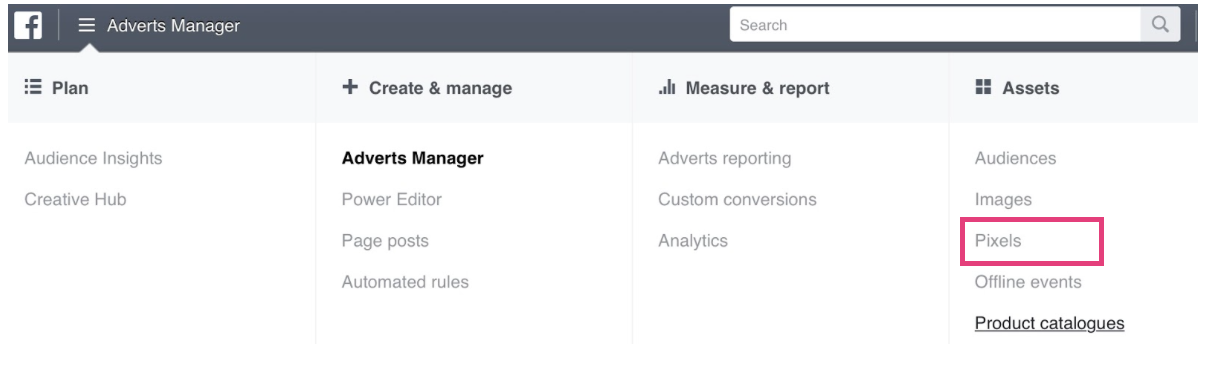
You’ll be prompted to create a Pixel if you don’t have an active one.
After you’ve created your Pixel, you’ll receive a tracking code that you have to copy and paste into the header of your website.
To easily place the Pixel on your website, you can do one of two things:
- Use Google Tag Manager to place the code in your title tags without messing around with your website’s HTML files.
- Use a WordPress plugin called PixelYourSite. After it’s installed, get your Pixel ID from your Ads Manager and simply copy it into the settings of the plugin. There’ll be no need to play with codes and title tags.
And that’s it!
Do this once, and you’re good.
Step #2: Gain Traction Organically Before Paying
We’ve seen how organic and paid reach work hand in hand.
This is an effective way to ensure that your ads reach more people at a cheaper cost.
Some tips for organic promotion:
- Share your post multiple times on Facebook. Make sure you vary the format as well as the time that you publish.
- Reach out to influencers to share your content with their networks.
- Post to other Facebook pages and groups where you’re allowed to.
Step #3: Create Your Ad or Boost Your Post
You can either run an official Facebook ad or a boosted post campaign.
At first glance, they appear the same.
So what’s the difference?
A few things.
- Ads are created using your Ad Manager while boosted posts can be run directly from your business page.
- You must first publish a post on your page to boost it whereas an ad does not need to be on your page.
This means the strategy of promoting posts organically first, is best suited to boosted posts.
Let’s get into the details.
How to Boost a Post on Facebook
First, find the “Boost Post” button under your post.

Select a goal:

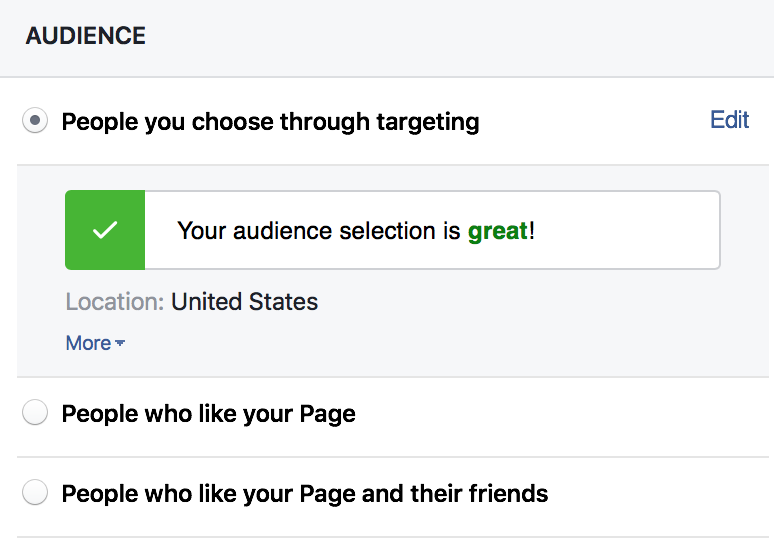
Narrow down your audience.
You can opt for:
- People who like your page
- People who like your page and their friends
- People who you choose through targeting
Set your budget and duration of your campaign.

Finally, ensure that your Tracking Pixel is turned on.

So that’s it for boosted posts.
What about actual Facebook ads? The concept is not much different.
Put these steps into action.
Step #4: Create your Ad using Ads Manager
Head to Meta Ads Manager.
Select an objective for your campaign.
You have way more options than a boosted post.

But you can only select one objective.

Step #5: Define Your Targeting Options
You can either:
- Create a custom audience: To reach people who’ve already engaged with your business. For example, you can import your email list to form a custom audience.
- Create a lookalike audience: To reach new people who are similar to an audience you already have elsewhere.
- Use a saved audience: If you’ve run ads in the past, you can use the same audience.
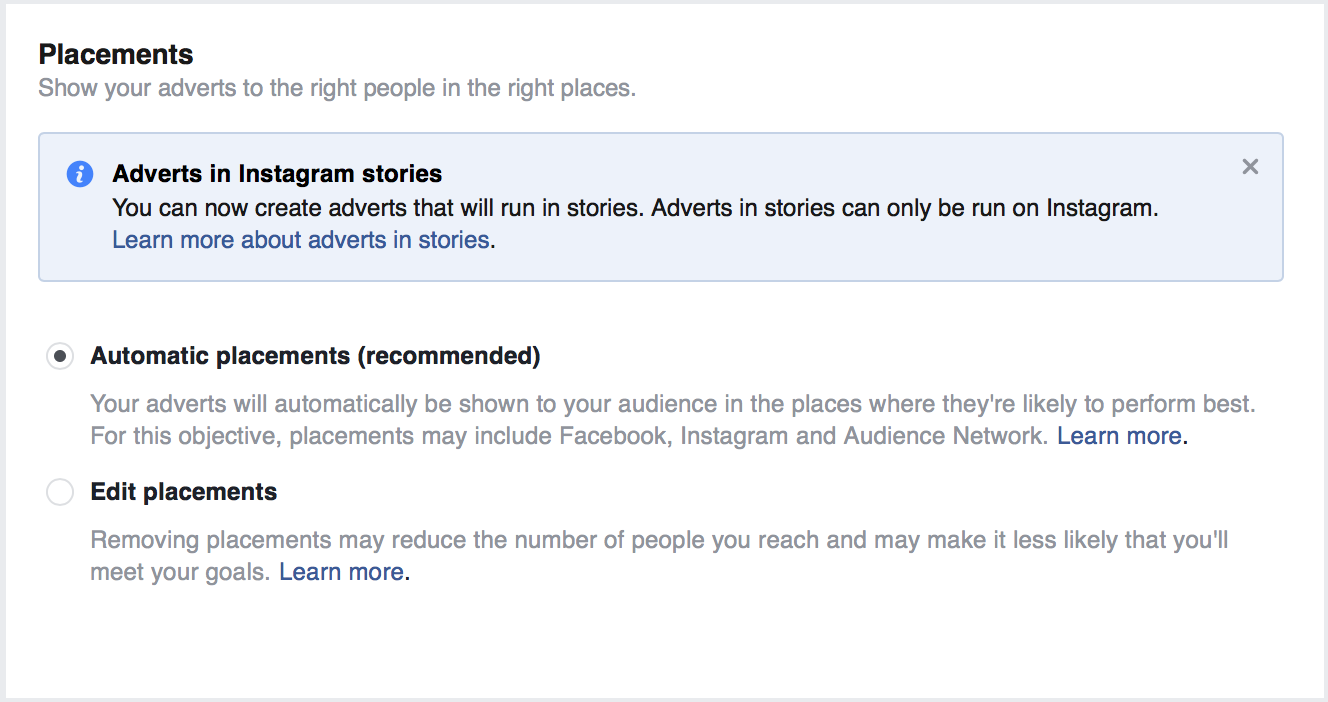
Select your ad placement.
Set your budget and schedule.

Format your ad, write a click-worthy caption, and add an eye-catching image.
After you’ve finalized the creative elements, you can place your ad order, and you’re set to go.
Pro tip: Read this post on how to make your Facebook ads better.
Step #6: Use Retargeting
Have you ever visited a website, and ten seconds later, been shown a Facebook Ad from that very website?
Chances are you have.
When marketers abuse it, this could get annoying for a consumer.
Imagine continuously being shown ads for a product you already bought or a website you were never really interested in.
In any event, this is still one of the most powerful tools in a marketer’s toolbox.
It’s where you’ll experience the full capability of the Facebook Pixel.
If you implemented Step 1, yours should be fired up and ready to go.
So, how does retargeting work?
It allows you to target your ads to people who’ve demonstrated an interest in your business.
Here’s a visual representation of the process:
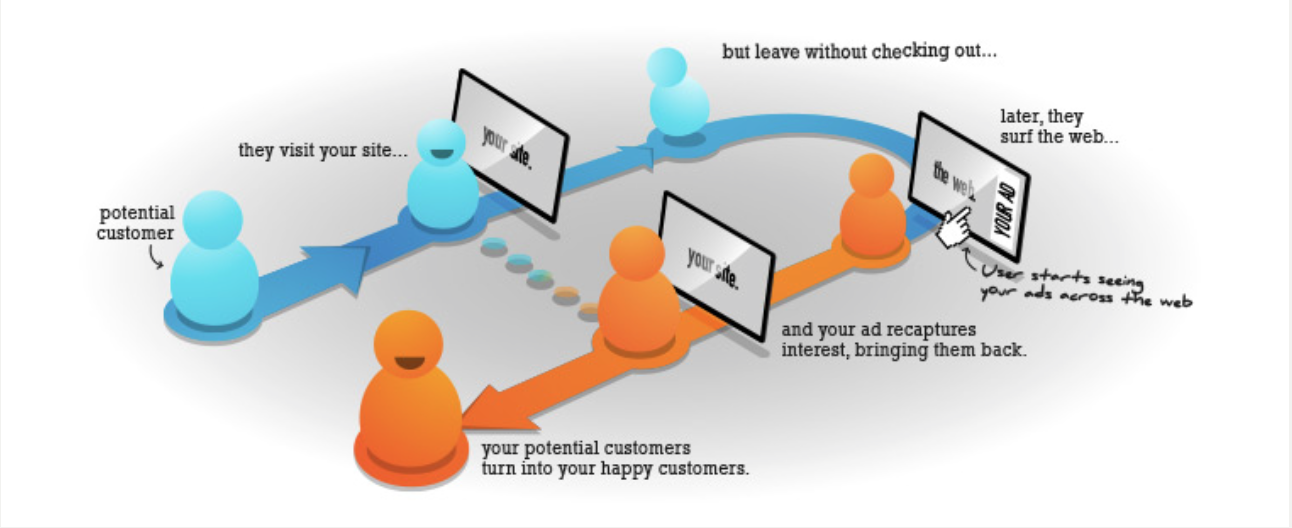
As you see, this is brilliant for recapturing lost leads.
The whole premise is that it’s easier to convert someone who’s already engaged with your business rather than a total stranger.
Now:
Your retargeting ads are set up with the same steps that I detailed above for a normal ad campaign.
Your targeting is the only variant.
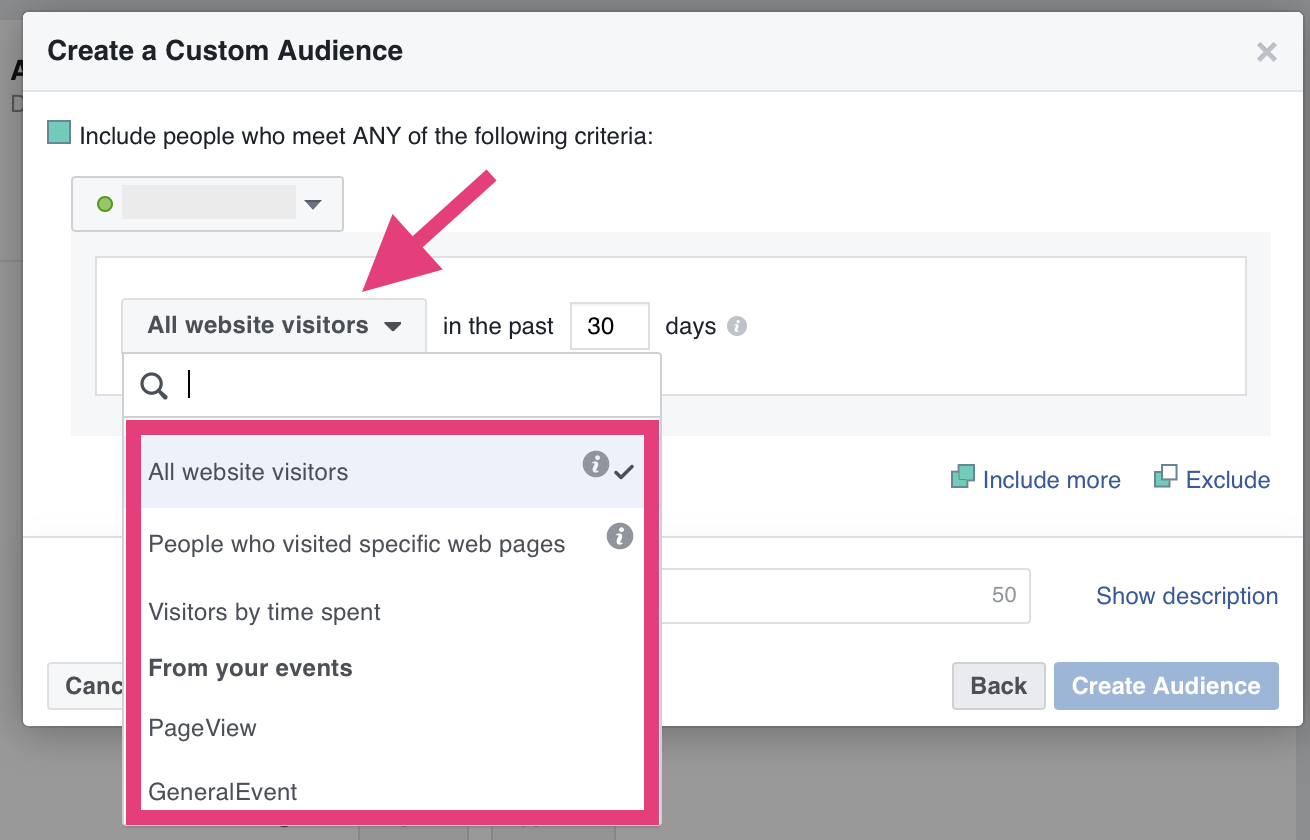
Something to keep in mind: Retargeting campaigns take some time to gain traction. Set a goal, decide on a time frame, and commit to running your ads for the duration of that time frame.
Step #7: Determine the ROI of your Facebook Ads
Let’s talk about results.
Facebook campaigns aren’t difficult to set in motion.
Yet, many marketers don’t see the results that they hoped for.
But here’s the brutal truth:
Unless you track your ads, how much they cost, and the return you’re getting, there’s no way you can keep optimizing your performance.
So which metrics should you be tracking?
- Conversion rates
- Number of times an ad has been served to a user
- Return on dollar investment
- Click Through Rate (CTR)
- Cost per Click (CPC)
These are all available in your Power Editor with Facebook’s Ad reporting function.
Analyze your results and work towards improving them.
18. Harness the Power of Facebook “Dark Posts”
Facebook “dark posts” have been around for a while.
Yet, they’re one of the most underutilized marketing tools.
Is the concept as sinister and shadowy as the name sounds? A bit.
“Dark posts,” otherwise called unpublished posts, are news feed style ads that don’t get published to your news feed. This means that they won’t be found on your timeline or in your fans’ feed.
So what’s the point?
You can:
- Create as many ads as you want without turning off your audience
- Split test several elements of your ads to select the highest-performing variations
- Decide to expose only the high-impact ads to your organic audience and be confident that they’ll perform
- Stay in Facebook’s good graces. Your page will be less promotional which is what Facebook’s algorithm favors
- Personalize your ad copy for different segments of your audience
Now that you know the benefits, here’s how you can put unpublished “dark posts” to work for your business.
Head to Ads Manager, then follow these steps from Facebook.

You’ve created an unpublished post, aka a Dark Post.
19. Grab Attention and Inspire Action with Persuasive Copy
If you’ve had any success on Facebook, you already know that the creative elements are the variables that matter.
What does this mean for your Facebook strategy?
You need to test different aspects of the creative. This includes split testing your copywriting and visual elements to find the highest performing combinations.
It will serve you well for both paid promotions and your organic reach.
We’ve already been through the visual elements.
So let’s talk about copy.
The purpose of persuasive copy is to:
1. Improve Your Click Through Rate (CTR)
CTR refers to the number of people who click through to your website after they’ve been served your ad.
If it’s low, that’s a pretty good indication that your ad copy and visuals need work.
CTR is not a metric that will make or break your media marketing performance, but you also don’t want to get it wrong.
That would mean leaving a better result on the table.
2. Lower your Cost per Action (CPA)
An action will depend on what your conversion goal is.
It could be:
- Video views
- App installs
- E-commerce store visits
- Page visits
- Shares, comments, and likes
Any action that you want users to take when served your content comes into play here.
The less it costs you to drive these actions, the higher your conversion rates.
So, what does persuasive copy have to do with CPA?
Well, users will only move on a solid call to action (CTA).
In turn, the strength of your CTAs depend on your copy.
How to Craft Compelling Facebook Call-Actions That Convert
- Always tailor your CTA to your conversion goal. Generic, one-size-fits-all copy won’t cut it.
- Use exclusivity to amp up perceived value. This goes hand in hand with urgency. In fact, words used to convey exclusivity can also be used to drive urgency.
- Create urgency to give users an extra push. Think of relevant words and phrases that evoke a sense of now. The fear of missing out (FOMO) will kick in, and users will have a greater chance of taking action.
- Eliminate weak verbs like download, save, learn, and find out. These lack the energy and punch to get people excited. If you must use them, add urgency words to modify. For example, CTAs with “Now” at the end always convert better than those without.
- Don’t get caught up in the rules. Yes, the tips above have been proven time and time again to generate results. But your audience and what they respond to is what matters. The other elements in your content also factor in, so don’t look at calls to actions in isolation.
20. Focus on Value and Don’t Worry About Reach
As a marketer, everything comes down to conversions and ROI, right?
The organic reach of your posts on Facebook is like a secondary metric.
Jon Loomer puts it perfectly.

If you go after reach rather than valuable content, you’ll be trying to game Facebook’s algorithm.
Deja vu?
Remember Google cracking down on black hat SEOs trying to game their search results?
Every platform wants to improve the experience of its users and increase engagement.
So, don’t go around chasing Facebook’s organic reach.
Instead, share every post with an objective.
- With links, you want to get clicks and drive traffic to your website.
- Status updates should be focused on engaging with your audience and getting comments.
- Share graphics to inspire your audience and get engagement.
- Share videos to primarily get video views. The CTA in the video can be used to drive traffic to your website.
The organic reach of your page is not the best performance indicator.
So while you may want to amp up your game, you need to consider how much reach is enough to justify the time and effort it takes to build your Facebook assets.
Write down the goals you want to achieve through your Facebook page.
Consider :
- The size of your business
- The scale of your operations
- Your objectives
- Your audience
- The ROI of increasing Facebook reach
Only then should you devise a Facebook marketing strategy around these goals.
Choose the metrics you’ll use to measure your results.
Don’t let algorithmic changes dictate your marketing strategy.
FAQs
What does organic reach on Facebook mean?
The number of people who see your content without paying for it is referred to as organic reach. People who see your posts in their own feeds or because their friends have interacted with you are included.
What is a good organic reach?
Since reach is based on unique views of your content, it can be assessed across your entire page or from post to post. Organic, non-sponsored reach is the hardest to gain, but viral reach and ad reach are also options when targeting your audience.
Is Facebook organic reach dead?
Organic reach on Facebook may be down, but it’s not dead. If your reach is close to 3%, you’re at a scalable target. You can also use a paid strategy to boost your numbers if you need to.
Conclusion
Facebook is a brilliant marketing tool.
There’s no doubt about that.
The number of businesses that actively use the platform continues to increase by millions, year over year.
But Facebook is not without its challenges.
The influx of published content has led to a downward spiral in organic reach, and the competition for news feed space is fierce.
Things that were once done on autopilot, now require significantly more effort and due diligence.
Will organic reach continue to plummet?
Or will it improve?
Nobody really knows what the future holds for organic reach on Facebook.
Either way, our task remains the same.
We have to get creative in our social media marketing and provide the highest quality content to our audience.
If you implement the strategies that I share in this post, you’ll be well on your way to improving how to increase organic reach on Facebook.
You’ll also be more skilled at navigating Facebook’s ever-changing platform.
What is your Facebook page’s average organic reach? What strategies are you using to combat organic reach decline on Facebook?
Are You Using Google Ads? Try Our FREE Ads Grader!
Stop wasting money and unlock the hidden potential of your advertising.
- Discover the power of intentional advertising.
- Reach your ideal target audience.
- Maximize ad spend efficiency.