 Sign In


 Ubersuggest
  AnswerThePublic
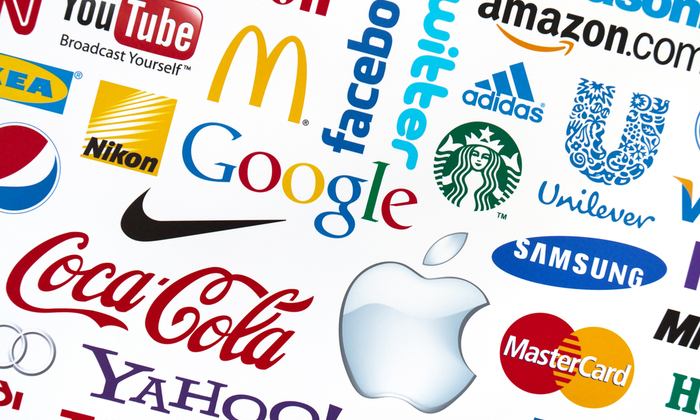
If you want your business to succeed, you’ll need to pay close attention to your brand strategy. And that strategy starts with a free brand logo.
A strong brand creates instant recognition in the marketplace, especially amongst your customers.
It also builds loyalty and shows you share your customer’s values. Do this right, and both your customers and your competitors will always remember you.
If you’re yet to define and build your brand, this guide can show you where to start.
One of the best ways to leave a positive and lasting (visual) imprint of your brand is to create a unique brand logo.
Getting your brand logo professionally designed can be expensive.
Look at 99Designs research. They found that a professionally-designed logo can cost you anywhere from $400 up to $2500+, with the quality varying depending on the actual cost.

That sounds pricey, right?
You could take it upon yourself to design your logo from scratch by investing time in learning graphic design.
I could even show you where to find some free fonts you could use.
Or, I could show you how to design a free brand logo for your company with minimal effort on your part.
You see, gone are the days when your only option was to get a graphic designer to create your logo. They usually came with a hefty price tag.
Now, you can use online resources to design and create your very own brand logo for free.
And you can literally do it within a few minutes.
Some of these companies will even allow you to download your logo without having to invest any money.
In this article, I’ll walk you through five ways to create a free brand logo for your company in just minutes.
1. Free Logo Design
Free Logo Design is a free brand logo creator that allows you to create a brand logo of your own and incorporate it into your business.
You can do this in a few simple steps:
- Select an existing logo template.
- Use the editor to move and scale your text or image.
- Download your logo.
- Display your logo everywhere.
First of all, you’ll need to go to the homepage and enter your company name, as shown.

You should notice right off the bat that Free Logo Design gives you several design options as you type.
These images are too generic. You’ll want to be more specific.
So, pick a category from the drop-down menu and click “Start.”
For the “new” Kissmetrics brand logo, I’ll pick “Business & Consulting.”

Once you’ve clicked “Get Started,” it will bring you to the design page where a pop-up platform will display auto-generated logo templates from existing images.
You’ll see some containing your company’s name.
In the “Business & Consulting” category, the software generated 90 designs, with a maximum of 15 per page.
For the next step, go through all of the designs and find a logo that you think will:
- Visually look good
- Define your brand
- Be remembered by your customers
- Fit your brand strategy
Once satisfied with your decision, select the desired logo, and click “Add.”

From there, it will take you to the logo editor, where you may notice that the text and graphics are overlapping or jumbled up.
Each part of the graphic is an individual element, but the text is grouped as one.
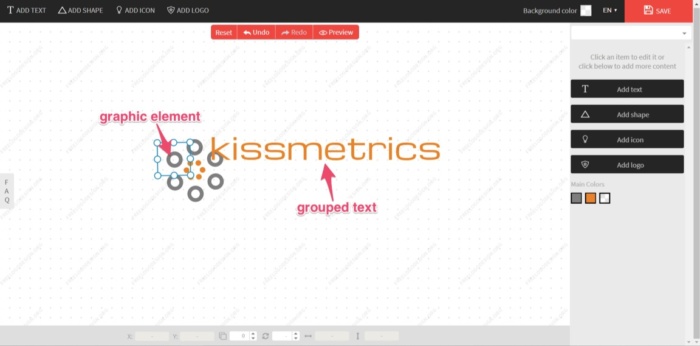
This is your default logo.
You could leave it as it is, but, quite frankly, it won’t look great.
In this case, I’d like to move the text under the graphic and center it.
Select the text and drag it into position.

Once the text is aligned and looks pleasing to the eye, I’ll select all elements and move back to the center of the screen.
To do so, click and drag the cursor over the elements you want to move.

This creates a selection box of all elements that you can move (or rotate if required). A properties box that shows each element individually will also appear.

If you need to edit these elements, you can do so under the “Actions” toolbar.
An element’s colors can be edited, moved, flipped, and rotated.
You can also edit the color, alignment/curve, and font style of the text if you’re not quite happy with it.

Or you can add an extra logo, icon, shape, or more text from the options on the right.
Add an extra element or edit logo color if required.

Sometimes you can get stuck tweaking your design, potentially for hours.
For the “new” Kissmetrics brand logo, the goal is to create a completed logo design in only a few minutes.
And that’s all that’s needed. I’m happy with the design.
Now, with the design complete, it’s time to download your new brand logo. You can easily do this by clicking “Save” at the top-right corner of the screen.
Free Logo Design will then prepare your logo for download. Once ready, it will give you the following options:

Click “Download” and enter your name and email address.
The finished logo will now be sent to you, free of charge.
Although the free PNG file is of a low-resolution, it’s ideal for website use and email signatures.
Even the high-resolution download is reasonably priced. Currently, at $39, this includes a PDF, EPS, and vector SVG file.
This is a steal compared to the prices I mentioned earlier for a professional design, and it’s very cost-effective for a bootstrapping business startup.
Whether you’re a bootstrapping startup or not, realizing your brand’s importance can play a major role in your business’s success.
By equipping your company with a new brand logo, you’ll be one step closer to achieving this success.
2. Logomakr
Another free resource with a hands-on approach is Logomakr.
With Logomakr, you can instantly make a brand logo for your company.
Most of these free online logo makers use similar concepts when designing and editing. They use existing templates on a user-friendly design platform.
To create your design with Logomakr:
Go to their homepage, and it will greet you with an instructional video. This will quickly run through the simple process of using their platform to design a logo.

It also presents you with the following design advice to consider:
- Make your logo clean and simple.
- Make sure your logo is 100% original.
- Make sure you’re able to copyright your own logo.
- Make sure the logo fits the style of your industry.
- Make sure your final logo images are in vector format.
With your concept in mind, you’ll need to pick a graphic for your logo.
Next, search the million or more graphics in Logomakr’s database by using the search bar at the top left of your screen.
For my design, I’ll search “kiss.”

The database should then give hundreds of free-use images to choose from (for that particular search word).
Scroll through the results and select the image you’d like to use.

You’ll then return to the editing page, where you’ve multiple options to edit your design.
You can add text, shapes, paint, scale, move, or change your graphic color.

For this example, I’ll scale up the graphic to be larger. That way, it’ll stand out more.

Next, you’ll need to add your company name. Using the “add text” function, I’ll add “kissmetrics.”
Once you’ve added the text, you’ll notice two drop-down menus at the top of the screen.
One is for the font category, and the other is for the font style.

Select the font style or category that you think will have the best visual impact on your design.

You can play around with the text and the scales of the elements (text, image, or shapes) so they sit proportionate to each other.
Once you’re satisfied, consider the colors you’ll use in the final design and how that ties in with your branding strategy’s overall color scheme.
At Kissmetrics, I’m partial to the color blue.
You can change the color in three steps:
- Select the elements you wish to change.
- Click on “Change Color” in the tools section.
- Pick the color you want in the top-right corner.

Once done, you’re ready to save and download a copy. Do this by clicking on “Save Logo” at the top right corner of your screen.

This will then bring you to your final set of options, depending on the logo’s use.
To opt for the free version, you’ll need to download and give credit to Logomakr.

For this design, I’ll click on “Download And Agree To Give Credit.”
Again, to download a higher-res image than the one provided for free, you’ll need to pay a premium. In this case, it’s $19.
With the high-res image, you’ll be able to use it on banners, company clothing, and for printing purposes.
If you’ve followed the simple steps above, you should now have a free brand logo that you can use as many times as you like.
You can do all of that in under 5 minutes, too.
3. Canva
Next on the list of software that offers free downloads is Canva.
If you’re not familiar with Canva, it’s simple design software that is quite popular with graphic designers and bloggers to create high-quality images like infographics and featured images.
Its popularity is due to its simplistic drag-and-drop design tools and a huge collection of photos, graphics, and fonts.
With the easy-to-use platform, you can create your brand logo in five easy steps:

Go to Canva’s Online Logo Maker and create an account.
Once you’re done, click on the “Start Designing A Custom Logo.”

The first thing you’ll want to do is select “Elements” from the toolbar and decide on a category. For this design, I’ll use an image from “Icons.”

A library of multiple icons will then appear. Scroll through them until you find an image you can use. Then, select it.
Some elements have the word “free” beside them. These are free-use graphics that you can use in your logo design.

Now that you have the main graphic for your logo, select the element, and change the color.
Remember: always keep your branding theme in mind. So, once again, I’ll use blue.

Next, you’ll want to add your company name by selecting the “Text” tool from the toolbar. Similar to “Elements,” you have a library of templates to choose from.
Scroll through to find a text that will fit your brand, keeping in mind the “free-use” templates.
Find your favorite and click on it. I’ll use “Blue Wood.”

You’ll notice that the text will center on top of the logo element. Click on it and drag it to where you want it.

Move both text and element so that they align with the center of the design template.
Once satisfied, it’s time to edit the text.
Click on and select the small text above “Blue Wood.” Delete this text.

Click on and select the text “Blue Wood” and replace it with your company name, “kissmetrics.”
Next, edit the text’s color and size by selecting the text and using the text toolbar at the top of your screen.
You also have the option to change the font style using the drop-down menu.

Your logo should now be ready to download. Click the “Download” button at the top right of the screen.
You’ll be given different file types to select for download.
The file types available are JPG, PNG, PDF standard, and PDF print. For the Kissmetrics logo, I’ll choose PDF standard.

Once downloaded, you’ll be able to view your new brand logo in a PDF reader.
Canva doesn’t yet support exporting logos in a vector format.
For higher-res graphics, you should make your logo as large as possible and download the PDF print version.
Don’t worry; with a PNG file, you’ll be able to add your logo to your website.
Another quick, simple, and free way to create a brand logo for your company.
4. GraphicSprings
GraphicSprings is software that allows you to use their platform to design and create a logo for free.
To begin your design, go to their logo design page and enter your company name.

Next, add an image from the database by selecting “Choose Your Graphic” from the side toolbar, left of the screen.
A sub-search bar will pop-up under your last selection, with a list of categories underneath.

If you know the graphic you’d like to add, enter it into the search bar.
GraphicSprings have included an “Internet” category, which is quite fitting, so I’ll use that.
Click the category you want, and a database containing stock images or graphics will appear.
(Just like the previous software).
Can you spot a common theme yet?
This simple concept works across each platform, eliminating the need to “reinvent the wheel.”
Search through the results, and once you see an image that you’d like to use, select it.

After choosing a graphic, the software will create your design and take you to the editing page. Once you’re there, it will prompt you to select the elements for editing.

Click on the text to edit it. It will allow you to change the font style, size, and format. You can also add some cool effects like stroke, shadow, or glow.
For simplicity, I’ll leave it as it is.

The options for editing are also basic. You have the ability to change the color and add some effects.
Canva will break the graphic into different elements (similar to Free Logo Design), so you can edit each piece individually.
I’ll stick with the color theme of blue, but I’ll keep the two-tone effect.
Next, select each element and change the colors accordingly.

Once the editing is complete and you’re satisfied with the design, click “Download Your Logo” at the bottom right of the editing page.

It will take you to the payment page, where you can buy the high-resolution image for as low as $19.99.
To access the vector files with the ability to edit after you purchase it, you’ll need to pay for the standard package, which costs $39.99.
With this option, you’ll have the ability to make aftermarket changes to your logo whenever you please.
5. Designimo
Designimo also requires payment once the design is complete, but you can use the design tools for free to create the graphic for your logo.
They previously offered a low-res free download, but they now produce high-res images only.
Designimo is similar to Free Logo Design and GraphicSprings in that you enter the name of your company into the search bar and select a category that fits your needs.
It’ll then auto-generate multiple graphics using a huge database of existing designs.
Again, the level of editing is basic, but the results are solid.
It also follows the simple process that Free Logo Design uses:
- Select
- Edit
- Download
- Display
For a quick video tutorial to help you use the platform, check out how it works here.
To ensure your design goes as smoothly as possible, I’ll walk you through the process below.
First, go to the homepage, add your company name, and click “Create Logo Now.”

Then, select a category from the drop-down menu, ranging from “Alphabetic Text” to “Travel & Hotel.”
For this example, I will use the category “Alphabetic Text.”

Designimo will provide you with numerous individual designs under each category.
While the other categories use existing graphics made up of symbols, the “Alphabetic Text” generates logos in the shape of the letter selected (hence the name).
It also files them alphabetically.
For the Kissmetrics logo, I’ll select the letter “K,” and go through the results. Each letter has multiple pages of designs, so navigate through them.

Once you’ve found the one you’d like to proceed with, select the graphic.

You’ll then land on the editing page, equipped with basic design and editing tools. Using the tools available, you can:
- Increase/decrease element size
- Rotate graphics left/right
- Flip vertical/horizontal
- Change text size and font style to suit
- Apply opacity to an element (i.e., make see-through)
- Easily move elements by clicking and dragging

For this alphabetical logo, I’ll be a little creative and use the symbol shaped as “K” and use it to start the company name, “Kissmetrics.”
By deleting the “k” from the text, I now have a completely different and unique looking logo.

Edit the text size or font style, if required.
The default font is OK, so I’ll leave it as it is.
Next, change the colors to match your theme.


If you’re happy with the design, your new brand logo should now be ready to download. Click on “Download Now” or “Save For Future” (if you’d like to come back and work on it).
First, you’ll need to register your details and sign up for an account to download your image.
You’ll then be brought to an order confirmation page, to confirm and proceed to checkout.
Pay and download.
The cost for a high-res image, including PNG, JPG, and EPS Vector files, is $29.95.
Although not free, the brand logo you can create and download using this software is a high-quality graphic at a relatively low price.
Brand Logo FAQs
Canva, Wix, and TailorBrands.com are free logo creator tools.
Above all, your brand’s logo should be unique. You want people to see it and immediately associate it with your brand and what you have to offer.
Some things to avoid when creating your logo are cluttered designs, blurry images, generic designs, designs that are too bright, designs that aren’t on the same tone as your brand, and confusing designs.
You can expect to spend at least $15 per hour for a freelance logo designer.
Conclusion to Free Brand Logo Design Tools
When it comes to starting a new business, the tasks on your to-do list, along with the costs of setting everything up, can be overwhelming.
But creating a brand logo for your company doesn’t have to be.
Branding should be the core of your company’s marketing strategy.
Your brand should tell a story, and part of that story is your logo.
Being an expert in graphic design or outsourcing to a professional was once the norm (and it still is for many brands).
But now, the Internet is full of innovative people with new ideas and free software that can help new businesses reduce their startup costs.
With user-friendly tools, it’s possible to create a free brand logo for your company in minutes.
These platforms also help prevent you from being paralyzed by options.
Previously, you may have been up all night studying “how-to-design” videos on YouTube.
Now you don’t have to.
These platforms do most of the designing for you and, and they’ll even give you some quick tutorials. All you have to bring to the table is a good idea and an eye for a visually-pleasing design.
With your brand’s color and theme in mind, pick the software that is easiest for you and get started designing a free brand logo today.
In terms of user-friendliness, design results, or cost, which free brand logo software would you recommend?
Are You Using Google Ads? Try Our FREE Ads Grader!
Stop wasting money and unlock the hidden potential of your advertising.
- Discover the power of intentional advertising.
- Reach your ideal target audience.
- Maximize ad spend efficiency.