 Sign In


 Ubersuggest
  AnswerThePublic

Still not ranking for your top keywords? It may not be your content’s quality or the number of backlinks you have that’s the problem.
It could be basic SEO issues that are holding your site back.
SEO mistakes are depressingly common, and the bad news is that your site won’t rank while they remain a problem. The good news is they are easy to fix.
In this article, I’ll show you how to find and fix SEO issues. I’ll cover the 11 most common search engine optimization issues I see on sites, explain why they’re a problem, and show you how to solve them.
Key Takeaways
- Poor keyword targeting is one of the most common SEO issues. Focus on long-tail keywords and avoid cannibalization. Poor quality content is a major SEO issue. Increase your E-E-A-T trust signals by signaling your expertise and experience, while also ensuring your content matches the search intent of a keyword.
- There are several on-page SEO issues that can cause problems, including under-optimized images, a lack of internal links, and missing metadata. Make sure these elements are present and correct, and optimize them using relevant keywords.
- A lack of mobile optimization can cause sites to suffer. Improve the technical performance of your site by improving loading times, reducing file sizes, and using a Content Delivery Network (CDN) that caches your content close to end users. A responsive site design will ensure your site looks great on every size screen.
- Poor quality backlinks can impede your efforts to rank. Avoid black hat techniques like paying for links and don’t over-optimize your anchor text.
- Novice marketers treat SEO as a one-off event. Instead, it should be an ongoing effort that you return to every month at minimum. The more consistent effort you put into improving your rankings, the more success you’ll see.
Keyword Targeting
There are two keyword-related issues I see beginner SEOs make: targeting the wrong keywords and cannibalizing them.
New or inexperienced SEOs have a habit of focusing their keyword research on broad, competitive keywords because they have the highest search volumes. But that brings with it more competition, and there’s no way a new site will outrank an established domain for these terms.
Instead, I recommend you target long-tail keywords. These are phrases with three or more words that are much less competitive and will usually bring in better-quality traffic because they are so specific.
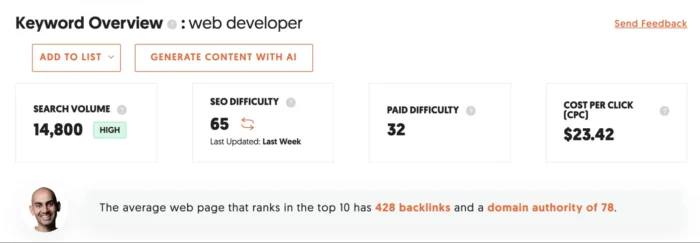
If you’re a web developer who specializes in e-commerce stores, for example, it’s better to rank for “Shopify web developer in San Diego” than it is to try ranking for “web developer”, which has an SEO difficulty of 65 and an average domain authority of 78.
Once you have suitable keywords, you need to make sure you don’t cannibalize them.
Keyword cannibalization happens when you have multiple pages targeting the same keyword. Google isn’t sure which page it should rank for the term, meaning both pages suffer.
You can avoid this by dedicating a keyword to each page. This gives every page a purpose and means no two pages rank for the same term.
Search Intent
Creating great content isn’t enough to rank in Google. You need to make sure your page’s content aligns with the search intent.
Search intent is the reason a user searches for a query. It could be informational (What is SEO?), commercial (what are the best SEO tools?), or transactional (Ubersuggest lifetime deal).
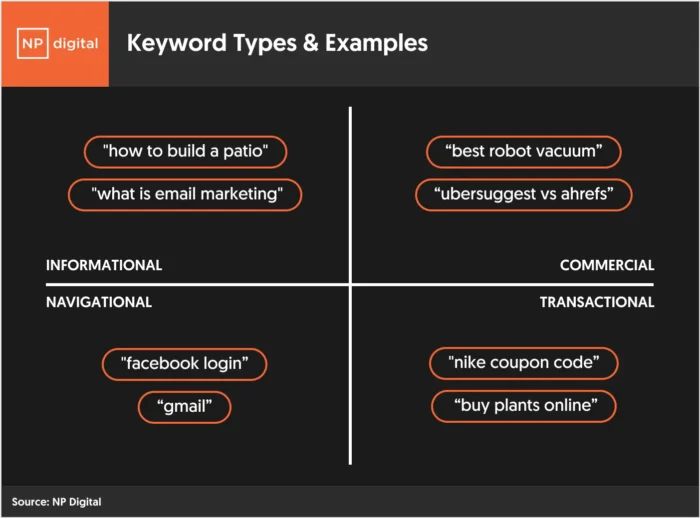
If I’m targeting “What is SEO?”, for example, then I’ll need to write an informative blog post. If I want to target “best SEO tools”, though, I’d be better off creating a product listing page or a listicle that compares the best SEO tools.
Understanding your query’s search intent is easy. Just Google your keyword and see which types of pages are ranking.

In the case of “best SEO tools,” it’s a mix of listicles and forum results. So, I’d write a comparison article to meet search intent.
Content Quality
There’s a lot of content on the web. If you’re serious about ranking at the top of Google, then you need to create content that is exceptional, unique, trustworthy, and backed by experience.
You don’t have to be Dickens of Hemingway, but you can’t get away with writing 100 words on each topic. Informative and exceptional content should be at least 1500 words in most cases.
Google also needs to consider you an authoritative source, which is why it’s important to improve your site’s E-E-A-T signals.
Experience, expertise, authoritativeness, and trustworthiness are the four factors Google uses to rate your content. You can improve them by:
- Collaborating with experts
- Showcasing your credentials in your bio and on your “about” page
- Demonstrating first-hand experience of a topic

Regularly updating your content is also important. Doing so will help you stay on top of the latest trends and ensure your content remains fresh in Google’s eyes.
Finally, avoid any instances of duplicate content on your site. These occur when two or more pages have the same or very similar content. It’s particularly serious when the original version is from another website.
The easiest way to avoid this is by making sure all your content is unique. If you can’t avoid repeating chunks of content, however, add a rel=”canonical” tag to your pages to point search engines to the original page.
Here’s an example from my own site:

Learn more about canonicalization.
Underoptimized Meta Data
Every page should have unique meta data — and not just for SEO purposes.
Your page titles should be descriptive and enticing since they appear in search results and whenever people share a link.
Meta descriptions are equally important. They are a 160-character sales pitch for your page within search results and should entice users to click to your website.
Here’s how I do it:

Optimize your own by:
- Including keywords where relevant
- Making sure titles and descriptions are the right length so Google doesn’t cut them short on result pages
- Ensuring both titles and descriptions mirror search intent
Each title and description should be unique across your site, too. You can use Ubersuggest’s Site Audit tool to highlight instances of missing or duplicated meta data.
Mobile Optimization
Google has been using mobile-first indexing since 2016. Why? Because Google knows the majority of people use mobile devices to browse the internet. According to our research, that figure is as high as 60%.
Mobile-first indexing means Google prioritizes the mobile version of your site in its index and uses that version when ranking content. That means you must have a mobile-optimized site if you want to rank well in Google.
Unfortunately, I see several things sites get wrong, including:
- Slow loading times
- Unresponsive site designs
- Poor quality user experiences
Start by understanding how your site currently performs using Google PageSpeed Insights. Enter your URL into the search bar, and Google will provide a performance score for desktop and mobile.

The tool will provide several tips on improving site performance, which you should implement as a priority.

Improve your site further by using a mobile responsive design that automatically fits your end user’s screen.
You should also minimize file and image sizes to improve load speed. Consider using a CDN to further improve your site performance and using a caching plugin like WPRocket.
Images
Images make your content more appealing and provide another ranking opportunity (in Google Image results). But basic issues like a lack of alt text, large file sizes, or poor-quality images can crater your SEO efforts.
A lack of alt text is a particular problem. Alt text is descriptive meta data that search engines and visually impaired visitors use to understand your images. If it isn’t there, both will find it harder to comprehend your site.
Fix this by giving every image descriptive alt text. Try to add a keyword where possible, but avoid keyword stuffing as this can negatively impact SEO.
You can see what alt text looks like in the wild in the image below:

You should also reduce image sizes as much as possible without impacting quality using a free tool like Biteable.
Optimized Internal Linking
Internal links improve your site structure and help Google to crawl and understand your site. They also pass page rank from high authority pages to the rest of your site.
Yet I see so many sites that don’t have any internal links or fail to optimize the ones they do.
Solve this by adding internal links to every new piece of content you write. Make a practice of reviewing existing content and looking for opportunities to add new links. A tool like Link Whisper can automate the process.
Make sure every internal link has descriptive or keyword-focused anchor text. Here’s an example from one of my blog posts:
Guess which keyword that page targets! You don’t have to worry about over-optimizing anchor text on your own site, so be as keyword-focused as you like.
Quality Backlinks
Search engines use backlinks to evaluate your site’s authority and trustworthiness. The more high-authority websites that link to your site, the better it is in the eyes of Google.
But you can’t just build any old backlink. Short-term thinking, like buying backlinks or participating in link networks, can result in dozens of poor-quality links that can result in manual penalties or the kind of link profile that makes it impossible to rank.
Fix this problem now by eliminating black hat link building techniques. Focus on building high-quality links from trusted websites through white hat methods like digital PR and the skyscraper technique.
When you do acquire backlinks, avoid over-optimizing anchor text. If you do get a say in how other sites link to your own, always ask for something brand-related, like the name of your site or product.
Not Focusing on Conversions
It’s no good having a high-ranking page if you aren’t also optimizing your website for conversions. That’s right, some sites can avoid all of the other SEO issues in this list and still end up bringing in little to no revenue because they can’t turn visitors into customers.
There are several strategies you can use to focus on both SEO and CRO (conversion rate optimization).
The first is targeting high-intent keywords that make visitors more likely to convert. These phrases usually have some kind of commercial or transactional intent that attracts users further down the sales funnel.
Once visitors land on your site, make sure you have several ways of capturing their information. This could be a newsletter signup form, an e-commerce discount code for new visitors, or a gated whitepaper. Most visitors won’t make a purchase on their first visit, but you can nurture the relationship if you get their email address.
For example, I encourage people to give me their URL as soon as they start reading my blog posts.
Finally, A/B test conversion elements of your site to maximize your conversion rate. That includes elements like your copy, CTA box, and offer.
Technical SEO
Technical SEO is the process of optimizing the technical aspects of your site to improve rankings. That’s things like performance, structure, and Core Web Vitals.
One of the most common technical SEO issues is poor crawlability. In some cases, that can mean a complete inability for Google to crawl your site because of a robot.txt file. That’s something that can easily be fixed using an SEO plugin like Yoast SEO.
In other cases, poor site structure can make your site difficult to crawl. If it takes too many clicks to reach certain pages on your site, there’s no guarantee Google’s bots or visitors will find them — and that will mean they won’t rank.
A bad URL structure is another common technical SEO issue that can cause problems.
Some sites have several different URL structures, which can lead to duplicate content issues. Others can have non-descriptive URLs (something like yoursite.com/gj2k), which make it hard for users and search engines to understand what a page is about.
Solve these by using a consistent and descriptive URL slug. If you use WordPress, I recommend navigating to Settings > Permalinks and choosing Post name as your permalink structure.
Ongoing SEO
You can’t treat SEO as a one-time event. Yet this is exactly what novice site owners and marketers do — and it’s why they never see their sites rise in the rankings.
Stop this being an issue by making SEO part of your monthly marketing process. Create a cadence that lets you do things like keyword research, on-page optimization, and link building regularly throughout the year.
By making SEO an ongoing priority, you’ll stay on top of changes to Google’s algorithm and ensure you continue optimizing your site bit by bit.
FAQs
What are some common SEO mistakes?
Some common SEO mistakes include targeting the wrong keywords, not matching your content with search intent, under-optimizing meta data, not having a mobile-optimized site, and ignoring technical SEO.
How to avoid common SEO mistakes
You can avoid common SEO mistakes by staying up to date on the latest SEO trends, continuously audit your performance, improve the technical performance of your site, and focus relentlessly on user experience.
Conclusion
Have you made any of the above mistakes with your SEO campaign? What other common errors do you see made by other websites, and ways that you can think of to fix them?
Also, for a more detailed lesson on the basics of SEO, please check out our SEO guide.
Unlock Thousands of Keywords with Ubersuggest
Ready to Outrank Your Competitors?
- Find long-tail keywords with High ROI
- Find 1000s of keywords instantly
- Turn searches into visits and conversions
Free keyword research tool